Back Button
Learn more
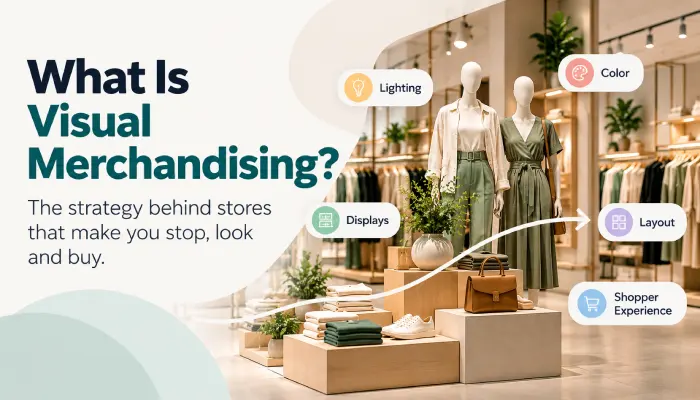
What Is Visual Merchandising? How Great Stores Turn Attention Into Sales
Retail

What Is Visual Merchandising? How Great Stores Turn Attention Into Sales

Visual merchandising is more than making a store look attractive. It is how retailers deliberately shape what shoppers notice, how they move through the store, what products they consider, and what they ultimately buy.

Nethra Ramani Author
Sharjeel Ahmed
CEO - Pazo

Your store may look perfect on paper.

What matters is what the shopper actually sees.

THE REAL RETAIL JOURNEY FROM STANDARD TO STORE
01
Visual
Merchandising
The intended experience
02
Product
Presentation
What is physically shown
03
Shopper
Attention
What the shopper notices
04
Store
Execution
What the store actually builds
05
Verification Did reality match the standard?

Visual merchandising is often described as the art of making a retail store attractive.

That definition is incomplete.
THE FOUNDATION

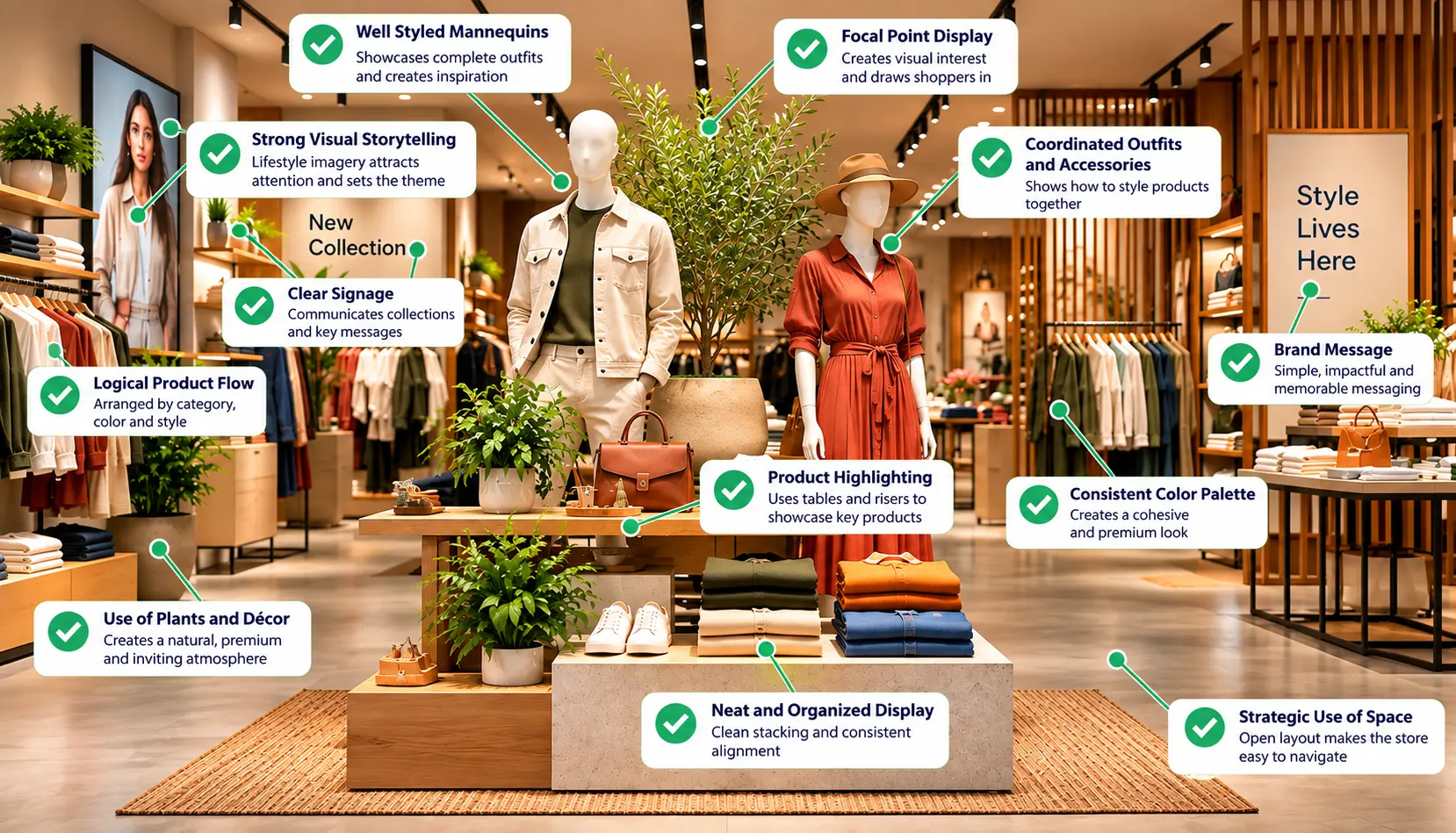
Visual merchandising is the deliberate planning and presentation of a retail space, products, displays, fixtures, signage, lighting, and other visual cues to guide shopper attention, communicate what the store is offering, and make products easier to notice, understand, and consider.

It is more than making a store look attractive.

Effective visual merchandising connects store layout, product presentation, visual hierarchy, shopper experience, brand communication, and store execution. The objective is to influence what shoppers notice first, how they understand the offer, where they explore, which products they consider, and how easily they can move toward a purchase decision.

THE VISUAL MERCHANDISING SYSTEM

A useful way to understand visual merchandising is through this sequence:

01 Store Environment
→
02 Shopper Attention
→
03 Product Presentation
→
04 Visual Hierarchy
→
05 Shopper Action
→
06 Store Execution
→
07 Verification
→
08 Performance Feedback
RETAIL CHAIN EXECUTION

The last three stages are particularly important for retail chains. A visual merchandising concept may be created centrally, but the shopper ultimately experiences what is physically present in the store.

ONE VIEW

Visual merchandising in one view

Element What it does
Store environment Shapes how the store feels and how shoppers read the space
Layout and zoning Determines where shoppers move and what they encounter
Displays Creates visual attention and product priorities
Product presentation Determines how products are grouped, positioned, and perceived
Visual hierarchy Establishes what shoppers notice first, second, and third
Signage and messaging Helps shoppers understand offers, categories, prices, and promotions
Planograms Define detailed product placement on shelves or fixtures
Store execution Turns the intended standard into the physical display
Verification Confirms whether the actual store matches the intended standard
THE EXECUTION TEST

The important question is therefore not only:

“Did we create the visual merchandising standard?”
OR

It is:

“Did the store actually execute the standard?”
FUNDAMENTALS

What Is Visual Merchandising?

Visual merchandising is the planned presentation of products and the retail environment to influence shopper attention, understanding, exploration, and purchase consideration.

For a deeper look at why this matters commercially, see our guide to the importance of visual merchandising in retail .

It can include the arrangement of products, store layout, displays, fixtures, lighting, color, signage, themes, props, and other visual elements.

The purpose is not simply decoration.

A useful visual merchandising decision should answer at least one practical question:

  • What should the shopper notice?
  • What should the shopper understand?
  • Where should the shopper look next?
  • Which products should be considered together?
  • What should make the product easier to evaluate?
  • What should help the shopper navigate the store?
  • How should the intended experience be reproduced across stores?

This makes visual merchandising a combination of creative design and retail execution.

DESIGN QUALITY

A display can be aesthetically strong but commercially weak if the shopper cannot understand what it is communicating.

EXECUTION QUALITY

Likewise, a technically correct product arrangement can still create a poor experience if the surrounding signage, lighting, space, or visual hierarchy is ineffective.

The broader visual merchandising process can therefore be understood as:

Store Environment → Shopper Attention → Product Presentation → Visual Hierarchy → Shopper Action → Store Execution → Verification → Performance Feedback
DESIGN The design defines the intended experience.
→
EXECUTION The execution determines whether that experience actually reaches the shopper.
Effective visual merchandising connects the store environment, product presentation, visual hierarchy, and shopper journey into one cohesive experience.
HOW VISUAL MERCHANDISING WORKS

How Does Visual Merchandising Work?

Visual merchandising works by controlling what shoppers notice, how they interpret what they see, and how easily they can move from one product or category to another.

A useful shopper journey is:

THE SHOPPER DECISION PATH From first glance to next action
01 Attention Get noticed
02 Hierarchy Establish priority
03 Understanding Explain the offer
04 Exploration Enable discovery
05 Context Show relationships
06 Action Support the next step

The broader goal is to create a coherent visual merchandising experience , rather than simply a collection of attractive displays.

01 NOTICE

Capture attention

The first job of a display is to get noticed.

Color contrast, lighting, product placement, scale, signage, and empty space can all contribute to visual attention.

But attention by itself is not enough. A display can attract attention while failing to communicate what the shopper is looking at.
02 PRIORITIZE

Establish visual hierarchy

Once attention has been captured, the shopper needs to understand what matters most.

A useful hierarchy might be:

01 Hero Product
02 Key Message
03 Supporting Products
04 Price or Offer
05 Additional Information

If everything has the same visual importance, nothing has a clear priority.

03 UNDERSTAND

Make the offer easy to understand

The shopper should be able to understand the basic proposition without having to decode the entire display.

Depending on the retail situation, that could mean understanding:

  • What category they are looking at
  • What product is being promoted
  • What products belong together
  • What the offer includes
  • What the product is intended for
  • Where to find related products
04 EXPLORE

Guide exploration

Visual merchandising can help shoppers move through a store or display by creating relationships between products and areas.

Layout, category zoning, fixtures, product grouping, signage, and sightlines can all contribute to this.

Layout Category zoning Fixtures Product grouping Signage Sightlines
The objective is not necessarily to control every shopper movement. It is to make the intended path or product relationship easier to understand.
05 CONNECT

Create product context

Products are often easier to understand when they are shown in a meaningful context.

FASHION Fashion

A fashion outfit can show how clothing works together.

GROCERY Grocery

A grocery display can show products used for the same meal.

HOME Home

A home display can show how furniture and accessories work together in a room.

Context reduces the need for the shopper to mentally construct the relationship between products.
06 SIMPLIFY

Reduce visual friction

Visual merchandising should make shopping easier, not more complicated.

Friction can come from:

  • Crowded displays
  • Unclear category organization
  • Competing messages
  • Poor signage
  • Difficult product access
  • Weak product hierarchy
  • Insufficient product information
The goal is not to maximize the number of visual elements. It is to make the important information easier to process.
07 ACT

Lead the shopper toward action

The final visual hierarchy should support whatever action is appropriate for the retail situation.

Exploring a product Comparing products Trying something Adding complementary products Responding to a promotion Making a purchase
CORE PRINCIPLE

Every Visual Element Needs a Job

A useful way to evaluate a display is to ask:

01 Is the shopper noticing it?
02 Is there sufficient contrast and hierarchy?
03 Can the shopper understand the message?
04 Is the product easy to explore or evaluate?
05 Does the surrounding context help?
06 Is the intended display actually maintained?
This approach prevents visual merchandising from becoming a collection of disconnected design techniques.
HOW VISUAL MERCHNADISING WORKS
VISUAL MERCHANDISING FUNDAMENTALS

What Are the Key Elements of Visual Merchandising?

The core elements of visual merchandising include color, lighting, space, store layout, signage, props and fixtures, and theme or storytelling.

We break down each of these key elements of visual merchandising in greater detail, including how each one solves a different merchandising problem.

Each element performs a different job, but the elements work best when they reinforce the same shopper objective.

THE SEVEN ELEMENTS

Each element solves a different merchandising problem

Element
Primary job
Common problem when poorly used
Color
Direct attention and create grouping
Important products do not stand out
Lighting
Highlight and reveal products
Products lack emphasis or are difficult to evaluate
Space
Create clarity and accessibility
Displays feel crowded or confusing
Store layout
Guide movement and product exposure
Shoppers do not encounter the intended sequence
Signage
Communicate and navigate
Shoppers cannot quickly understand the offer
Props and fixtures
Structure and contextualize presentation
Products lack context or visual support
Theme and storytelling
Create relevance and meaning
Display looks attractive but communicates little
HOW THE ELEMENTS WORK

Seven elements. Seven different jobs. One shopper objective.

Think of visual merchandising as a connected system rather than a collection of isolated techniques. Each element changes how the next element is perceived.

01 ATTENTION

Color

Color can direct attention, create visual grouping, establish contrast, support brand identity, communicate promotions, and reinforce seasonal themes.

It can be used to:

  • highlight priority products
  • separate categories
  • create visual blocks
  • support promotional campaigns
  • reinforce brand presentation
  • establish a seasonal mood
The merchandising problem

However, color is not a solution to every visual merchandising problem. If an important product is not being noticed, the real issue could be:

  • poor lighting
  • weak placement
  • clutter
  • competing displays
  • an oversized sign
  • poor sightlines

Changing the color without fixing the underlying problem may have little effect.

02 EMPHASIS

Lighting

Lighting influences product visibility, emphasis, atmosphere, comfort, and presentation.

Retailers can use different lighting approaches for different purposes, including:

  • ambient lighting for the overall environment
  • accent lighting for featured products
  • task-oriented lighting where shoppers need to inspect products

For example, fresh produce may require lighting that supports product appearance, an electronics display may use focused lighting around a hero product, and fashion environments may use lighting differently in general store areas and trial rooms.

The merchandising principle

The important principle is that lighting should support the intended visual hierarchy rather than simply make the store brighter.

03 CLARITY

Space

Space affects:

  • product density
  • visibility
  • browsing clarity
  • category separation
  • accessibility
  • visual emphasis
The merchandising balance

Too much product can make a display feel crowded.

Too much empty space can reduce product productivity or make the display feel incomplete.

The objective is not simply to maximize or minimize space. It is to create enough clarity for shoppers to understand what is important and interact with the products comfortably.

04 MOVEMENT

Store Layout

Store layout provides the physical structure within which visual merchandising operates.

It influences:

  • shopper movement
  • product exposure
  • category relationships
  • sightlines
  • traffic flow
  • discovery

Store layout and visual merchandising are related but not identical.

LAYOUT Layout establishes the physical structure.
VISUAL MERCHANDISING Visual merchandising determines how products, displays, signage, fixtures, and visual cues work within that structure.
05 INFORMATION

Signage

Signage provides the information layer of visual merchandising.

It can communicate:

  • category names
  • prices
  • promotions
  • product features
  • directions
  • seasonal messages
  • brand messages
The merchandising principle

Good signage reduces uncertainty.

Poor signage can create visual noise.

A promotional sign that is much larger and stronger than the product itself may attract attention but make the actual product harder to understand.

06 CONTEXT

Props and Fixtures

Props and fixtures provide structure, height, variation, context, and accessibility.

They can help:

  • organize categories
  • create focal displays
  • vary product height
  • support campaigns
  • create lifestyle context
  • establish product relationships
Why the fixture matters

The fixture itself changes how the shopper perceives the product.

The same product can communicate differently when presented on a premium display table, a standard shelf, a hanging fixture, or inside a complete lifestyle setting.

07 MEANING

Theme and Storytelling

Theme and storytelling connect products to an idea, occasion, lifestyle, or need.

Examples include:

  • seasonal collections
  • fashion looks
  • home environments
  • meal occasions
  • gifting
  • product launches
The merchandising purpose

A themed display gives shoppers a reason to understand the products as a collection rather than as unrelated SKUs.

BRINGING THE ELEMENTS TOGETHER

How the Seven Elements Work Together

Consider a new product focal display:

Color creates contrast
Lighting creates prominence
Space creates breathing room
Layout provides exposure
Signage explains the proposition
Fixture presents the product
Storytelling creates context

The important principle is that the elements should reinforce the same objective.

THE QUESTION TO ASK What problem is this element solving?

Do not add a visual element simply because it is a common merchandising technique. First ask:

What problem is this element solving?
elements of visual merchandising

What Are the Types of Visual Merchandising?

Visual merchandising can operate at different levels of the retail environment—from the moment a shopper sees a store from outside to the way an individual product is presented on a shelf.

A practical structure is:

01 Exterior
→
02 Entry
→
03 Store Floor
→
04 Product
→
05 Communication
→
06 Experience
→
07 Shelf

Each layer has a different job.

01
BEFORE ENTRY

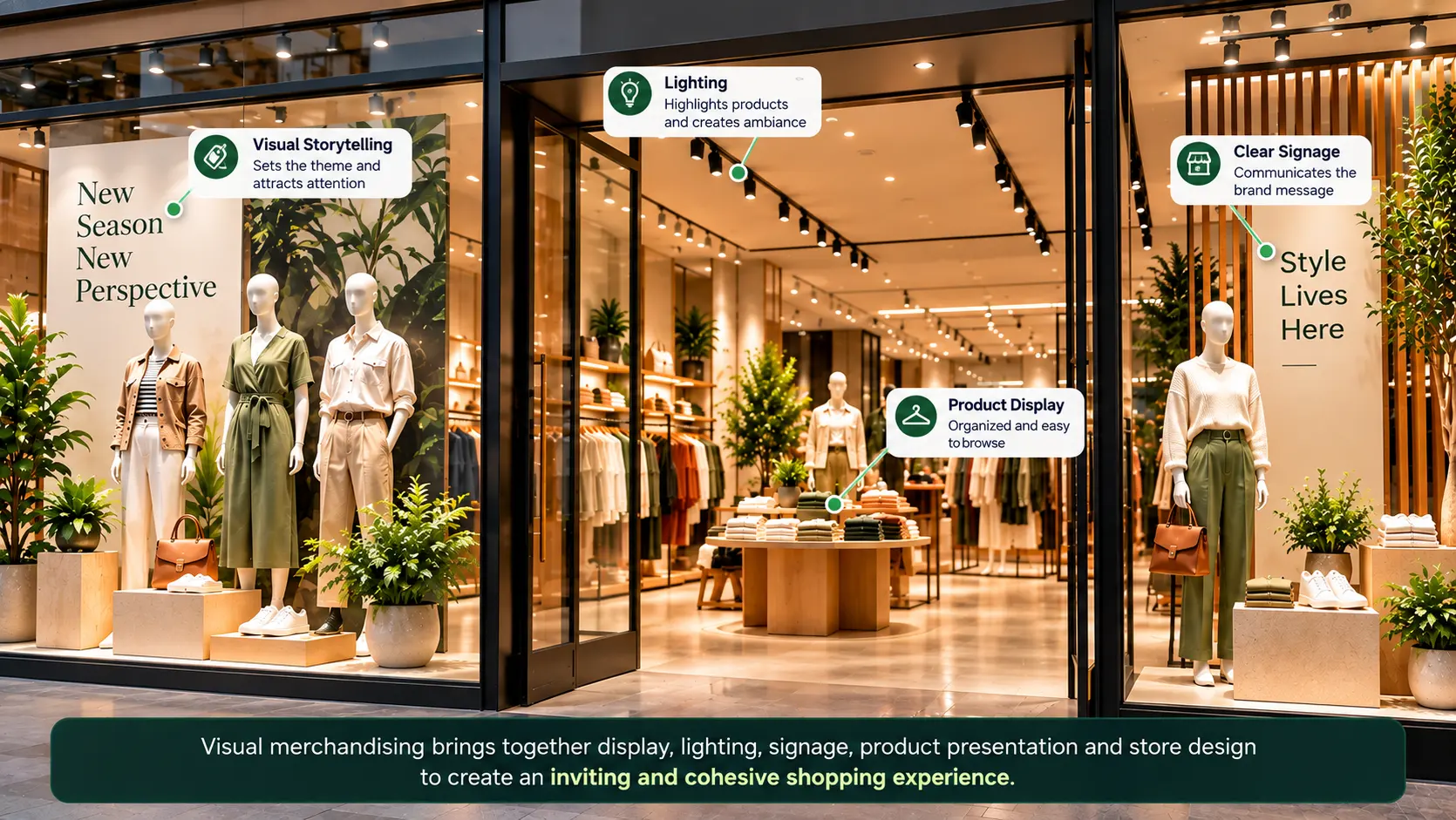
Exterior visual merchandising

Exterior visual merchandising is everything that communicates with the shopper before they enter the store.

It can include:

  • storefront design
  • facade
  • window displays
  • external signage
  • entrance graphics
  • promotional messaging
  • seasonal themes
OBJECTIVE Why should the shopper notice this store and consider entering?

Window displays can communicate:

  • new collections
  • seasonal campaigns
  • product launches
  • brand identity
  • promotional events
  • lifestyle or product stories

A strong window display usually has a clear visual idea rather than trying to show everything the store sells.

The window is not the catalogue. It is the invitation.
02
TRANSITION INTO STORE

Entry-zone visual merchandising

Once shoppers enter the store, the visual strategy changes.

The entrance needs to transition shoppers into the retail environment while establishing what is important inside.

The initial entrance area can function as a transition zone where shoppers orient themselves before encountering more detailed product and promotional messaging.

Further into the entrance area, retailers can establish a stronger visual focal point around:

  • new arrivals
  • seasonal campaigns
  • priority categories
  • promotional products
  • brand stories
PRINCIPLE Use the entrance to establish visual orientation and priority—not to communicate everything at once.
03
NAVIGATION & DISCOVERY

Store-floor visual merchandising

Once shoppers move beyond the entrance, visual merchandising becomes increasingly connected to store layout, zoning, fixtures, category presentation, and shopper movement .

This can include:

  • category zones
  • department presentation
  • aisle displays
  • feature tables
  • end-cap displays
  • mannequins
  • promotional zones
  • focal points
  • cross-merchandising areas

The objective is to make the store easy to read and explore.

Example: Fashion
Women's → Dresses → Occasion → Accessories
Example: Grocery
Breakfast → Cereal → Spreads → Beverages

The exact structure depends on the retail format, assortment, and shopper mission.

04
PRODUCT PRESENTATION

Product-level visual merchandising

This is where visual merchandising moves closer to the individual product.

Common techniques include:

  • product grouping
  • color blocking
  • cross-merchandising
  • product bundling
  • facing
  • height variation
  • product adjacency
  • mannequin styling

Product grouping presents related products together.

Color blocking creates visual structure through color relationships.

Cross-merchandising brings products from different categories together when they serve a related shopping need.

SHOPPING NEED Pasta
+
COMPLEMENT Pasta Sauce
+
COMPLEMENT Seasoning
LOOK Shirt
+
LOOK Trousers
+
LOOK Belt

Bundling can visually present multiple products as a solution or package.

These techniques should have a shopper or commercial objective rather than being used simply to make a shelf or display look organized.

05
INFORMATION LAYER

Communication-based visual merchandising

Not every visual merchandising decision involves moving products.

Important visual cues include:

  • category signs
  • price tags
  • promotional signs
  • POP displays
  • POS materials
  • product information cards
  • directional signage
  • campaign messaging
  • digital screens
THE JOB The job of communication-based merchandising is to reduce uncertainty.

A shopper should be able to understand:

What category is this? What product is this? What does it cost? Is there an offer? Why should I consider it? Where can I find the rest of this category?

The challenge is maintaining hierarchy.

06
ENVIRONMENT & ENGAGEMENT

Experiential visual merchandising

Visual merchandising can extend beyond what shoppers see.

Retailers may combine:

  • lighting
  • sound
  • scent
  • digital screens
  • interactive displays
  • touchpoints
  • immersive installations

The objective is to create an environment that reinforces the brand or shopping experience.

These elements should support the retail objective rather than becoming technology or decoration for its own sake.
07
DETAILED PRODUCT PRESENTATION

Shelf-level visual merchandising

At the shelf, visual merchandising becomes highly specific.

This is where concepts such as:

  • facings
  • shelf position
  • product blocking
  • adjacency
  • SKU sequencing
  • shelf labels
  • promotional strips
  • planograms

become important.

Category → Brand → Product → Variant → Price

A shelf is a small visual environment with its own hierarchy.

The shopper should be able to understand that hierarchy without having to inspect every SKU individually.

This is where visual merchandising overlaps most closely with planogramming.
THE RETAIL SYSTEM

Visual merchandising types: a practical map

Retail level
Examples
Primary objective
Exterior
Storefront, window, facade, external signage
Attract attention and communicate brand
Entry
Hero display, new arrivals, seasonal presentation
Establish orientation and priority
Store floor
Zoning, fixtures, feature displays, end caps
Guide exploration and category discovery
Product
Grouping, blocking, bundling, cross-merchandising
Create product relationships and context
Communication
Signage, POP, POS, price and promotional messaging
Explain and navigate
Experiential
Lighting, digital and environmental elements
Shape atmosphere and engagement
Shelf
Facings, adjacency, sequencing, planograms
Control detailed product presentation
ONE CAMPAIGN • MULTIPLE LAYERS

These categories overlap.

A single campaign can use all seven.

Window display attract attention
Entrance display establish the launch as a priority
Store-floor display create discovery
Product grouping show complementary products
Signage explain the proposition
Lighting highlight the hero product
Planogram define the product's shelf position

This is why visual merchandising is better understood as a system of connected decisions rather than a list of display techniques.

Store format + Shopper mission + Product category + Campaign objective

These approaches can be combined in different ways depending on store format, shopper mission, product category, and campaign objective. See our guide to visual merchandising displays for a deeper look at how different display formats are used in retail.

What Are Some Visual Merchandising Examples?

The easiest way to understand visual merchandising is to look at the retail problem behind the display.

A useful framework is:

What was the retailer trying to achieve? → What visual decision was made? → What shopper behavior was it intended to support? → What needs to be executed consistently?
01
EXTERNAL ATTENTION

Window display: turning foot traffic into store interest

Retail objective

Attract attention from people outside the store and give them a reason to enter.

→
Visual decision

Use a small number of products, strong composition, clear theme, lighting, mannequins or props, and minimal messaging to communicate a particular collection or idea.

Why it works:

The shopper can understand the broad proposition without needing to examine individual products.

For example, a fashion retailer launching a new seasonal collection might use a small number of coordinated outfits rather than displaying dozens of products.

The display communicates:

“This is what is new here.” rather than: “Here is everything we sell.”

A window display can lose its impact when products are missing, mannequins are styled differently, promotional material is added without following the guideline, lighting changes, or the display becomes cluttered over time.

02
SHOPPING SOLUTION

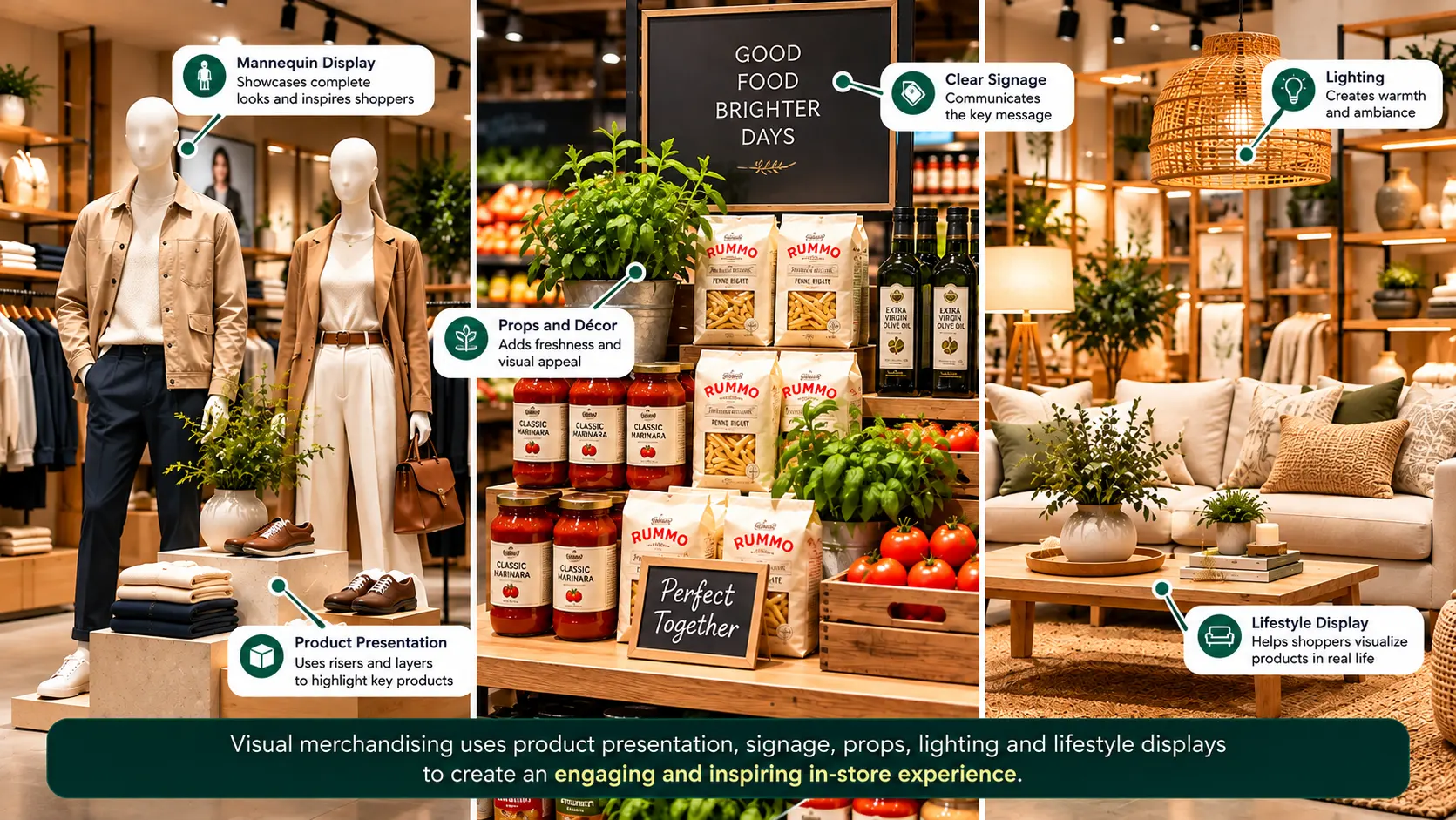
Grocery cross-merchandising: selling a shopping solution

Retail objective

Help shoppers discover complementary products and make a shopping mission easier.

→
Visual decision

Place products that are used together within the same visual zone.

For example:

Pasta + Pasta Sauce + Seasoning

or:

Coffee + Biscuits + Breakfast Items

The individual products belong to different categories, but the visual presentation creates a relationship between them.

Instead of asking the shopper to navigate several unrelated categories, the display communicates a potential solution.

Product presentation → Solution presentation.

Cross-merchandising also depends on availability. If the hero product is present but the complementary product is out of stock, the intended visual story is broken.

03
PRODUCT CONTEXT

Fashion outfit display: creating product context

Retail objective

Help shoppers understand how individual products can work together.

→
Visual decision

Present clothing, accessories, and footwear as a coordinated outfit rather than as isolated products.

For example:

Jacket + Shirt + Trousers + Shoes + Belt

The display gives the shopper a visual reference for how the products relate.

The retailer is not only showing individual products. It is reducing the mental effort required to imagine the complete look.

The visual standard may need to define:

  • product combination
  • styling
  • mannequin positioning
  • accessories
  • color relationships
  • signage
  • replacement rules when a product is unavailable
04
VISUAL HIERARCHY

Electronics display: making the hero product the focus

Retail objective

Give a priority product enough visual attention to encourage shoppers to explore it.

→
Visual decision

Use controlled lighting, open space, product positioning, supporting information, and carefully selected complementary products.

The display might place a new smartphone or laptop in the primary position, with accessories and product information supporting it.

The key principle is hierarchy.

FIRST What is the hero product?
↓
SECOND Why should I consider it?
↓
THIRD What else is relevant to it?

A display becomes weaker when the hero product, accessories, promotional signs, and technical information all compete for the same level of attention.

05
ASSORTMENT CLARITY

Beauty retail: using grouping to simplify choice

Retail objective

Make a large assortment easier to understand.

→
Visual decision

Group products using factors such as:

  • product type
  • concern
  • routine
  • brand
  • skin or hair need
  • usage occasion
  • color family
Cleanse → Treat → Moisturize

Rather than presenting dozens of products as a flat assortment, the retailer creates a visual sequence around a need or routine.

The objective is not necessarily to reduce the number of products. It is to make the relationships between them easier to understand.

06
LIFESTYLE CONTEXT

Home retail: showing the product in its intended environment

Retail objective

Help shoppers imagine how products will look and function in their own environment.

→
Visual decision

Create a complete room or lifestyle setting instead of presenting products individually.

For example:

Sofa + Coffee Table + Rug + Cushions + Lighting

The shopper can evaluate:

  • scale
  • color relationship
  • styling
  • product compatibility
  • overall appearance
The display moves from: “Here is a product.” to: “Here is how this product could exist in your life.”
07
TIME & RELEVANCE

Seasonal display: making the store feel relevant

Retail objective

Connect products with a specific time, occasion, or seasonal need.

→
Visual decision

Use a coordinated theme across displays, products, colors, signage, and supporting materials.

Examples include:

  • festive collections
  • back-to-school
  • summer products
  • gifting
  • seasonal food
  • occasion-based merchandise

The visual theme creates relevance.

But seasonal merchandising also creates an operational challenge: timing.

Installed at the right time → Correctly stocked → Maintained during campaign → Updated when campaign ends
08
SHELF STRUCTURE

Shelf blocking: making a category easier to read

At shelf level, products can be grouped by:

  • brand
  • category
  • variant
  • color
  • pack size
  • price
  • usage
  • promotional status

Several SKUs from the same brand may be arranged together to create a recognizable visual block.

The shelf should communicate structure before the shopper has to read every individual label.

This is where visual merchandising begins to overlap strongly with planogramming.

09
COMMERCIAL MESSAGE

Promotional display: making an offer easy to understand

Retail objective

Bring attention to a promotion or commercial message.

→
Visual decision

Create a clear relationship between:

Product → Offer → Price → Call to Action

A promotional display can fail when the promotional message dominates the product.

A large “SALE” sign may attract attention, but if shoppers cannot quickly understand which products are included or what the actual offer is, the display creates attention without clarity.

Effective promotional merchandising therefore requires both:

Attention + Information clarity.
10
FOODSERVICE

Restaurant and foodservice visual merchandising

Visual merchandising is not limited to conventional retail stores. Restaurants and foodservice businesses also use visual presentation to influence what customers notice and consider.

Examples include:

  • entrance displays
  • menu boards
  • counter displays
  • food presentation
  • product photography
  • promotional signage
  • digital menu screens
  • meal-combination displays
  • seasonal campaigns
  • takeaway counter merchandising

Consider a restaurant promoting a new meal combination.

Instead of communicating only: New Meal — ₹299
→
The visual presentation could show: Main Item + Side + Beverage with clear pricing and supporting imagery.

The objective is to make the complete offer immediately understandable.

We've explored additional visual merchandising examples across retail formats, including the execution lessons behind each approach.

What These Examples Have in Common

Example
Primary objective
Visual merchandising decision
Window display
Attract store entry
Create a strong external focal point
Grocery cross-merchandising
Support complementary purchases
Present related products together
Fashion outfit
Create product context
Show a coordinated look
Electronics
Focus attention on a hero product
Establish strong visual hierarchy
Beauty
Simplify assortment
Group products around a need or routine
Home retail
Help shoppers imagine usage
Present products in a lifestyle setting
Seasonal display
Create relevance
Connect products to an occasion
Shelf blocking
Improve category readability
Create visual product structure
Promotion
Communicate an offer
Connect product, price, and message
Restaurant
Improve offer discovery
Present a complete meal or offer visually
THE COMMON THREAD The display is designed around a shopper objective, not around decoration alone.

A photograph can show what the intended display looks like. It cannot necessarily tell us whether every store implemented it, whether the correct products were available, whether the planogram was followed, whether signage was installed correctly, whether fixtures were available, or whether the display remained intact after launch.

For a retail network, that becomes an execution problem.

01 Visual merchandising

defines how the retail environment should look and communicate.

→
02 Planogram

defines detailed product placement.

→
03 Retail execution

determines whether those standards actually appear in the store.

How Do Visual Merchandising and Planograms Work Together?

Visual merchandising and planograms are closely related, but they solve different parts of the retail presentation problem.

For a deeper explanation of how planograms fit into the broader merchandising process, see our guide to visual merchandising and planograms .

A useful way to think about the relationship is:

THE RELATIONSHIP Visual merchandising defines the shopper-facing visual experience. A planogram defines precise product placement within that experience.
THE TWO LAYERS

Visual merchandising vs. planogram

Visual Merchandising
Planogram
Primary focus
How the store, display, or product presentation looks and communicates
Where specific products should be positioned
Main question
What should the shopper notice, understand, and experience?
Where should each SKU go?
Scope
Store, zone, display, fixture, or campaign
Shelf, fixture, or product-facing level
Typical inputs
Shopper objective, brand, campaign, space, product priorities
Category data, SKU assortment, shelf space, facings, placement requirements
Typical output
Display or merchandising standard
Detailed product placement layout
Execution question
Does the display look and communicate as intended?
Does the shelf match the intended product arrangement?

A correct planogram does not guarantee strong visual merchandising execution

A retailer can have a technically correct planogram and still have weak visual merchandising execution.

For example, every SKU may be in its prescribed position, but the surrounding display could still have:

poor lighting cluttered signage missing promotional material incorrect fixtures weak visual hierarchy unavailable hero products
The result The planogram may be correct while the overall shopper experience is not.
FROM INTENTION TO PRECISION

What does a planogram add to visual merchandising?

A visual merchandising guideline might communicate:

VISUAL MERCHANDISING GUIDELINE “Create a premium presentation for this product range.”

A planogram can make that instruction considerably more specific:

SKU A 3 facings Shelf 2 Position 4
→
SKU B 2 facings Shelf 2 Position 5
→
SKU C 3 facings Shelf 3 Position 4

This converts a broad merchandising intention into a repeatable physical arrangement.

That becomes particularly important when the same merchandising strategy has to be implemented across many stores.

FROM STRATEGY TO STORE

Where the two work together

Consider a new beverage launch.

Visual merchandising strategy
attract attention make the new product the hero communicate the launch position complementary products nearby create visual distinction
↓
Planogram
determines which shelf the product occupies specifies facings determines which SKUs sit beside it defines product sequence allocates shelf space
↓
Store execution
physically implements the standard
Commercial Objective ↓ Visual Merchandising Concept ↓ Display / Store Standard ↓ Planogram ↓ Store Execution ↓ Verification
EXECUTION CONTROL

Planogram compliance is not the same as visual merchandising compliance

A store could achieve high planogram compliance while still failing another part of the visual merchandising standard.

Standard
Store result
SKU positions
Correct
Facings
Correct
Product sequence
Correct
Promotional signage
Missing
Hero lighting
Incorrect
Display fixture
Incorrect
Campaign graphic
Missing

The shelf may technically comply with the planogram, but the complete visual merchandising standard has not been reproduced.

This is why retailers may need to measure multiple execution dimensions rather than relying on one compliance score.

THE THREE-LAYER MODEL

The relationship between VM, planogram, and retail execution

A useful three-layer model is:

Visual Merchandising
Defines the experience and presentation. “What should the shopper see and understand?”
↓
Planogram
Defines the product arrangement. “Where should each product be?”
↓
Retail Execution
Determines whether the intended standard exists in the physical store. “Did the store actually implement it?”
Was the standard designed? Was the product placement defined? Was the standard actually executed?

They should not be treated as interchangeable.

FROM ONE STORE TO A RETAIL NETWORK

Why Does This Matter for Multi-Store Retailers?

In one store, a visual merchandising manager can potentially walk the floor and identify problems.

At scale, the problem changes.

Imagine a retailer with hundreds of stores launching the same campaign.

HEAD OFFICE CREATES
One visual concept
↓
One merchandising guideline
↓
One set of planograms
BUT STORES MAY HAVE DIFFERENT
floor layouts fixtures inventory levels product availability store sizes staff capabilities
DESIGNED EXPERIENCE One intended standard
⇄
EXECUTED EXPERIENCE What shoppers actually encounter

The actual result can therefore vary from the original standard.

Designed Experience and Executed Experience

How Do You Create a Visual Merchandising Strategy?

A visual merchandising strategy should begin with the retail objective, not with the question:
“How should we decorate the store?”

A practical sequence is:

Business Objective → Shopper → Message → Hero Product → Space → Visual Hierarchy → Execution Standard → Verification → Measurement

1. Start with the commercial objective

First define what the merchandising activity is supposed to accomplish.

The objective could be to:

  • launch a new product
  • increase visibility of a priority category
  • support a seasonal campaign
  • improve product discovery
  • promote complementary products
  • simplify a complex assortment
  • create a premium presentation
  • support a promotional offer
Objective changes the visual hierarchy A product launch and a clearance campaign should not necessarily have the same visual hierarchy.

2. Define the shopper and shopping mission

Who is the shopper, and what are they trying to accomplish?

Consider whether the shopper is:

  • browsing
  • looking for a specific product
  • comparing alternatives
  • shopping for an occasion
  • looking for a solution
  • responding to a promotion
  • making a routine purchase

Visual merchandising becomes more useful when it reduces the effort required to complete that mission.

3. Decide what the shopper should notice first

If the shopper looks at this display for two seconds, what should they notice?

Then determine the second and third levels of attention.

A simple hierarchy might be:

Hero Product
Primary focal point
Key Message
What the shopper should understand
Supporting Products
Products that reinforce the primary offer
Price / Offer
Commercial information
Additional Information
Supporting details

4. Select the hero product or category

Not every product needs equal visual prominence. Identify the product, category, or message that deserves priority.

Then determine:

  • where it should appear
  • how much space it needs
  • what products should surround it
  • what visual contrast it requires
  • what supporting message is necessary

The hero should have a reason for being the hero. It might be:

a new launch
a strategic product
a high-priority category
a seasonal product
a promotional item
a product around which complementary products are being presented

5. Design the space around the objective

Consider:

  • available floor space
  • fixtures
  • sightlines
  • shopper movement
  • category zones
  • shelf space
  • product availability
  • store format
  • campaign materials

A design that works perfectly in a large flagship store may not automatically work in a smaller-format location.

A scalable VM strategy should therefore distinguish between:

Non-negotiable standards

Non-negotiable: hero product, key message, product sequence.

Adaptable elements

Adaptable: fixture size, exact spacing, secondary props.

6. Build the visual hierarchy

Once the space and products are defined, establish the visual order. Think about the display in layers:

Layer 1 — Attention
What catches the eye?
Layer 2 — Recognition
What is the shopper looking at?
Layer 3 — Meaning
What does the display communicate?
Layer 4 — Evaluation
What information helps the shopper compare or understand the product?
Layer 5 — Action
What should the shopper do next?

7. Translate the concept into an execution standard

A concept is not enough for a retail network.

The standard may define:

product placement number of facings display sequence fixture requirements signage lighting promotional material product grouping planogram acceptable substitutions exceptions
Could two different store teams interpret this guideline differently?
If yes, the standard may need more visual or operational detail.

8. Define what happens when reality changes

Retail environments rarely remain exactly as planned.

Products can go out of stock. Fixtures can become unavailable. POS material may arrive late. A store may have a different physical configuration. A display component may be damaged.

Therefore, a good VM standard should also define exceptions.

Actual store condition

Hero SKU is unavailable.

Local improvisation could change the intended merchandising strategy.

→

Approved exception

“If the hero SKU is unavailable, use the approved secondary SKU rather than filling the space with an unrelated product.”

This prevents local improvisation from completely changing the intended merchandising strategy.

9. Verify the actual store

After deployment, the retailer needs to determine whether the physical store matches the intended standard.

Verification can examine:

Display presence
Product placement
Planogram compliance
Signage
Promotional material
Product availability
Fixture condition
Visual hierarchy
Campaign execution
The important distinction is: Guideline created ≠ Store executed

10. Measure the result

Depending on the objective, retailers can monitor:

Product performance:
units sold sales sell-through SKU performance category sales attach rate basket value
Space performance:
sales per square foot share of shelf display productivity
Shopper behavior:
traffic interaction engagement conversion where measurable
Execution:
VM compliance planogram compliance display compliance availability signage compliance
The measurement should be connected to the specific objective rather than assuming that every sales change was caused by visual merchandising.

The 8-Question Visual Merchandising Framework

Before approving a visual merchandising plan, ask:

Question What it determines
Who is the shopper? Target audience and shopping mission
What are we trying to communicate? Core message
What should shoppers notice first? Visual hierarchy
What is the hero product/category? Priority
What belongs around it? Product relationships
How should the eye move through the display? Composition and sequencing
What should the final store execution look like? Execution standard
How will we verify it? Measurement and compliance

This creates an important shift.

Instead of starting with:

“What display should we create?”

the process starts with:

“What shopper or commercial problem are we trying to solve?”
The display → is then the physical expression of that decision.

Why Does Visual Merchandising Fail in Real Stores?

A visual merchandising concept can look perfect in a presentation and still fail when it reaches the store.

The reason is simple:

The designed experience and the executed experience are two different things.

Designed Experience

The intended visual merchandising concept, standard, hierarchy, placement, materials, and shopper experience.

→

Executed Experience

What actually exists in the physical store after the team, products, fixtures, inventory, and operating conditions affect the standard.

1. The concept is too complex to execute

A VM guideline may contain too many products, props, instructions, signage requirements, or styling details.

The store team then has to interpret a complicated set of instructions under real operating conditions.

The result can become:

HQ standard → Partial implementation → Local interpretation

2. The design does not account for store differences

Retail chains rarely have identical stores.

They can differ in:

floor size
fixture configuration
shelf dimensions
product assortment
inventory
store layout
available display space
A concept designed for one store format may therefore require approved adaptations for other formats.

3. The planogram and VM guideline conflict

A display may communicate one product hierarchy while the planogram specifies another.

For example, the VM guideline may make Product A the visual hero while the shelf allocation gives greater prominence to Product B.

VM Guideline

Product A is the visual hero.

≠

Planogram

Product B receives greater shelf prominence.

The store team then has no clear answer about which standard takes priority.

4. Products or materials are missing

Even a well-designed display can fail because the required components are unavailable.

Common examples include:

hero SKU out of stock missing POS material incorrect promotional signage unavailable fixture damaged display component incomplete assortment
The store may then improvise.

5. The standard is implemented but not maintained

A store can execute a campaign correctly on launch day and gradually drift away from the standard.

Products move.
Stock gets replenished differently.
Signage gets damaged.
Fixtures are moved.
Promotional material remains after the campaign.

This is execution decay.

6. There is no verification loop

One of the biggest gaps is assuming:

“We sent the guideline, therefore the store implemented it.”

Those are two different events.

A stronger operating loop is:

Standard → Store Execution → Evidence → Verification → Correction → Recheck

The Real VM Failure Chain

Good Concept
Poorly Defined Standard
Incorrect Store Interpretation
Execution Gaps
No Verification
No Correction
Inconsistent Shopper Experience

The problem may therefore have nothing to do with the original creative concept.

Sometimes the failure occurs after the design is already complete.

The better question is:

Where does the gap occur between the intended standard and the actual store?

How Do You Maintain Visual Merchandising Standards Across Stores?

Creating a visual merchandising guideline is only the beginning.

For a retail chain, the harder problem is maintaining the same intended experience across different stores, teams, and operating conditions.

This is the role of visual merchandising execution: turning centrally defined standards into repeatable store-level implementation.

Make the standard clear enough to execute, flexible enough to work across store formats, and measurable enough to verify.
A useful operating model is:
Standard
Deploy
Execute
Verify
Correct
Recheck

1. Create a clear visual standard

The standard should make clear:

  • what the display should look like
  • which products should be featured
  • where products should be positioned
  • what signage is required
  • which fixtures or materials are needed
  • what the visual priority should be
  • which elements are mandatory
  • which elements can be adapted

A photograph or mood board alone may communicate the desired appearance, but it may not provide enough operational detail for consistent execution.

2. Separate mandatory standards from flexible elements

Not every detail needs to be identical across every store.

Mandatory elements

  • hero SKU
  • campaign message
  • product sequence
  • required signage
  • core brand elements
  • minimum display requirements

Flexible elements

  • exact fixture configuration
  • available secondary props
  • spacing within approved limits
  • adaptation for different store formats

This gives stores enough flexibility to handle physical differences without changing the underlying merchandising objective.

3. Adapt the standard to store formats

A retailer may have:

flagship stores large-format stores standard stores compact stores shop-in-shop locations

Trying to force one physical implementation across all formats can create unnecessary execution problems.

Instead, the retailer can maintain the same visual objective while providing format-specific execution standards.

4. Give store teams an executable instruction

A useful execution instruction should answer:

What? Which products or display?
Where? Which location?
How? What arrangement or presentation?
When? When should it be installed and removed?
What if something is unavailable? What is the approved alternative?
How is completion verified? What evidence is required?

This turns visual merchandising from a creative recommendation into an executable store task.

5. Verify the physical store

After execution, the retailer needs evidence that the standard was actually implemented.

Verification can check:

display presence
product placement
planogram compliance
signage
promotional materials
fixture setup
product availability
visual hierarchy
campaign execution
Store photographs can be particularly useful because they provide a visual record of the actual condition at a specific point in time.
Do not confuse deployment of instructions with execution of the standard.

6. Identify the exact execution gap

A useful verification process should do more than produce a generic score.

It should identify what is wrong.

Campaign display Present
Hero SKU Missing
Signage Correct
Fixture Correct
Planogram 2 SKU positions incorrect
Promotional material Missing
This is more actionable than simply reporting: “VM compliance: 72%”

7. Correct and recheck

Verification only creates value when it leads to action.

The operating loop becomes:

Detect Identify the execution gap
Assign Give the correction to the responsible store/team
Fix Complete the required action
Recheck Confirm that the standard has been restored

8. Monitor execution over time

Visual merchandising is not static.

A store that passes an audit today may not pass it next week.

Products sell.
→
Displays move.
→
Campaigns change.
→
Materials become damaged.
→
Store teams make operational adjustments.

The appropriate verification cadence therefore depends on the risk and importance of the standard.

The Multi-Store Visual Merchandising Control Loop

1 Create Standard Define the intended visual experience.
2 Deploy Provide guidelines, planograms, tasks, and required materials.
3 Execute Store teams implement the standard.
4 Capture Evidence Document the actual store condition.
5 Verify Compare actual execution with the required standard.
6 Correct Resolve identified gaps.
7 Recheck Confirm completion.
8 Measure Track execution and relevant commercial outcomes.
9 Refine Improve future standards based on what happened in stores.

This creates a useful distinction between three levels:

Creative Standard
“This is how the display should look.”
Execution Standard
“This is exactly what the store needs to implement.”
Verified Reality
“This is what is actually present in the store.”

The gap between the execution standard and verified reality is where many retail execution problems become visible.

This is closely connected to visual merchandising compliance, where retailers compare actual store execution against defined merchandising standards.

How Do You Measure Visual Merchandising?

Visual merchandising should be measured at more than one level.

A display can look correct but fail commercially. Conversely, sales can increase even when the display was not executed correctly because other factors—such as pricing, promotions, seasonality, or availability—changed at the same time.

A useful measurement model separates execution, shopper behavior, product performance, space productivity, and commercial outcomes.

For a more detailed measurement framework, see our guide to visual merchandising KPIs .

A useful measurement model looks at the retail experience from execution to commercial outcome.
01
Execution
Was the standard implemented?
02
Shopper
Did shoppers respond?
03
Product
How did relevant products perform?
04
Space
How effectively was space used?
05
Commercial
Did the activity support the objective?

1. Measure visual merchandising execution

The first question is:

Did the store implement the intended visual standard?

Typical execution measures include:

VM compliance display compliance planogram compliance signage compliance promotional material compliance product availability fixture compliance campaign execution

This measures execution quality, not sales performance.

2. Measure product performance

The next level asks:

What happened to the products being merchandised?

Depending on the retail format and objective, relevant measures can include:

units sold revenue sell-through SKU-level sales category sales attach rate basket value
The measurement should be tied to the specific merchandising objective.

3. Measure space productivity

Visual merchandising also affects how physical retail space is used.

Useful measures can include:

sales per square foot sales per display category productivity share of shelf display productivity
Is the space being used productively for the objective we assigned to it?

4. Measure shopper behavior

Where reliable data is available, retailers can examine:

store traffic dwell time product interaction engagement with displays category visitation conversion, where measurable

These measures can help connect visual merchandising decisions with shopper behavior.

5. Measure the execution gap

For multi-store retailers, one particularly useful measurement is the gap between:

Intended Standard
What should the store contain and how should it be presented?
Actual Store
What is actually present and how is it currently executed?

For example:

VM Requirement Intended Actual
Hero display Present Present
Hero SKU 4 facings 2 facings
Signage Installed Missing
Planogram Correct 3 deviations
Promotional material Installed Installed
Fixture Required fixture Correct

This provides operational information that a sales report alone cannot provide.

6. Connect execution with commercial performance

The strongest measurement model connects both sides:

Execution layer
Was the standard implemented?
Shopper layer
Did shopper behavior change?
Product layer
Did product/category performance change?
Commercial layer
Did the intervention contribute to the intended business outcome?
The exact relationship should be validated rather than assumed.

A Practical Visual Merchandising Measurement Framework

Measurement layer Example metrics What it tells you
Execution VM compliance, display compliance, planogram compliance Was the standard implemented?
Availability Hero SKU availability, display SKU availability Could shoppers actually buy what was presented?
Shopper Traffic, interaction, dwell time Did shoppers respond to the presentation?
Product Units, sales, sell-through, attach rate How did relevant products perform?
Space Sales/sq ft, share of shelf, display productivity How effectively was space used?
Commercial Basket value, conversion where measurable, campaign outcome Did the activity support the intended commercial objective?

Don't Use One Number to Explain Everything

A common mistake is reducing visual merchandising to a single score.

For example:

VM Compliance: 90%

This does not explain:

what was compliant what was missing whether the hero product was available whether the shopper noticed the display whether the campaign achieved its objective whether sales changed

A compliance score is useful as an operational indicator, but it should not be confused with overall merchandising effectiveness.

Similarly: Sales increased 15% does not automatically prove that visual merchandising caused the increase.

Other variables may have changed simultaneously.

The measurement should therefore begin with:

What were we trying to change?

Product visibility If the objective was product visibility, measure visibility and execution.
Cross-selling If the objective was cross-selling, examine attachment and related-product performance.
Campaign execution If the objective was campaign execution across stores, measure compliance and execution gaps.
Space productivity If the objective was space productivity, examine the performance of the allocated space.

What Are the Most Common Visual Merchandising Mistakes?

Many visual merchandising problems are not caused by a lack of creativity.

They happen because the display is designed without enough attention to shopper intent, visual hierarchy, execution constraints, or ongoing maintenance.

Shopper Intent
Is the display solving a real shopper need?
Visual Hierarchy
Is it clear what matters first?
Execution Constraints
Can stores actually implement it?
Ongoing Maintenance
Can the standard remain correct over time?
1

Trying to show too much

One of the most common mistakes is treating every product, message, and promotion as equally important.

The result can be:

  • crowded displays
  • competing messages
  • weak focal points
  • difficult navigation
  • visual fatigue
A display needs hierarchy.
2

Designing for appearance instead of a shopper objective

A display can be visually impressive without solving a meaningful retail problem.

Before designing it, ask:

What should the shopper notice?
What should they understand?
What should they consider next?
3

Weak visual hierarchy

When the product, signage, promotional message, props, and supporting information all compete for attention, shoppers have to work out what matters.

A stronger hierarchy might be:

Hero
Message
Supporting Products
Details
4

Ignoring the physical store

A VM concept can look excellent in a presentation while being difficult to implement in an actual store.

Common constraints include:

different fixture sizes
limited space
different store layouts
unavailable products
unavailable display materials
different store formats
5

Treating the planogram and VM standard as separate

A planogram may specify precise product placement while the VM guideline establishes a broader presentation.

If the two communicate conflicting priorities, store teams may not know which instruction to follow.

Planogram

Precise product placement
≠

VM Standard

Broader presentation
6

Forgetting product availability

If the hero product is unavailable, the intended visual hierarchy can immediately break.

The same applies to cross-merchandising. If one component of a product combination is missing, the shopper may no longer see the intended solution.

The intended presentation depends on the products actually being available.
7

Using signage as a substitute for clear merchandising

Adding more signs does not necessarily make a display easier to understand.

Too many signs can create:

clutter
competing messages
reduced product visibility
weak hierarchy
Signage should answer a useful shopper question rather than simply occupy visual space.
8

Creating a standard without defining exceptions

If the guideline says only:

“Use Product A here.”

but Product A is unavailable, the store team is forced to improvise.

A stronger standard can define an approved alternative or decision rule.

9

Measuring compliance without understanding the gap

A single compliance score can hide important details.

For example:

VM Compliance: 85%

does not tell the retail team whether the missing 15% represents:

a missing hero product incorrect signage one misplaced SKU an entire campaign display a minor fixture deviation

Effective measurement should identify the specific execution gap.

10

Assuming launch-day execution equals sustained execution

A display can be correct on launch day and deteriorate later.

Launch-day execution
→
Products move.
Stock changes.
→
Display drifts from the standard.

Products move. Stock changes. Promotional material gets damaged. Store teams modify displays.

Visual merchandising is not finished when the display is installed.

When Does Visual Merchandising Not Work?

Visual merchandising is not automatically effective simply because a store looks attractive or a display follows a design guideline.

It can underperform when the visual intervention does not solve the underlying shopper or commercial problem.

1. When the problem is not visual

If shoppers cannot find a product because it is out of stock, changing the display may not solve the problem.

Similarly, if the issue is:

incorrect pricing
poor product assortment
inadequate inventory
inconvenient store location
poor product quality

visual merchandising alone cannot address the underlying issue.

The first question should be:

Is this actually a visual merchandising problem?

2. When the display creates more friction

A display can attract attention while making shopping harder.

For example:

excessive signage
overcrowded fixtures
unclear category organization
too many competing focal points
difficult product access
The objective should be clarity, not maximum visual stimulation.

3. When the standard cannot be reproduced

A concept that works in one flagship store may not work in every store format.

If the required fixtures, products, or space are unavailable, forcing the same design everywhere can produce inconsistent or impractical execution.

Core merchandising objective

Preserve the underlying objective.

Appropriate adaptations

Adjust the physical implementation for the store format.

The better approach is to preserve the core merchandising objective while defining appropriate adaptations.

4. When there is no execution or verification system

A strong VM concept has limited value if stores cannot implement or maintain it consistently.

The operating chain needs to extend beyond design:

The operating chain
Concept → Standard → Execution → Verification → Correction

How Does Technology Help With Visual Merchandising?

Technology becomes valuable in visual merchandising when it helps retailers connect the intended standard with what is actually happening in stores.

Retailers increasingly use visual merchandising software to distribute standards, assign tasks, collect store evidence, track deviations, and manage corrective actions.

For a small number of stores, teams can physically inspect displays and make corrections.

At larger scale, technology can connect:

The technology-enabled execution chain
VM Guidelines
Store Tasks
Physical Execution
Verification
Corrective Action
Reporting

1. Turn VM guidelines into store tasks

A visual merchandising guideline describes the intended presentation. Technology can help translate that guideline into operational tasks for store teams.

For example:

Campaign Launch → Install display → Position hero products → Add approved signage → Complete setup → Submit store evidence

2. Capture evidence from the store

Store teams can use photographs or other digital evidence to document execution.

Instead of simply reporting:

Simple status

“Campaign completed.”
→

Actual evidence

Evidence showing the actual display.

the retailer can have evidence showing the actual display.

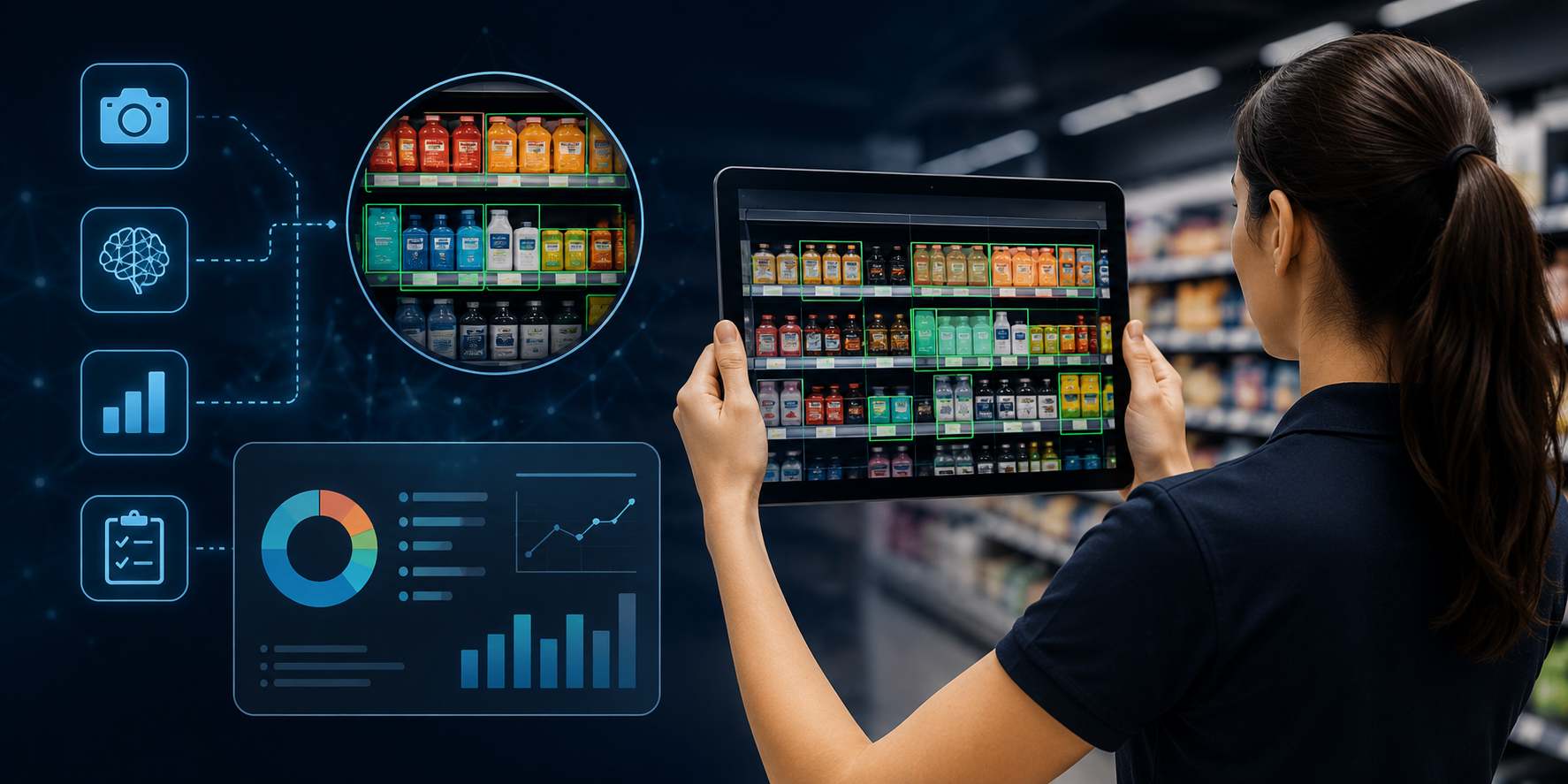
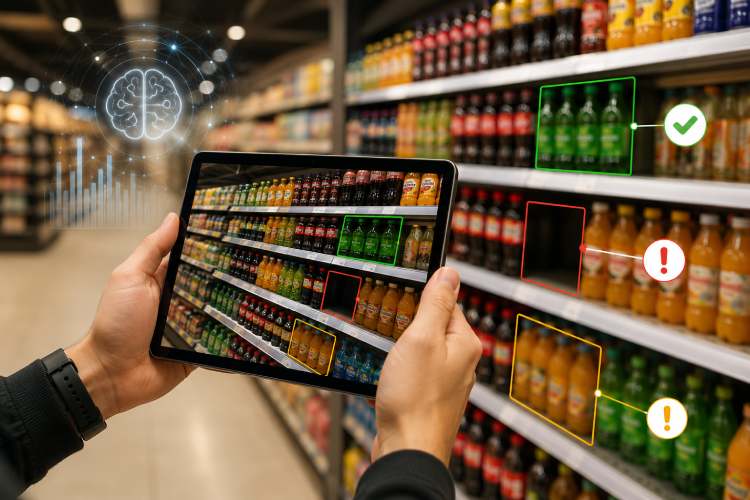
3. Use image-based verification

For large store networks, manually reviewing every store photograph can become time-consuming.

Image-based technology can assist with identifying whether required visual elements appear in store images.

Depending on the system and use case, this can support checks such as:

required display present
product placement
signage presence
planogram compliance
promotional material
display conditions
Technology should be treated as a verification layer rather than a replacement for the underlying VM standard.

4. Convert gaps into corrective actions

Finding a problem is only useful if somebody can act on it.

A technology-enabled workflow can move from:

Image / Audit
Detected Gap
Corrective Task
Store Action
Reverification

5. Create a store-level view of execution

A retail operations team could view:

Store VM Display Planogram Signage Availability Action
Store A ✓ ✓ ✓ ✓ None
Store B ✓ ✗ ✓ ✓ Correct shelf
Store C ✗ ✓ ✗ ✓ Rebuild display
Store D ✓ ✓ ✗ ✗ Replenish + replace signage

This makes the execution problem concrete.

Instead of asking:

“Are stores following the VM guidelines?”

the team can ask:

“Which stores have which execution gaps, and what needs to happen next?”

How Pazo Fits Into This Workflow

For a platform such as Pazo, the relevant opportunity is not simply to create another visual merchandising guideline.

The more practical role is to help retailers manage the execution layer around the standard:

How do you make sure the visual merchandising standard created by the retail team actually appears in stores—and remains there?

That connects visual merchandising with related operational workflows such as:

The value of a visual merchandising standard is realized only when the intended experience reaches the shopper.

Key Takeaways

Visual merchandising is more than making a store attractive.

It is a connected process of:

Planning
Presentation
Visual Hierarchy
Shopper Experience
Store Execution
Verification
Measurement

The most important shift is to think beyond the display itself.

A strong visual merchandising program asks:

What should the shopper see?
What should they understand?
What should they do next?

And for a multi-store retailer:

Does the actual store consistently deliver the visual experience we designed?

That final question is where visual merchandising connects with planograms, retail execution, compliance, store audits, and technology—turning visual merchandising from a purely creative activity into an operational retail discipline.

VISUAL MERCHANDISING EXECUTION

Turn Visual Merchandising Standards Into Store-Level Execution

Your visual merchandising strategy is only valuable when stores can execute it consistently. See how Pazo can help connect standards, store tasks, execution evidence, verification, and corrective actions in one workflow.

VM Standards
Store Tasks
Execution
Verification
Corrective Action
See the workflow in action. Explore how Pazo can support visual merchandising execution across your retail operations.
Schedule a Demo →
30-minute demo
Nethra Ramani Author
ABOUT THE AUTHOR
Sharjeel Ahmed

As someone who has built highly scalable products from the ground up, I've always been drawn to solving challenging problems. But it's the quest for operational excellence that truly lights my fire. The thrill of streamlining processes, optimizing efficiency, and bringing out the best in a business – that's what gets me out of bed in the morning. Whether I'm knee-deep in programming or strategizing solutions, my focus is on creating a ripple effect of excellence that transforms not just businesses, but the industry at large. Ready to join forces and raise the bar for operational excellence? Let's connect and make retail operations and Facilities Management better, together.

Enjoyed this read?

Stay up to date with the latest video business news, strategies, and insights sent straight to your inbox!

Thank you! Your submission has been received!
Oops! Something went wrong while submitting the form.