Visibility
Measure whether shoppers notice the display as they move through the store.
Key question
Are shoppers noticing the display?

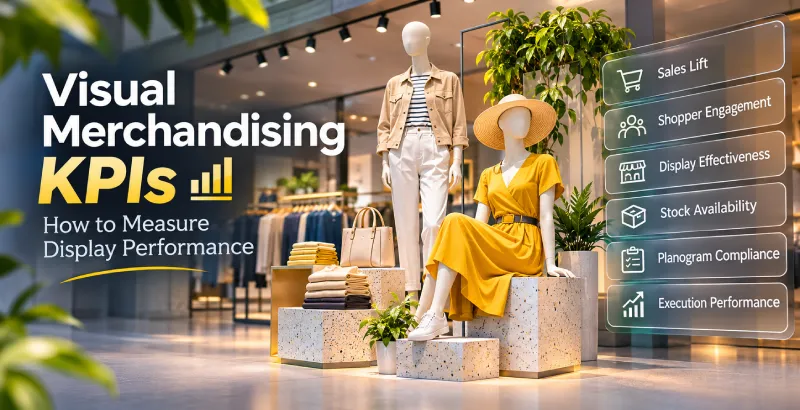
Track visual merchandising KPIs like sales per sq. ft, conversion rate & dwell time to turn creative displays into measurable retail performance.

Visual merchandising KPIs help retailers measure whether product displays attract shoppers, encourage product interaction, influence purchases, and meet execution standards across stores.
Rather than tracking sales alone, retailers should measure six areas of performance:
What to measureKey KPIDisplay visibilityDisplay stopping rateShopper engagementDwell time and interaction ratePurchase impactConversion rate and sales liftProduct performanceSell-through rate and sales per facingProduct availabilityOn-shelf availabilityStore executionPlanogram compliance
The right metrics depend on what a display is designed to achieve. A window display intended to attract shoppers needs different measurements from an in-store promotional display designed to increase product sales.
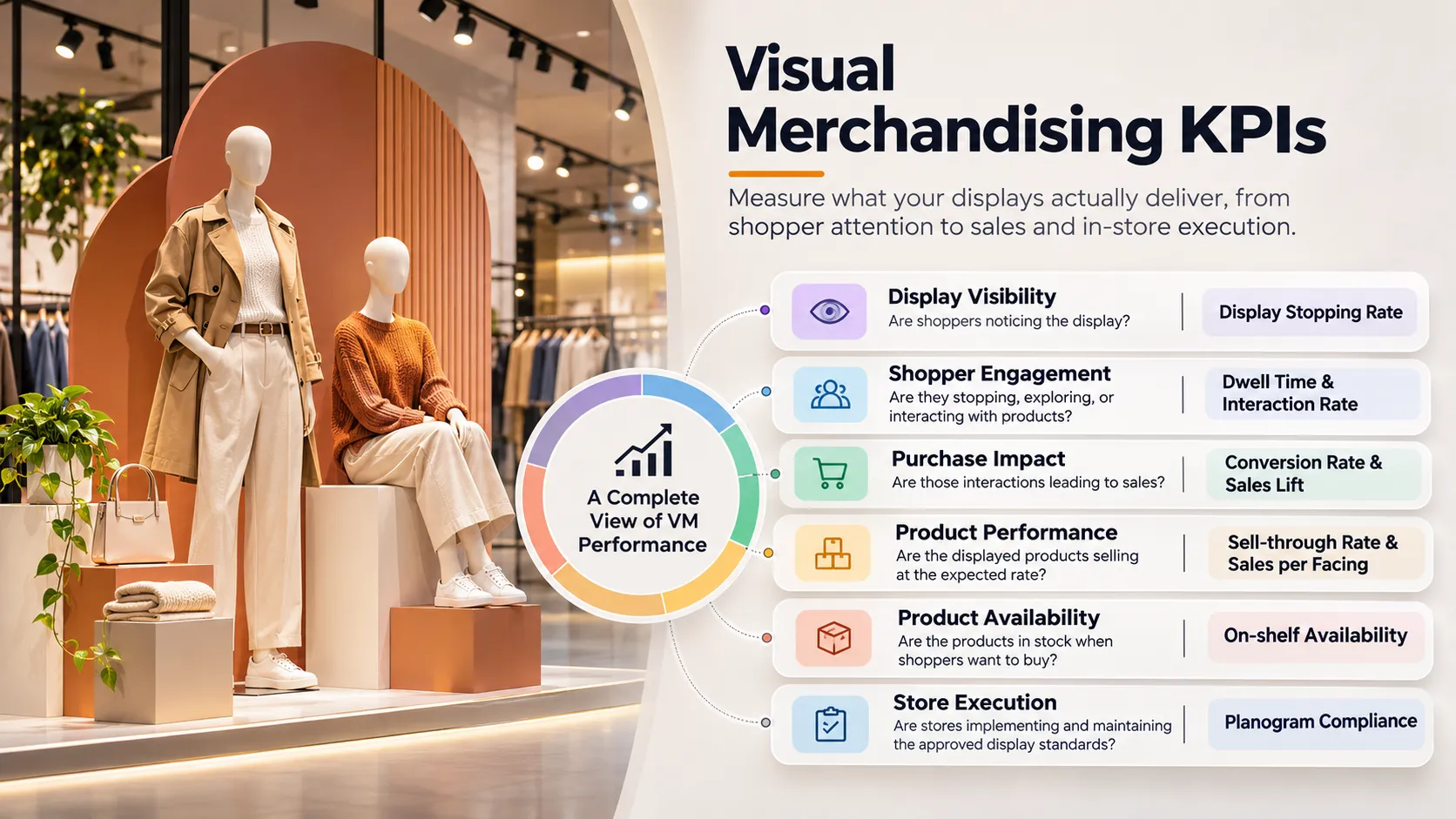
A display's effectiveness depends on more than its visual appearance. Retailers need to understand whether products are positioned correctly, visible to shoppers, and performing as intended.
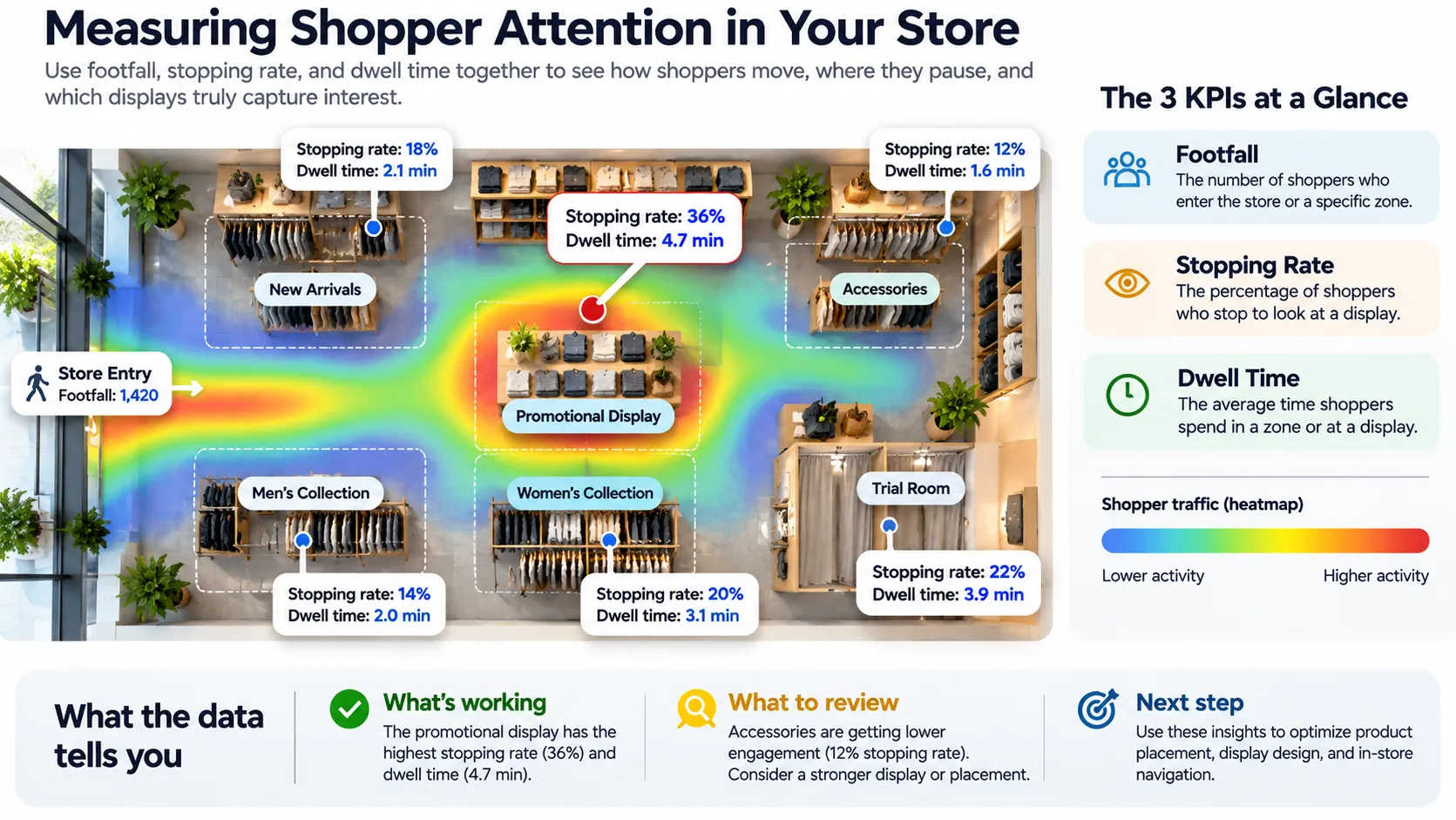
Useful measurements include:
Consider a grocery retailer that moves a frequently purchased product from a lower shelf to eye level.
The merchandising team can compare its sales before and after the change. But it should also check whether the number of facings, stock availability, pricing, and promotional support remained consistent.
Otherwise, the team may attribute a sales improvement to product placement when another factor was responsible.
A display can follow the approved design and still fail to deliver the expected results. The problem may not be the visual concept itself. It could be how the display is implemented, maintained, or monitored across stores.
Six situations commonly need attention:
1. The actual display differs from the approved planogram.
Store teams may use a different product arrangement, miss required facings, or place products in the wrong sequence. The display might look acceptable, but it no longer matches the intended merchandising standard.
2. Key products or sizes are missing.
A display may have been set up correctly but gradually lose products as stock sells. Missing sizes, colours, or SKUs can make the assortment incomplete.
3. Promotional signage is not updated.
A store may retain old campaign signage, miss promotional price information, or use materials that do not match the current campaign.
4. Displays are not maintained after setup.
Folded products become disorganised, hangers are misplaced, and products are returned to the wrong sections. The initial display quality gradually deteriorates.
5. Different stores interpret the same guidelines differently.
Without clear reference images and execution instructions, individual store teams may interpret display requirements differently. This creates inconsistencies across locations.
6. Execution problems are identified too late.
If display checks happen infrequently, missing products, incorrect placement, and campaign execution gaps may remain unnoticed until the next audit.
These problems require different corrective actions. A missing product needs replenishment, an incorrect arrangement needs display correction, and an outdated campaign needs updated instructions. Treating all three as poor display performance will not help a merchandising manager identify the real problem.
Product availability directly affects whether shoppers can purchase what they see in a display.
A well-designed promotional display cannot deliver its intended results if featured products are missing or the required sizes and colours are unavailable.
Three useful measurements are:
For example, a fashion retailer may have an attractive seasonal display, but popular sizes are missing. The display attracts attention, yet customers cannot complete their purchases.
In this situation, redesigning the display may not solve the problem. Replenishment and inventory management need attention.
Managing visual merchandising across 10 stores is very different from managing it across 200 or 500 stores.
Head office may create one approved display standard, but ensuring that every store implements it correctly requires a repeatable process.
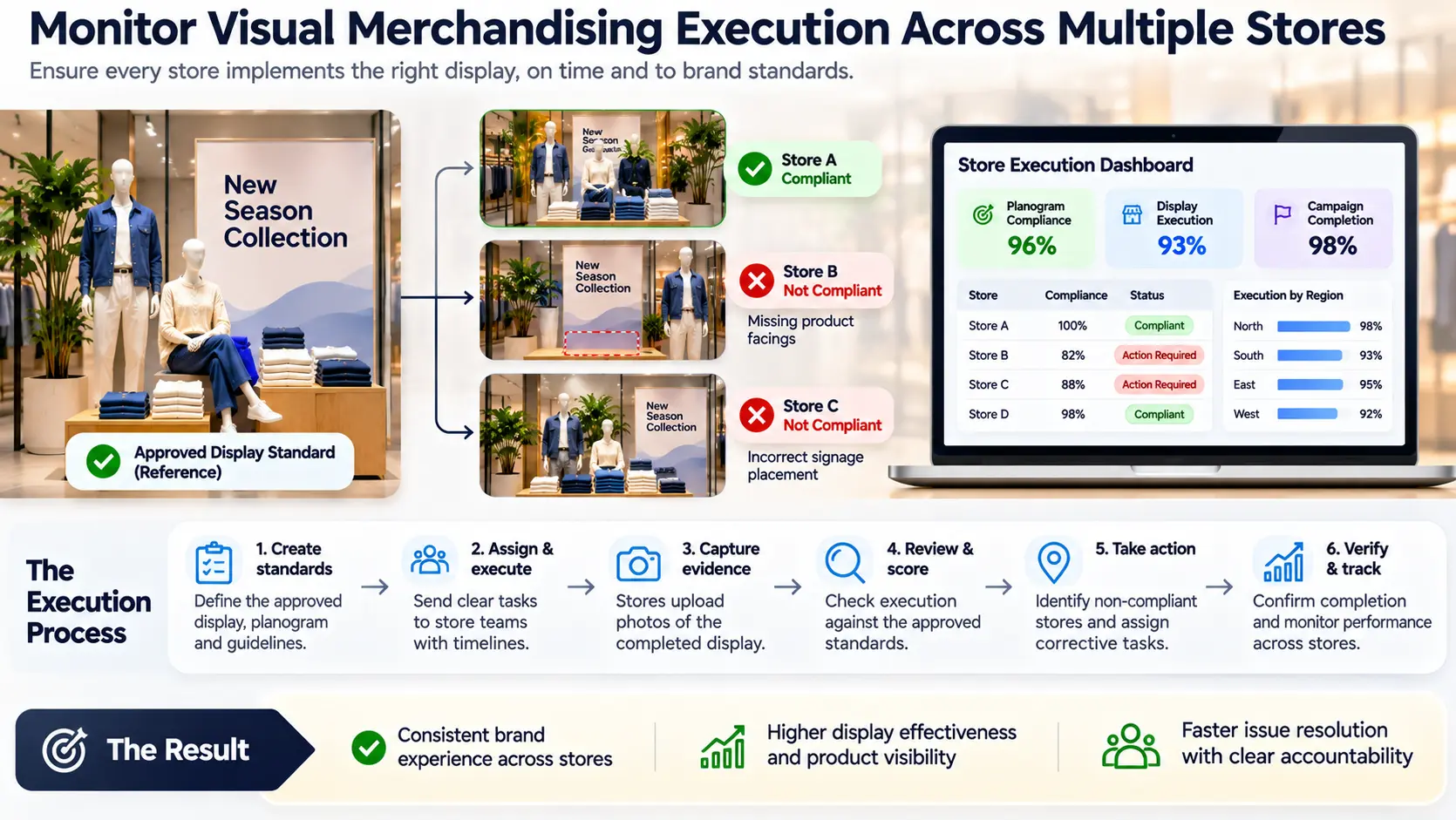
A practical multi-store execution workflow involves seven steps.
1. Create approved display standards.
Head office prepares the planogram, reference photographs, product placement instructions, signage requirements, and campaign guidelines.
2. Assign display tasks to stores.
The VM team communicates the requirements, identifies applicable store locations, assigns responsibilities, and establishes completion deadlines.
3. Capture photographs of completed displays.
Store teams submit photographs showing the actual display after implementation. This provides evidence of what was executed.
4. Compare actual execution with approved standards.
Regional managers or VM teams review photographs against reference images and check product assortment, positioning, facings, and signage.
5. Identify non-compliant stores.
Record missing products, incorrect placements, incomplete displays, and other deviations. Categorise issues so teams know what needs attention.
6. Assign corrective tasks.
Send the required corrections to the responsible store teams, with clear instructions and completion deadlines.
7. Verify completion and track performance.
Review updated photographs or audit evidence to confirm that the issue has been corrected. Track compliance across stores and identify recurring problems.
A display audit should not end when a problem is identified. It should end when the store has corrected the problem and the correction has been verified.
Planogram compliance measures how closely actual shelf arrangements match the approved planogram.
Formula:
Planogram compliance (%) = Compliant audited positions ÷ Total audited positions × 100
For example, if 90 out of 100 audited shelf positions meet the required arrangement, planogram compliance is 90%.
Compliance checks may include:
A retailer operating 200 stores may have an approved planogram for every location. The challenge is ensuring that store teams implement it correctly and maintain it after the initial setup.
Photo audits and digital store checklists can help regional managers verify execution without relying entirely on physical store visits.
Display execution compliance measures whether promotional and visual merchandising instructions have been completed correctly.
For example, a retailer launching a seasonal campaign may require stores to install specific signage, arrange mannequins, position promotional products, and maintain approved display standards.
Managers can audit these requirements using photographs and execution checklists.
This metric helps identify stores where campaigns have not been implemented as planned.
Store task completion rate measures the proportion of assigned merchandising activities completed within a defined period.
Formula:
Task completion rate (%) = Completed tasks ÷ Total assigned tasks × 100
For example, if 180 out of 200 stores complete an assigned campaign display task by the deadline, the completion rate is 90%.
This metric helps head office understand whether stores are completing merchandising instructions on time.
However, task completion alone does not establish display quality. A completed task should also be checked against the required execution standards.
Retailers should establish a baseline before changing a display. Without a baseline, it is difficult to determine whether sales or shopper behaviour improved after the intervention.
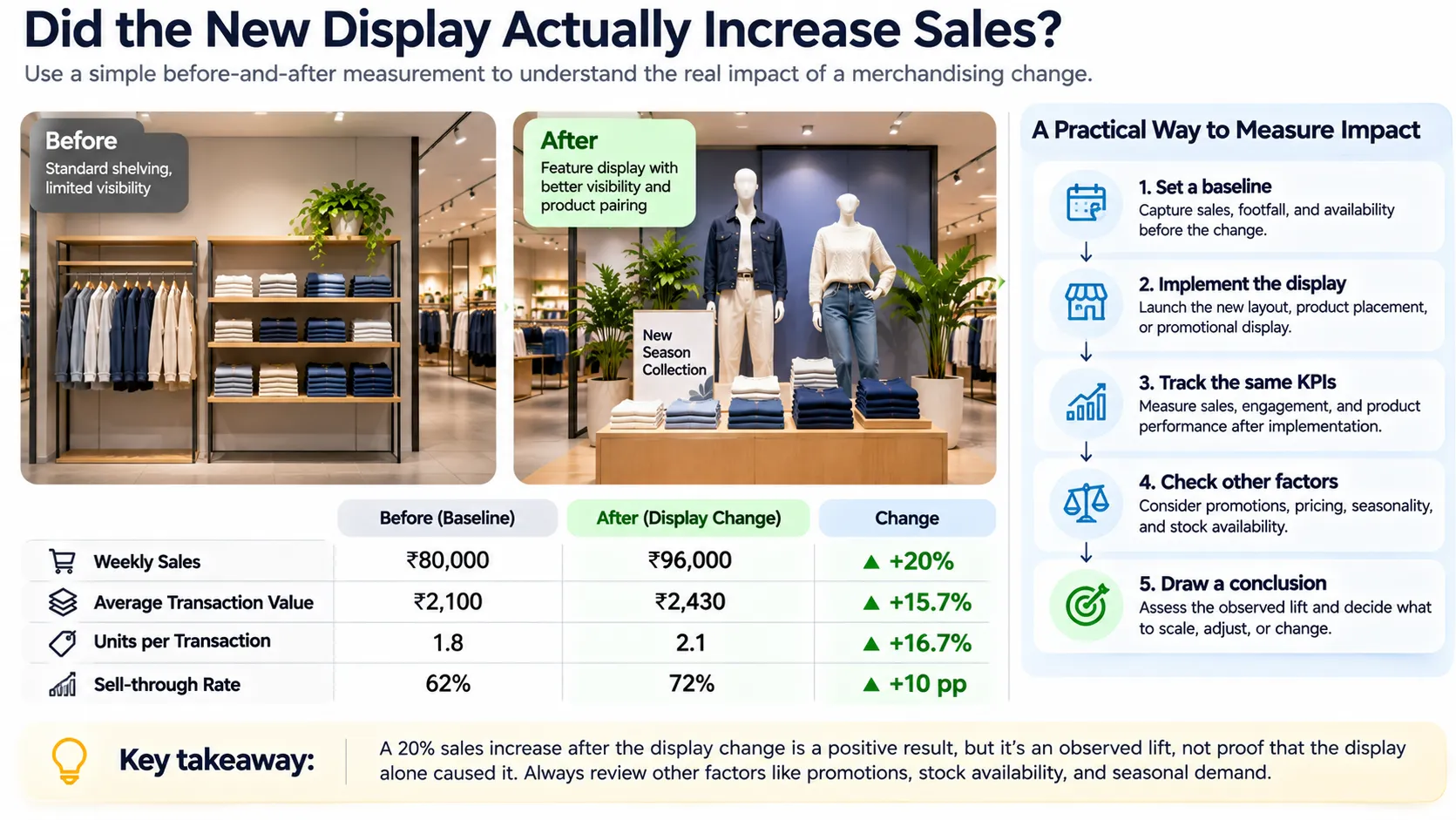
A practical measurement process involves five steps:
For example, suppose weekly sales increase from ₹80,000 to ₹96,000 after a display change. This represents an observed increase of 20%.
If similar stores without the display change also experienced sales growth, the merchandising team needs to account for that when assessing the actual contribution of the new display.
This comparison helps retailers distinguish a general sales increase from an improvement that may be associated with the merchandising intervention.
Retailers managing multiple locations often rely on spreadsheets, emails, photographs, and manual store reports to monitor visual merchandising.
Visual merchandising software connects these activities so that head office can define standards, store teams can execute them, and regional managers can review the results.
Four capabilities are particularly relevant.
Planogram distribution and tracking
Retailers can distribute approved product arrangements and track their implementation across stores. This supports planogram compliance monitoring and helps ensure that stores work from the correct display guidelines.
Photo-led store audits
Store teams can submit photographs of actual displays. VM teams can compare these photographs against approved reference images to identify incorrect placement, missing products, or incomplete displays.
Store task management
Head office can assign display setup, maintenance, and corrective activities to store teams. Task status and completion can be monitored across locations.
Store and regional reporting
Regional managers can review execution status and compliance across individual stores and identify locations requiring attention.
Pazo's retail execution platform brings together capabilities such as planogram distribution, photo-led store audits, visual merchandising checklists, store tasks, and campaign tracking.
For example, a retail brand launching a new seasonal collection can distribute approved display guidelines, assign implementation tasks to stores, collect photographs, and review execution against reference images.
If a store has missing products or incorrect placement, the team can identify the issue and follow up with corrective actions.
Pazo also provides store-wise and region-wise visual merchandising compliance reporting. Its published product material describes AI-assisted shelf compliance capabilities for identifying missing SKUs, misplaced products, and shelf gaps.
These capabilities help retailers connect merchandising standards with actual store execution and compliance reporting.
One important distinction: photo audits and planogram checks measure execution. Sales lift, conversion rate, and average transaction value require appropriate sales and transaction data. Visual merchandising software should not be treated as a substitute for that data.
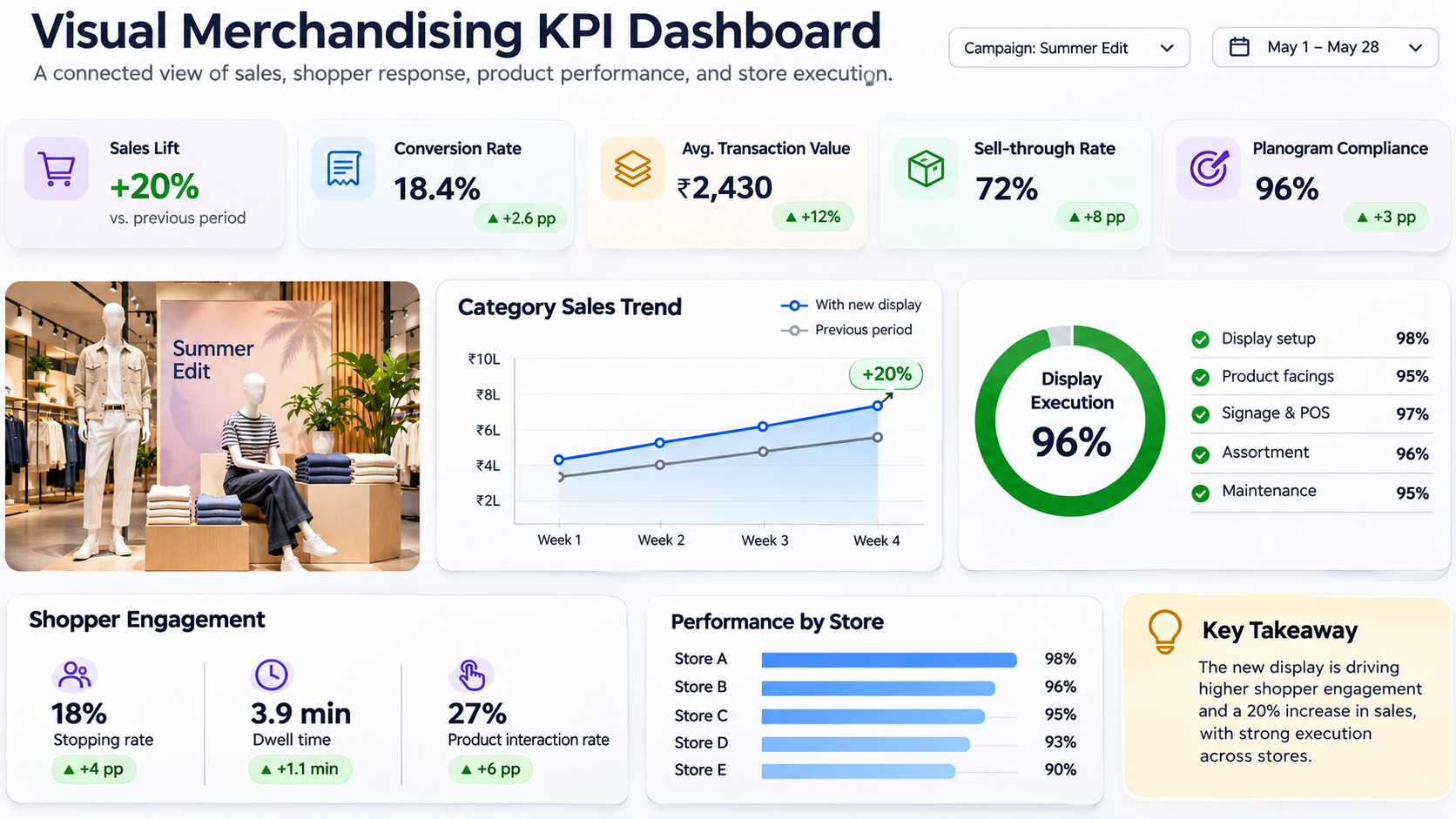
A useful visual merchandising dashboard should connect commercial performance with store execution.
Rather than displaying every available metric, managers should select KPIs based on their merchandising objectives.
Reporting levelWhat to monitorStore levelSales, display compliance, stock availabilityCategory levelSell-through, ATV, sales per square footCampaign levelSales lift, display execution, product interactionRegional levelPlanogram compliance, store exceptions, task completion
The reporting frequency should also reflect the metric.
Digital checklists, photo audits, and store execution dashboards can help teams collect evidence, identify non-compliant locations, and follow up on corrective actions.
Even when retailers collect the right data, poor interpretation can lead to incorrect merchandising decisions.
Five mistakes are particularly important:
Visual merchandising performance cannot be evaluated through sales figures alone. Retailers need to measure shopper attention, product engagement, sales performance, stock availability, and display execution together.
For multi-store retailers, the ability to distribute display standards, verify execution, identify deviations, and track corrective actions is just as important as measuring commercial results.
The most useful KPIs are those that help managers identify what is working, understand why performance is changing, and decide what needs to be corrected across stores.
As someone who has built highly scalable products from the ground up, I've always been drawn to solving challenging problems. But it's the quest for operational excellence that truly lights my fire. The thrill of streamlining processes, optimizing efficiency, and bringing out the best in a business – that's what gets me out of bed in the morning. Whether I'm knee-deep in programming or strategizing solutions, my focus is on creating a ripple effect of excellence that transforms not just businesses, but the industry at large. Ready to join forces and raise the bar for operational excellence? Let's connect and make retail operations and Facilities Management better, together.
Stay up to date with the latest video business news, strategies, and insights sent straight to your inbox!