Back Button
Learn more
Retail Store Audit: Checklist, Process & Best Practices
Retail

Retail Store Audit: Checklist, Process & Best Practices

Learn how to conduct a retail store audit, check planogram and merchandising execution, prioritize findings, and turn store gaps into corrective action.

Nethra Ramani Author
Sharjeel Ahmed
CEO - Pazo

A retail store audit compares what is actually happening inside a store with the standards the retailer expects—covering product availability, planogram execution, visual merchandising, pricing, promotions, operations, and compliance.

A useful audit does more than produce a score. It should identify the execution gap, capture evidence, assign corrective action, and verify that the problem was fixed.

Retail Store Audit in 30 Seconds

A useful audit moves from a defined standard to verified corrective action.

01

Define the Standard

Establish what the store should look like.

→
02

Inspect

Check actual store execution against the standard.

→
03

Capture Evidence

Record photos, observations and relevant context.

→
04

Identify the Gap

Compare the expected state with what is actually happening.

→
05

Correct

Assign ownership and complete the corrective action.

→
06

Verify

Confirm that the issue has actually been resolved.

The audit loop Standard → Inspect → Evidence → Gap → Correct → Verify
Why this matters The audit should not end when the checklist is submitted. Its value comes from turning execution gaps into corrective action and confirming that the store is back to the required standard.

A retail audit becomes much more valuable when it closes this loop rather than ending when the checklist is submitted.
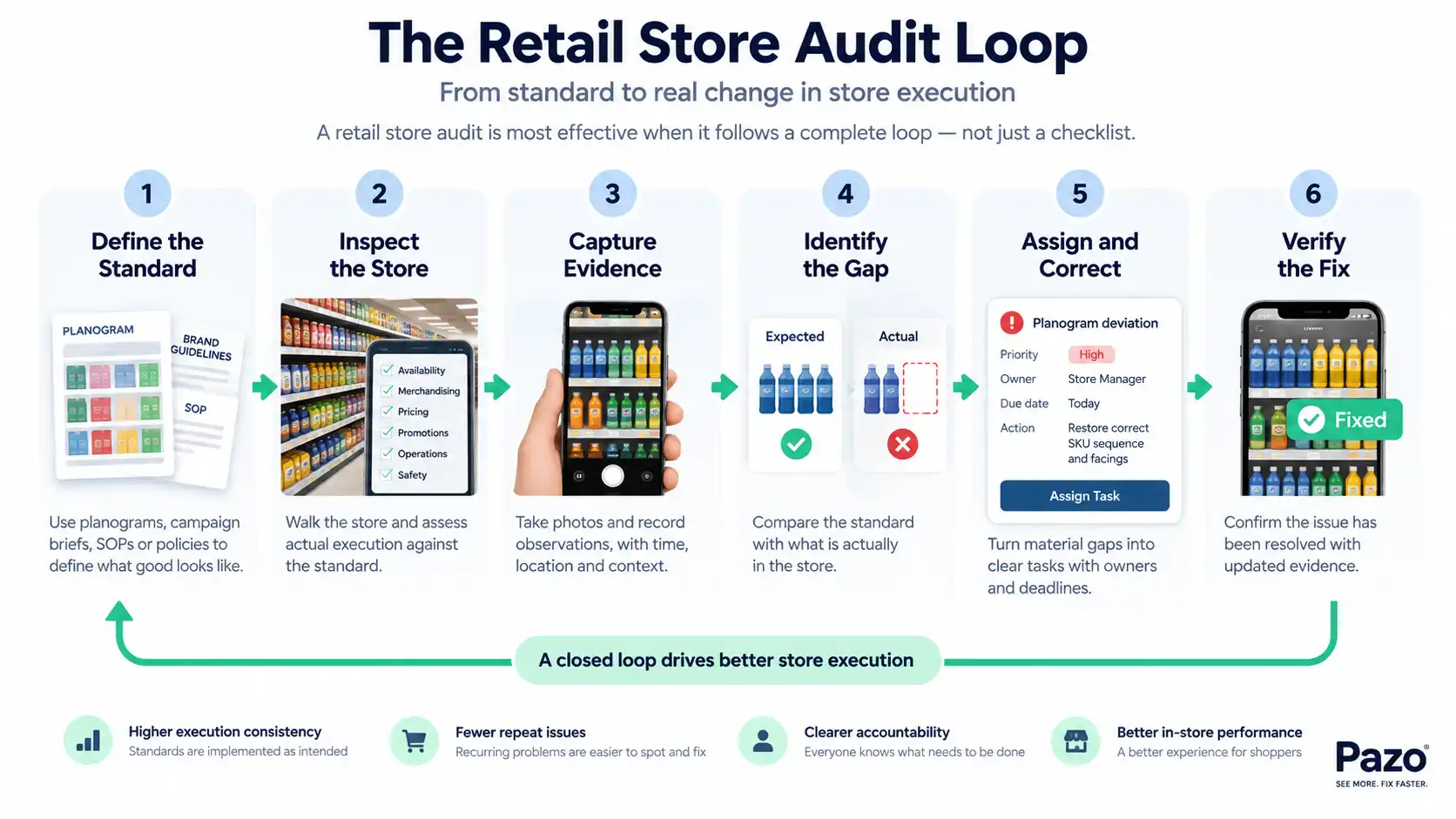
Retail store audit loop showing six stages from defining standards and inspecting the store to capturing evidence, identifying gaps, correcting issues and verifying the fix.

What Is a Retail Store Audit?

A retail store audit is a structured assessment of whether a store is executing the standards defined by the retailer, brand, or operating team.

The simplest way to understand an audit is:

Expected state → Actual state → Gap

For example, a beverage planogram may require SKU A to occupy three facings in positions 2–4 on a particular shelf.

During the audit, the product may be present but have only two facings and be positioned elsewhere.

The product is available, but the shelf is not compliant with the merchandising standard.

That distinction matters.

A store audit can evaluate several parts of execution at the same time:

  • Product availability
  • Planogram and shelf execution
  • Visual merchandising
  • Pricing and promotions
  • Store operations
  • Compliance and safety
  • Customer-facing execution

It is therefore broader than simply walking around a store and looking for problems.

The purpose is to create a consistent way of answering:

What should be happening? What is actually happening? Where is the gap? What needs to happen next?

Retail Store Audit vs. Store Inspection vs. Merchandising Audit

These terms overlap in practice, but their purpose, scope and focus can be different.

01

Retail Store Audit

Primary question:
Is store execution meeting defined standards?

02

Store Inspection

Primary question:
What condition is the store in?

03

Merchandising Audit

Primary question:
Is merchandising being executed correctly?

Retail Store Audit Store Inspection Merchandising Audit
Primary question Is store execution meeting defined standards? What condition is the store in? Is merchandising being executed correctly?
Scope Broad or targeted Usually specific condition or requirement Primarily products, shelves and displays
Planogram Can be included May be included Usually central
Availability Can be included May be checked Often relevant
Pricing / promotions Can be included May be checked Often included
Corrective action Usually part of the process May follow Usually important
Evidence Photos, observations, scores Notes, photos Shelf and display evidence
Typical users Retail operations, area managers, merchandising, compliance Operations, safety, facilities, compliance Merchandising and category teams
The terminology can overlap. What matters most is defining the business purpose, scope and expected outcome before creating the checklist.

A store inspection typically asks:

“What condition is the store in?”

A merchandising audit asks:

“Is merchandising being executed according to the defined standard?”

A retail store audit asks:

“Is the store executing the required standards, where are the gaps, and what needs to be corrected?”

There can be overlap. A retailer might include safety checks in a broader store audit or include availability checks in a merchandising audit.

The terminology matters less than defining the business purpose and expected outcome before creating the checklist.
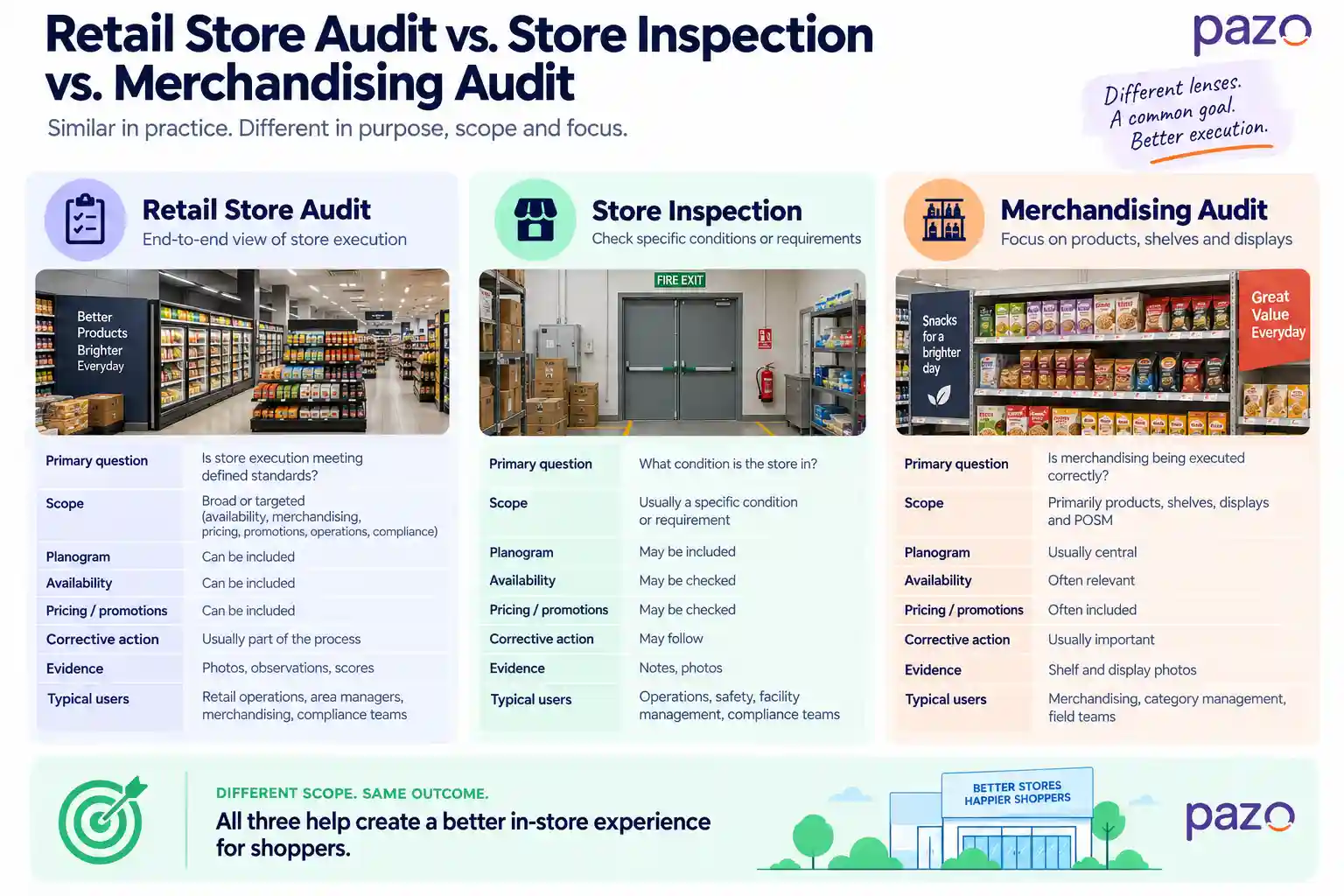
Comparison of retail store audit, store inspection and merchandising audit by purpose, scope, planogram, availability, pricing, corrective action and evidence.

What Should a Retail Store Audit Actually Check?

A useful retail store audit checks the areas that influence store execution rather than trying to document every possible condition in the building.

Six areas commonly matter.

1. Product Availability

The first question is straightforward:

Are the products shoppers are expected to find actually available?

An availability audit can check:

  • Priority SKUs
  • Out-of-stock products
  • Shelf gaps
  • Incorrect product variants
  • Substituted products
  • Minimum stock requirements
  • Replenishment execution
  • Backroom stock where relevant

But a shelf gap is only an observation, not necessarily a diagnosis.

An empty shelf could mean the product is out of stock. It could also mean stock is sitting in the backroom, replenishment was missed, the product was placed somewhere else, or the shelf allocation is incorrect.

The audit should therefore capture enough context to determine what action is required.

2. Planogram and Shelf Execution

A product being present does not mean the shelf is correctly executed.

For planogram compliance, the audit should look beyond simple SKU presence.

A practical merchandising sequence is:

SKU → Position → Sequence → Facing → Orientation → Adjacency → Allocation

For example:

  • Is the correct SKU present?
  • Is it in the assigned shelf or bay?
  • Is it in the correct sequence?
  • Does it have the required number of facings?
  • Is the product facing the shopper correctly?
  • Are related products positioned together as required?
  • Does the shelf space match the planned allocation?

This catches a common audit mistake: treating “product present” as equivalent to “planogram compliant.”

It isn't.

3. Visual Merchandising

Visual merchandising checks whether the store's physical presentation matches the intended merchandising standard.

Depending on the format, this may include:

  • Primary and secondary displays
  • POSM placement
  • Signage
  • Product grouping
  • Colour blocking
  • Promotional zones
  • Window displays
  • Fixture presentation
  • Display condition
  • Product presentation
  • Category communication

A display can look attractive and still be commercially wrong.

For example, a promotional display may be visually neat but positioned in the wrong zone, contain the wrong products, or lack the required communication.

The audit therefore needs to evaluate execution against a defined standard, not simply whether something looks good.

4. Pricing and Promotions

Pricing errors are particularly useful to audit because they can directly affect both customer trust and store execution.

Checks may include:

  • Shelf price labels
  • Price accuracy
  • System price vs. shelf price
  • Promotional pricing
  • Promotional SKUs
  • Campaign dates
  • Promotional signage
  • POSM installation
  • Display location
  • Offer communication

One important distinction is:

POSM presence does not prove that a promotion has been correctly executed.

The right POSM may be installed while the wrong SKU is promoted, the price is incorrect, the campaign has expired, or the display is in the wrong location.

A good audit checks the complete promotional requirement rather than treating the presence of signage as proof of compliance.

5. Store Operations and Compliance

A store audit can also evaluate whether operational standards are being followed.

Depending on the retailer, this may include:

  • Opening and closing procedures
  • Stock handling
  • Backroom organization
  • Equipment condition
  • Cleaning standards
  • Staff SOPs
  • Safety requirements
  • Emergency exits
  • Required documentation
  • Regulatory requirements
  • Internal compliance standards

The important point is to convert each requirement into something that can actually be observed.

Instead of:

“Is the store compliant?”

ask:

“Is the emergency exit unobstructed?”

Instead of:

“Is stock handled correctly?”

ask:

“Are returned products stored in the designated area?”

The second version gives the auditor something specific to inspect and gives the store team something specific to correct.

6. Customer-Facing Execution

Some audit questions should focus on what the shopper actually experiences.

These may include:

  • Category signage
  • Store navigation
  • Product discoverability
  • Queue management
  • Fixture accessibility
  • Store presentation
  • Customer service standards
  • Availability of priority products
  • Clarity of promotional communication

The goal isn't to turn every subjective shopper experience into a score.

The goal is to identify observable execution issues that can affect the customer journey.

The strongest audit questions are:

Specific → Observable → Measurable → Actionable
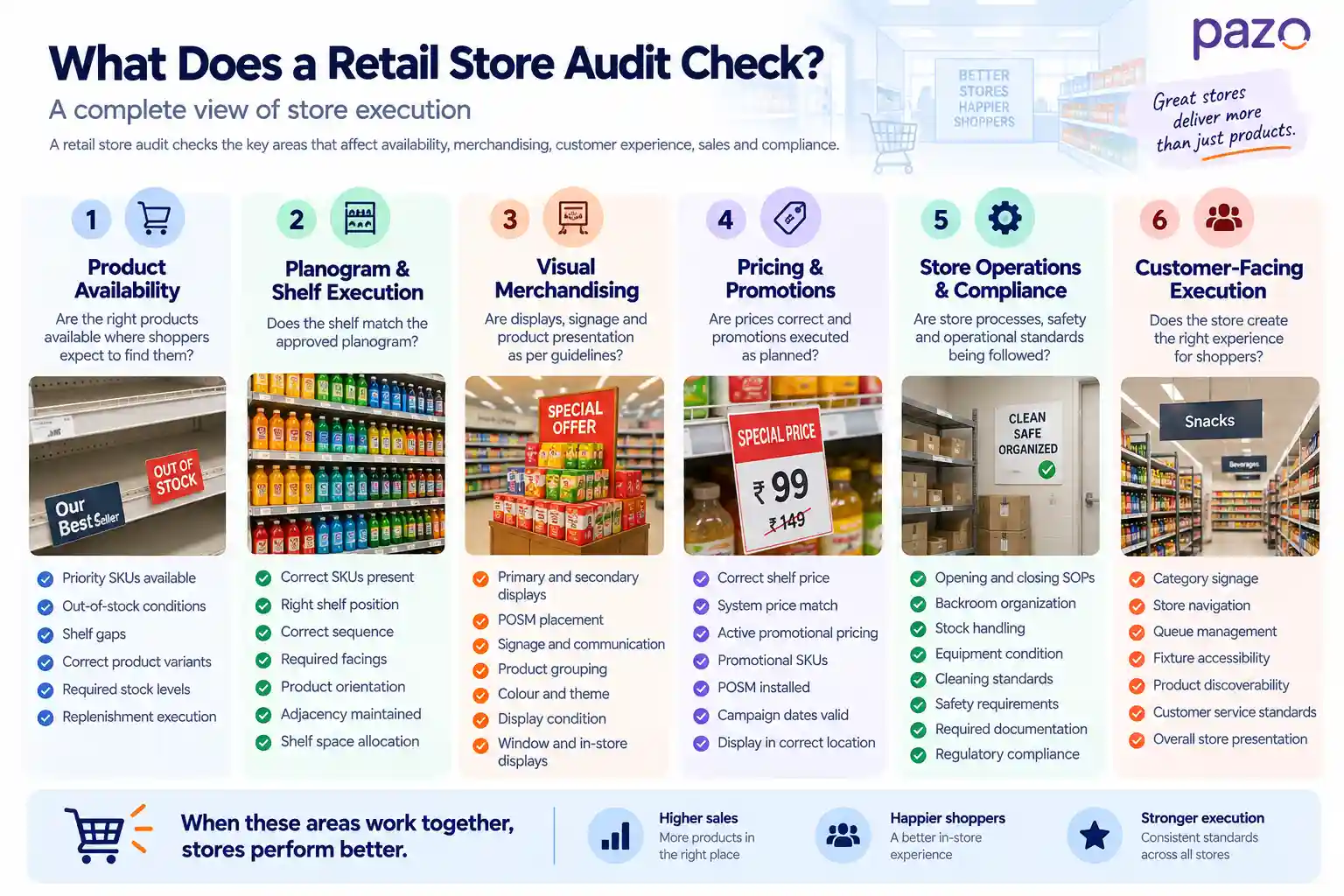
Six areas of a retail store audit including product availability, planogram and shelf execution, visual merchandising, pricing and promotions, store operations and compliance, and customer-facing execution.

How Do You Conduct a Retail Store Audit?

A strong audit is not simply a checklist that an employee completes.

It is a closed operational loop:

Standard → Inspect → Evidence → Gap → Correction → Verification

Here is how that works in practice.

1. Define the Purpose Before Building the Checklist

Start with the decision the audit needs to support.

Are you trying to measure:

  • Planogram compliance?
  • Promotional execution?
  • Store readiness?
  • Product availability?
  • Safety?
  • Overall store execution?
  • A specific campaign?

The purpose determines what should be measured.

A common mistake is starting with a long list of questions and only later deciding what the audit is supposed to accomplish.

The better sequence is:

Business objective → Standard → Audit questions → Evidence → Action

2. Convert Standards Into Observable Checks

Standards such as “maintain good merchandising” are too broad to audit consistently.

Break them into observable requirements.

For example:

Broad requirement:

Maintain the approved beverage planogram.

Auditable requirements:

  • Correct SKUs present
  • Correct shelf
  • Correct sequence
  • Required facings
  • Correct orientation
  • Required adjacency
  • Correct shelf-space allocation

This makes scoring more consistent and makes corrective action much easier.

3. Decide What Evidence Is Required

Not every question needs a photograph.

Evidence should be selected based on the risk and importance of the requirement.

A photo may be useful for:

  • Planogram deviations
  • Display execution
  • Shelf availability
  • POSM placement
  • Pricing discrepancies
  • Safety conditions

Other checks may only require a yes/no response or a numeric value.

The important thing is that evidence should help someone understand and act on the finding later.

A useful evidence record may contain:

Photo + Location + Standard + Observation + Priority + Owner + Due Date

This creates much more value than a photo sitting by itself in a report.

4. Inspect the Physical Store Against the Standard

The auditor then compares the actual store against the defined requirement.

This is where discipline matters.

The auditor should not silently change the standard based on what seems reasonable at the time.

If the planogram says three facings, the audit should record the actual number.

If the promotional brief specifies a particular location, the audit should check that location.

If the requirement has changed, the standard should be updated before the audit rather than informally changed during the inspection.

5. Separate the Observation From the Diagnosis

This is one of the most useful distinctions in store auditing.

Suppose an auditor sees an empty shelf.

The observation is:

“SKU A is not present on the shelf.”

The diagnosis might be:

“SKU A is out of stock.”

But the diagnosis isn't necessarily proven.

There could be stock in the backroom.

The product might have been moved to another location.

The replenishment process might have failed.

The product might have been incorrectly substituted.

So the audit should distinguish between:

What was observed and why it happened.

Technology can help identify the first. The second may require operational context.

6. Turn Material Gaps Into Owned Actions

Not every observation should automatically become a task.

A minor cosmetic issue may not need the same workflow as a priority SKU being out of stock or a major promotional failure.

For material findings, the action should specify:

  • What needs to be corrected
  • Who owns it
  • Priority
  • Due date
  • Required evidence
  • Current status

For example:

Finding: SKU C has two facings instead of three and is positioned after SKU B.

Owner: Store Manager

Priority: High

Action: Reposition SKU C according to the approved planogram and restore three facings.

Verification: Updated shelf photo.

This turns an audit observation into something operationally useful.

7. Verify the Correction

An audit is not operationally complete when the checklist is submitted.

It is complete when material findings have been:

Assigned → Corrected → Verified

Verification can involve:

  • A new photograph
  • A follow-up inspection
  • Manager confirmation
  • Updated audit status
  • Evidence of correction

The purpose is to avoid confusing reported with resolved.

A finding marked “closed” without evidence may simply mean that someone changed its status.

Verification provides confidence that the physical execution actually changed.

8. Look for Patterns Across Stores

Individual findings are useful.

Patterns are more valuable.

Suppose 50 stores repeatedly fail the same planogram requirement.

The answer may not be to send the same corrective instruction to 50 stores.

The repeated failure could indicate:

  • An unclear planogram
  • Poor training
  • An unrealistic shelf allocation
  • A supply issue
  • An incorrect standard
  • Weak communication
  • A recurring replenishment problem

This changes the role of the audit.

The audit is no longer only measuring stores.

It is helping the organization understand why execution repeatedly breaks down.

How Should You Audit Planogram and Merchandising Execution?

Planogram compliance should be checked by comparing the actual shelf against the approved merchandising standard.

The easiest mistake is checking only whether the expected SKUs are present. A stronger audit checks the complete shelf relationship:

The Planogram Compliance Stack
01

SKU

Is the correct product or variant present?

02

Position

Is it on the correct shelf, bay or section?

03

Sequence

Are products arranged in the intended order?

04

Facing

Does each SKU have the required number of visible facings?

05

Orientation

Are products front-facing, readable and presented correctly?

06

Adjacency

Are related products positioned next to one another where required?

07

Allocation

Does each product occupy the planned amount of shelf space?

Expected vs. Actual
Approved Planogram
SKU A
3 facings
SKU B
2 facings
SKU C
3 facings
VS
Actual Shelf
SKU A
1 facing
SKU B
4 facings
SKU C
3 facings
!
Merchandising audit: FAIL All three SKUs are present, but the actual facings do not match the approved allocation. Availability alone would miss this deviation.
The important distinction Availability is not the same as merchandising compliance. A product can be present on the shelf and still fail the planogram because its position, sequence, facings, orientation, adjacency or allocated space does not match the approved standard.

What Should a Retail Store Audit Checklist Include?

A checklist should contain questions that can be answered consistently by different auditors.

A practical structure could look like this:

Retail Store Audit Checklist

Build questions around observable execution and define the evidence needed to support each finding.

Audit area
Example checks
Typical evidence
Product availability
Priority SKUs, OOS, shelf gaps, variants
Photo · Quantity · Observation
Planogram
SKU, position, sequence, facings
Shelf photo
Visual merchandising
Displays, POSM, signage, grouping
Photo
Pricing
Shelf price, system price, promotional price
Photo · System check
Promotions
SKU, signage, dates, display location
Photo
Operations
SOPs, stock handling, backroom
Photo · Checklist
Safety & compliance
Exits, equipment, documentation
Photo · Check
Customer-facing execution
Navigation, queues, accessibility
Observation · Photo
Design the question around the action. If an answer is “No,” the auditor should be able to identify what is wrong, what evidence supports it, and what needs to happen next.

The quality of the questions matters more than the length of the checklist.

Compare:

“Is merchandising correct?”

with:

“Are SKU A, B and C in the approved sequence?”

The second question has a much lower interpretation gap.

Use evidence selectively

A retailer does not necessarily need photographs for every checklist item.

Too much evidence creates unnecessary audit workload and can make reporting difficult to manage.

Use evidence where visual or contextual proof matters most.

Adapt the checklist to store formats

A supermarket, convenience store, department store and specialty retailer may not require identical questions.

However, the measurement logic should remain consistent wherever possible.

For example, the concept of planogram compliance can remain consistent even when the exact shelf standards differ by format.

This allows retailers to compare execution without forcing every store into an identical checklist.

Keep questions actionable

A good test for every checklist question is:

If this answer is “No,” does someone know what they need to do next?

If not, the question may be too vague.

How Should Audit Findings Be Prioritized and Closed?

Not every audit finding deserves the same response.

A useful practical model is:

Impact × Severity × Urgency

This is a decision framework rather than a universal retail-industry scoring standard.

For example:

  • A blocked emergency exit may require immediate action.
  • A priority SKU being out of stock may require rapid correction.
  • A major promotional display being missing may require same-day attention.
  • A wrong facing count may be corrected in the next execution cycle.
  • A minor signage alignment issue may be handled during routine maintenance.

The finding lifecycle should be clear:

Observation → Finding → Priority → Owner → Deadline → Correction → Verification

A useful finding record might therefore contain:

!

Retail Audit Finding

Example finding record
Verified
Finding
Wrong SKU position
Location
Beverages, Shelf 2
Priority
High
Owner
Store Manager
Due date
Today
Evidence
Shelf photo
Corrective action
Restore approved SKU sequence
Finding lifecycle
1 Open
→
2 In Progress
→
✓ Verified
A finding is more useful when it can be acted on. The record should make the issue, location, priority, owner, corrective action, evidence and verification status clear.

The objective isn't to create tasks for every small observation.

It is to ensure that important execution gaps do not disappear inside an audit report.

When the same finding appears repeatedly across stores, the organization should also investigate the underlying process rather than continuously assigning the same correction.
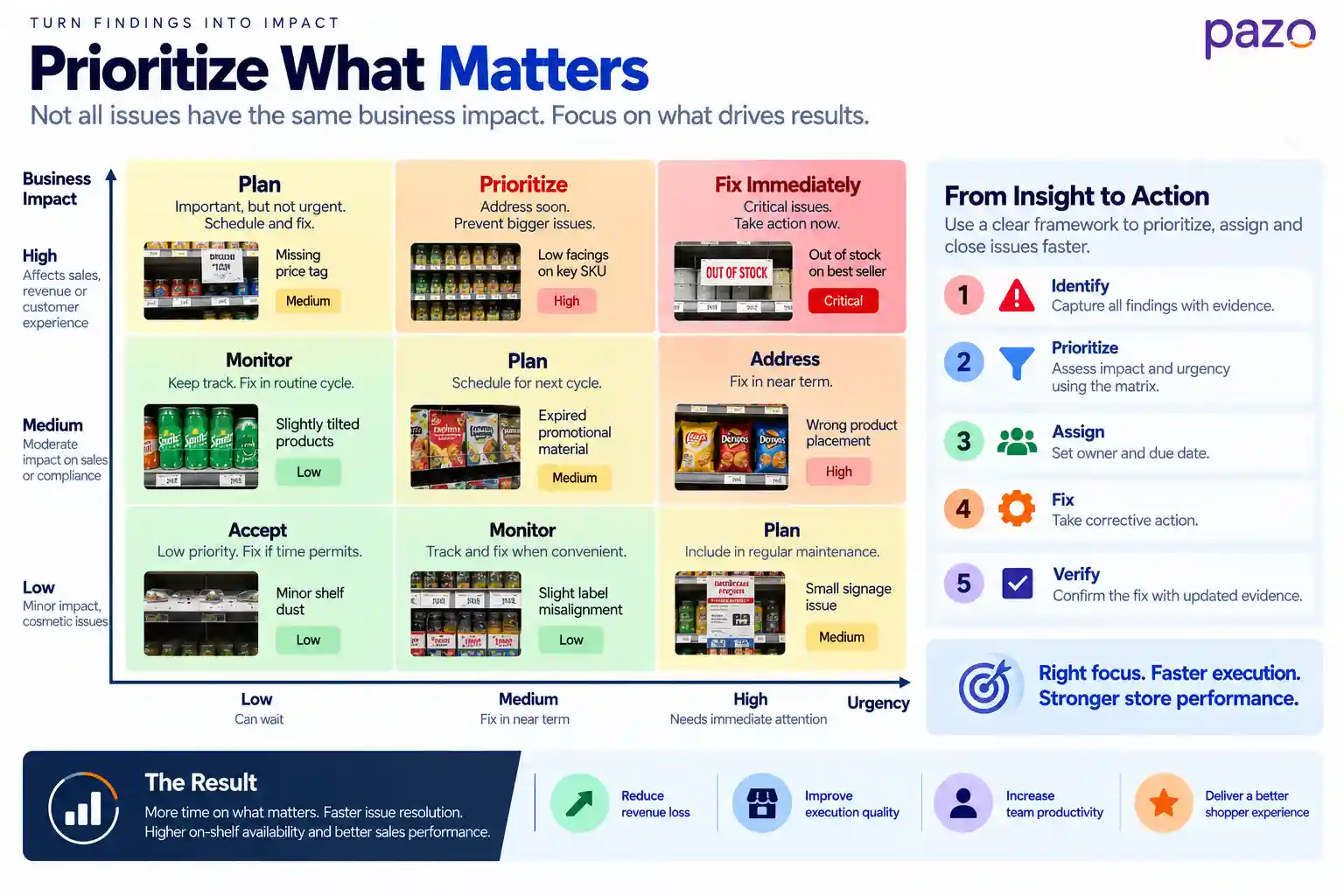
Retail audit finding prioritization matrix showing business impact and urgency, with examples ranging from minor shelf issues to critical out-of-stock and compliance problems.

Why Do Retail Store Audits Fail?

Retail audits usually don't fail because retailers don't have enough questions.

They fail because the audit does not lead to better execution.

Common failure points
01

Checklist overload

Too many questions make audits slow and encourage rushed completion.

→
02

Ambiguous standards

Different auditors interpret the same requirement differently.

→
03

No clear ownership

A finding is recorded, but nobody is explicitly responsible for fixing it.

→
04

Score becomes the goal

Teams focus on improving the audit score instead of improving execution.

→
05

Delayed reporting

Problems discovered in the store reach the responsible team too late.

→
06

No verification

A finding is marked complete without confirming the physical correction.

→
07

Punitive culture

Teams focus on defending their score instead of fixing the underlying issue.

The deeper failure

The audit measures the store, but the organization does not learn from what the audit is repeatedly showing.

If the same issue appears across dozens of locations, the response should go beyond another round of corrective tasks. The repeated failure may point to a problem with the standard, training, supply process, communication or operating model.

Audit-only mindset “Which stores failed?” Identify locations and assign another corrective task.
→
Execution-learning mindset “Why does this keep happening?” Look for the systemic cause behind repeated execution gaps.
A recurring finding is a signal, not just another task. When the same failure appears repeatedly across stores, investigate the system behind the execution—not only the individual store.

What Can Technology and AI Actually Automate in Retail Store Audits?

Technology can remove a large amount of manual administration from retail audits, but it should not be treated as a replacement for operational judgment.

Automation vs. AI vs. Human Judgment

Technology can reduce manual work and surface patterns, while people provide context and make important operational decisions.

⚙

Automation

Handles repetitive capture, administration, workflow and reporting tasks.

AI

AI assistance

Helps recognize products, analyze shelves, compare standards and identify patterns.

✓

Human judgment

Adds context, handles exceptions and makes corrective operational decisions.

Activity
Automation
AI assistance
Human judgment
Checklist distribution
✓
—
—
Photo and evidence capture
✓
—
—
Time/location records
✓
—
—
Scoring and reporting
✓
—
—
Task assignment
✓
—
—
Product recognition
—
✓
—
Shelf analysis
—
✓
—
Planogram comparison
—
✓
—
Recurring issue detection
—
✓
—
Root-cause interpretation
—
✓
✓
Exceptions and edge cases
—
—
✓
Corrective decisions
—
—
✓
Automate the repetitive Capture, distribute, assign, track and report without unnecessary manual work.
Assist with the visual Use AI to identify products, shelf deviations and recurring execution patterns.
Keep decisions human Context, exceptions and corrective decisions still require operational judgment.

What automation does well

Automation is useful for repetitive administration:

  • Sending audits to the right stores
  • Standardizing checklists
  • Capturing evidence
  • Recording timestamps
  • Managing audit status
  • Assigning actions
  • Tracking deadlines
  • Generating reports

Where AI can help

AI and computer vision can assist with repetitive visual analysis.

Potential applications include:

  • Recognizing products on shelves
  • Detecting missing products
  • Identifying misplaced products
  • Comparing shelf execution with planograms
  • Detecting recurring execution patterns
  • Flagging potential compliance issues

But detection is not the same as diagnosis.

An AI system may identify an empty shelf.

It may not know whether the cause is an inventory problem, replenishment failure, backroom stock, a planogram issue or an operational exception.

That distinction matters when designing an AI-enabled audit process.

The practical approach is:

Automate capture and administration. Assist with repetitive visual analysis. Keep important operational decisions with the people who understand the context.
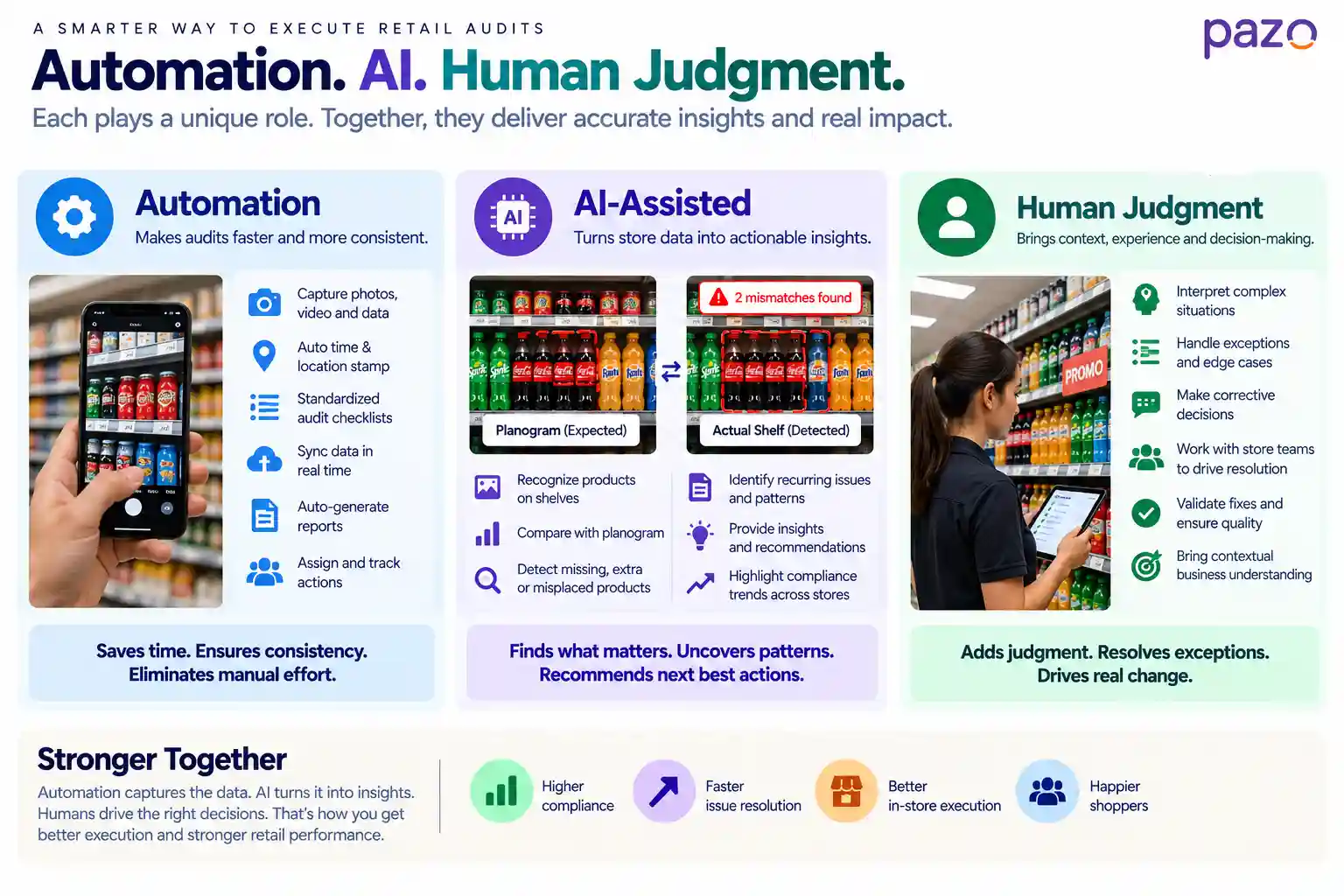
Retail audit technology model showing which tasks can be automated, which can be AI-assisted and which require human judgment.

When Does a Retailer Need Retail Audit Software?

Retail audit software becomes useful when the execution loop is difficult to manage through spreadsheets, paper checklists, email or messaging applications.

The need usually becomes apparent when retailers struggle to:

  • Standardize audits across locations
  • Capture evidence consistently
  • Track findings
  • Assign ownership
  • Monitor corrective actions
  • Verify closure
  • Analyze recurring issues
  • Report execution across stores

Platforms such as Pazo can centralize digital audits, evidence capture, reporting, corrective-action tracking and store-execution analytics in one workflow.

The important consideration is not how many software features a retailer can deploy.

It is whether the technology makes it easier to move from:

“We found a problem.”

to:

“We know what the problem is, who owns it, whether it was fixed, and whether it keeps happening.”

Retail Store Audit: What Actually Makes It Work?

A useful retail store audit answers four questions clearly:

  1. What should be happening?
  2. What is actually happening?
  3. What is the execution gap?
  4. Was the gap corrected and verified?

The checklist is only the starting point.

The real value comes from closing the loop between standard, observation, evidence, action and verification.

Technology can make that loop faster and easier to manage. AI can help identify patterns and repetitive visual deviations. But the quality of the audit still depends on clear standards, useful questions and sound operational judgment.

The goal is not to produce more audit data. It is to make store execution more consistent—and make recurring problems easier to see, fix and prevent.

Take Store Execution Further

See How Pazo Connects Teams, Tasks & Store Execution

Bring your retail workflows, SOPs, tasks, audits and frontline execution into one connected system—so teams know what to do, managers can verify execution, and operations leaders can see what is happening across stores.

✓ Standardize workflows
✓ Assign & execute tasks
✓ Verify store execution
✓ Identify execution gaps
Book a 30-Minute Conversation →
See how Pazo can fit into your retail operations.
Nethra Ramani Author
ABOUT THE AUTHOR
Sharjeel Ahmed

As someone who has built highly scalable products from the ground up, I've always been drawn to solving challenging problems. But it's the quest for operational excellence that truly lights my fire. The thrill of streamlining processes, optimizing efficiency, and bringing out the best in a business – that's what gets me out of bed in the morning. Whether I'm knee-deep in programming or strategizing solutions, my focus is on creating a ripple effect of excellence that transforms not just businesses, but the industry at large. Ready to join forces and raise the bar for operational excellence? Let's connect and make retail operations and Facilities Management better, together.

Enjoyed this read?

Stay up to date with the latest video business news, strategies, and insights sent straight to your inbox!


Thank you! Your submission has been received!
Oops! Something went wrong while submitting the form.