A retail SOP (Standard Operating Procedure) is a documented process that tells a store team what needs to be done, who is responsible, when it should happen, how it should be performed, what “done correctly” looks like, what to do when something goes wrong, and how completion is verified.
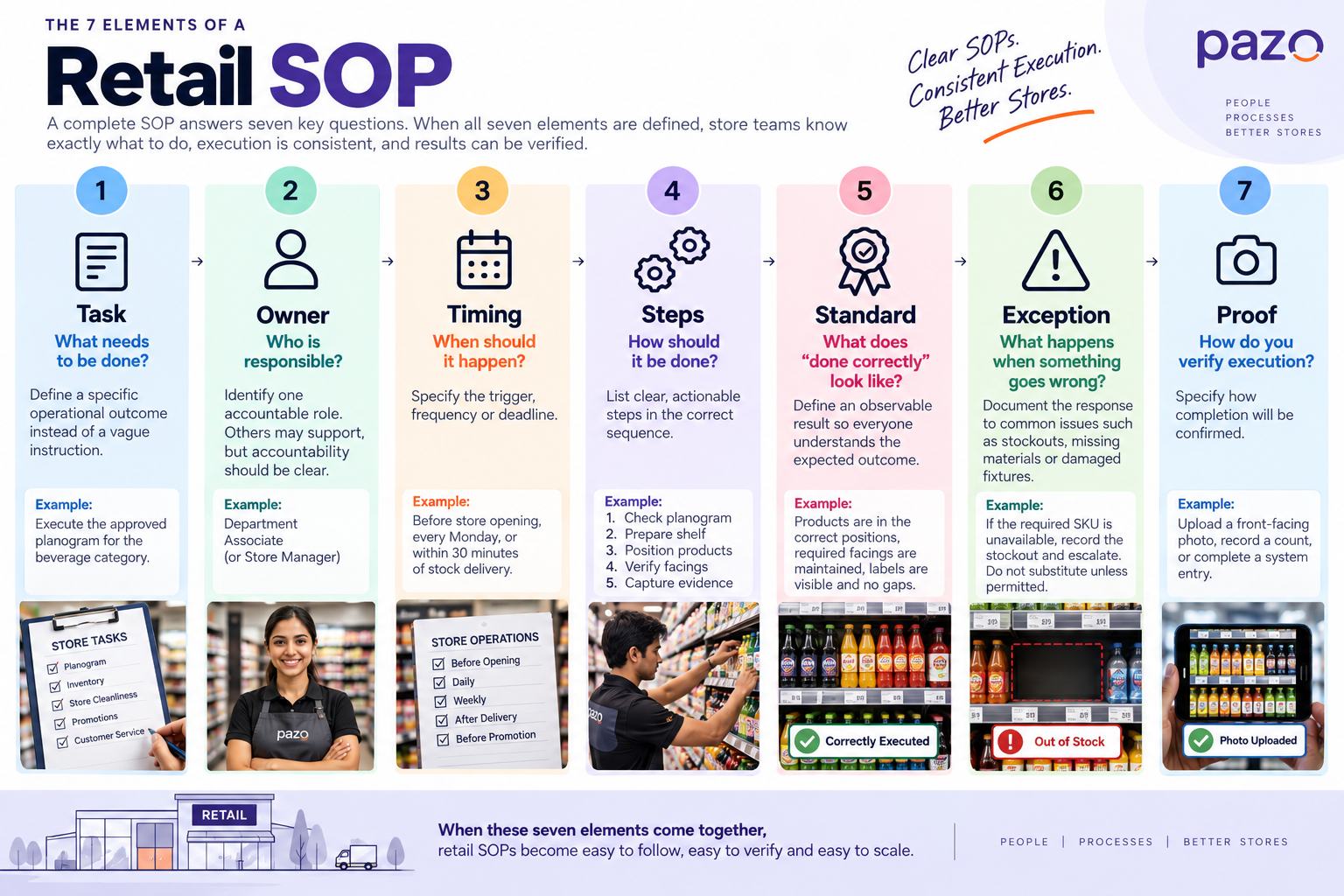
A useful retail SOP can be reduced to seven elements:
For example, “Maintain the product display” is not a useful SOP instruction. A frontline employee still has to decide what “maintain” means.
A stronger instruction would specify the expected display standard, required facings, shelf position, signage, timing, and the evidence required after execution.
The difference matters because an SOP is valuable only when it can be executed consistently and verified across stores.
What Is a Retail SOP?
A retail SOP is a standardized set of instructions for performing a repeatable store operation.
Retailers use SOPs for activities such as opening and closing stores, receiving inventory, replenishment, cash handling, customer service, merchandising, planogram execution, promotional setup, housekeeping, and compliance checks.
But a strong SOP does more than document a sequence of steps.
It answers seven practical questions:
Question
SOP element
What needs to happen?
Task
Who does it?
Owner
When does it happen?
Timing
How is it performed?
Steps
What does correct execution look like?
Standard
What happens when the normal process cannot be followed?
Exception
How is execution confirmed?
Proof
This distinction becomes important when the same process has to be executed across multiple stores.
Two stores can receive exactly the same SOP but execute it differently if the instructions are vague, ownership is unclear, or the expected result is not defined.
A good retail SOP therefore connects instruction with execution and verification.
The 7-Part Retail SOP Framework
A practical way to design a retail SOP is to build every procedure around seven elements.
1. Task: What needs to be done?
Start with a specific operational outcome.
Weak:
Maintain the store display.
Better:
Execute the approved planogram for the beverage category before store opening.
The second version gives the employee a clearly defined job.
2. Owner: Who is responsible?
Every SOP needs a clear accountable role.
Instead of:
Store team
define:
Department Associate
or:
Store Manager
Other employees may support the activity, but one role should remain accountable for completion.
3. Timing: When should it happen?
Specify the trigger or frequency.
Examples include:
Before store opening
At the start of every shift
After inventory receipt
Every Monday
Before a promotion goes live
Within 30 minutes of a stock delivery
“Regularly” is rarely useful operational guidance.
4. Steps: How should it be done?
Break the process into actions that a frontline employee can follow.
Keep the steps operational rather than explanatory.
For example:
Check the approved planogram version.
Confirm the effective date.
Remove discontinued SKUs.
Position products according to the planogram.
Verify facings and labels.
Check for gaps.
Upload completion evidence.
5. Standard: What does “done correctly” mean?
This is one of the most frequently overlooked parts of an SOP.
“Clean the shelf” doesn't define a measurable standard.
Instead:
Products must be front-facing, labels must be visible, required facings must be maintained, and no empty packaging should remain on the shelf.
The employee now knows what successful execution looks like, and a manager has something observable to verify.
6. Exception: What happens when something goes wrong?
Real stores rarely operate under perfect conditions.
An SKU may be unavailable. A delivery may be late. A fixture may be damaged. A promotional material may not have arrived.
The SOP should explain what happens next.
For example:
If the required SKU is unavailable, record the stockout and follow the defined escalation process. Do not substitute another SKU unless the merchandising standard permits substitution.
7. Proof: How do you verify execution?
A checkbox saying “Completed” doesn't necessarily prove that the standard was achieved.
Depending on the activity, proof could include:
Photograph
Count
Inventory record
Manager verification
System entry
Audit result
The right evidence depends on the SOP.
Retail SOP vs. Checklist vs. Task vs. Audit
These terms are often used interchangeably, but they serve different purposes.
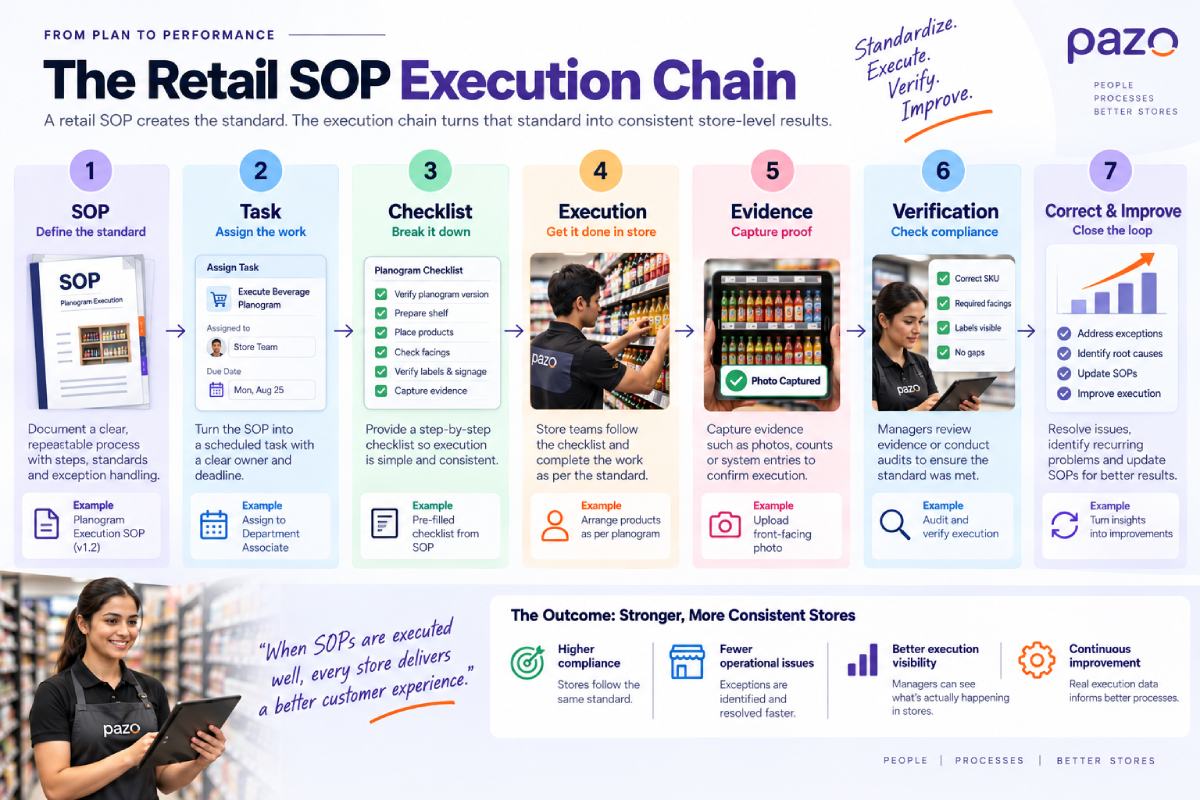
An SOP can define the standard, but retailers still need a mechanism to assign the work, execute it, verify it, identify exceptions, and improve the process.
Retail SOP Template
A retail SOP should be detailed enough for a store employee to execute the task without repeatedly asking a manager for clarification, but concise enough to use during an actual shift.
Retail Operations
Retail SOP Template
A practical structure for creating procedures that store teams
can execute, understand and verify.
SOP Name
Planogram Execution – Beverage Category
Store / Department
Specify where the SOP applies.
Responsible Role
Identify the person accountable for execution.
Frequency
State when or how often it should happen.
Effective Date
Specify when the current version applies.
Objective
Describe the outcome the SOP is intended to achieve.
01
When to Perform
Define the trigger clearly.
Example
Complete the procedure before store opening on the effective
date of a new planogram.
02
Procedure
List the actions in the order they should be performed.
Confirm the current instruction or standard.
Prepare the required products, equipment or materials.
Complete each operational step.
Check the result against the defined standard.
Record or submit the required evidence.
03
Expected Standard
Describe what correct execution looks like.
Avoid vague instruction
“Ensure the display looks good.”
Instead
Products are positioned according to the approved planogram,
required facings are maintained, labels are visible and the
display contains no avoidable gaps.
04
Exceptions
Document what the employee should do when the normal process
cannot be completed.
05
Evidence
Specify how completion should be demonstrated.
06
Escalation
State who should be contacted when an exception cannot be
resolved at store level.
07
Review Date
Set a date or trigger for reviewing whether the SOP is still
accurate.
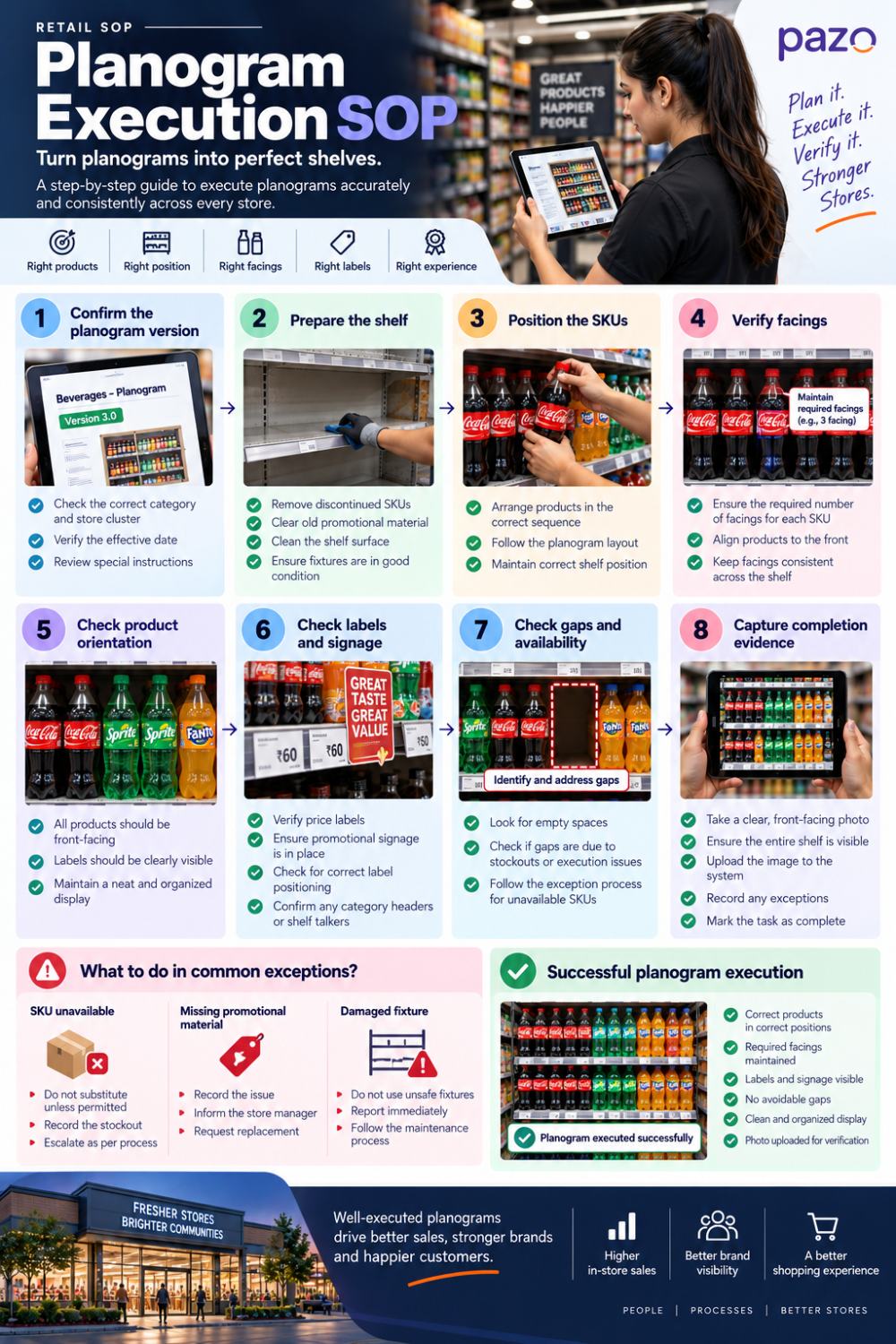
Retail SOP Example: Planogram Execution
A planogram execution SOP shows why retail procedures need more detail than generic instructions.
The objective is not simply to tell employees to “follow the planogram.” The SOP needs to translate the approved merchandising standard into specific actions that can be performed and verified at store level.
SOP: Execute an Approved Planogram
Objective: Implement the approved planogram accurately and ensure the completed shelf matches the required merchandising standard.
Responsible role: Store Manager or Department Associate.
When to perform: Before the effective date of the new planogram or within the specified execution window.
Procedure
Confirm the planogram version Verify the correct planogram, store cluster and effective date.
Prepare the shelf Remove discontinued, replaced or incorrectly positioned products as required.
Position the SKUs Place each product according to the approved sequence and shelf position.
Verify facings Check that each SKU has the required number of visible facings.
Check product orientation Ensure products are front-facing and presented consistently.
Check labels and signage Verify that price labels, category labels and promotional signage are present and correctly positioned.
Check gaps and availability issues Identify empty positions and determine whether they are caused by stock availability or execution issues.
Capture completion evidence Take a front-facing photograph showing the completed bay.
Submit exceptions Record any deviation that could not be corrected and escalate it according to the defined process.
What Happens When a SKU Is Unavailable?
This is where a good SOP differs from a simple planogram checklist.
If a required SKU is out of stock, the employee should not automatically replace it with another product. The SOP should specify whether substitution is permitted, whether the position should remain empty, or whether the issue needs to be escalated.
The same principle applies to damaged fixtures, missing signage or products that do not fit the allocated shelf space.
A planogram can also be technically implemented and still fail the merchandising objective. The shelf may contain the correct SKUs while having incorrect facings, poor product orientation, missing labels, avoidable gaps or incorrect promotional signage.
Successful execution therefore means the physical shelf matches the approved merchandising standard, not simply that the employee checked a completion box.
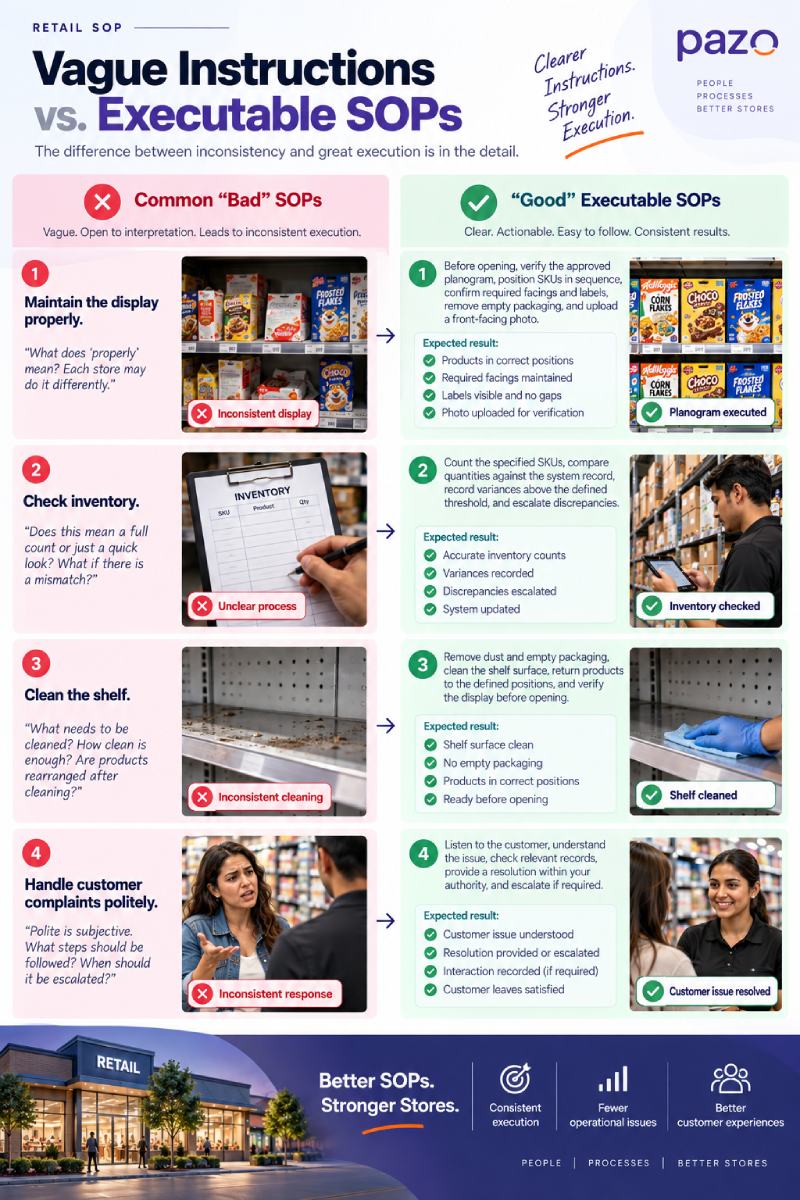
Bad SOP vs. Good SOP
The easiest way to improve an SOP is to replace vague instructions with observable actions and standards.
Weak instruction
Executable instruction
Maintain the display properly.
Before opening, verify the approved planogram, position SKUs in sequence, confirm required facings and labels, remove empty packaging, and upload a front-facing photo.
Check inventory.
Count the specified SKUs, compare quantities against the system record, record variances above the defined threshold, and escalate discrepancies.
Clean the shelf.
Remove dust and empty packaging, clean the shelf surface, return products to the defined positions, and verify the display before opening.
A useful test is simple:
Could a new employee perform the task correctly without asking the person who wrote the SOP what they meant?
If not, the SOP probably needs more operational detail.
Common Retail SOPs by Store Function
Retailers rarely need one SOP for the entire store. They need a library of SOPs covering the recurring processes that influence store execution.
Not every activity needs a separate, lengthy document. Related activities can often be grouped into a single SOP when they follow the same workflow and ownership structure.
The better approach is to build the SOP library around repeatable processes that need consistent execution across stores, rather than creating documents simply to cover every activity employees perform.
How to Create a Retail SOP That Works in the Real Store
Creating a retail SOP should start with observing how the work actually happens, not with writing instructions in isolation.
1. Observe the Existing Workflow
Watch the process being performed in the store.
Look for where employees hesitate, which steps are regularly skipped, where handoffs occur, and which problems repeatedly interrupt the normal workflow.
If the documented process does not match the real workflow, employees will eventually create their own shortcuts.
2. Define the Desired Outcome
Before writing individual steps, establish what successful completion looks like.
3. Break the Process Into Actions
Convert the workflow into clear, sequential steps. Each step should describe something the employee can actually do.
4. Assign Clear Ownership
Identify the accountable role instead of using vague ownership such as “store staff.”
5. Define Exceptions
Ask:
What normally goes wrong?
Document the response to common stockouts, missing materials, damaged equipment, system issues or other operational constraints.
6. Define the Evidence
Decide how completion will be verified.
A simple task may require a system confirmation, while a merchandising activity may require a photograph. Inventory processes may require quantities or system records.
7. Test With a Frontline Employee
Give the SOP to someone who was not involved in writing it.
Watch where they hesitate, interpret an instruction differently or need clarification. Those moments expose weaknesses in the SOP.
8. Pilot Before Scaling
Test the procedure in one or a small group of stores before rolling it out across the network.
9. Measure Execution
Track completion, compliance, exceptions and recurring failures.
10. Review and Update
New products, planograms, promotions, technology, store formats or operating policies can make an existing procedure outdated.
The SOP should have a clear version, effective date and review process.
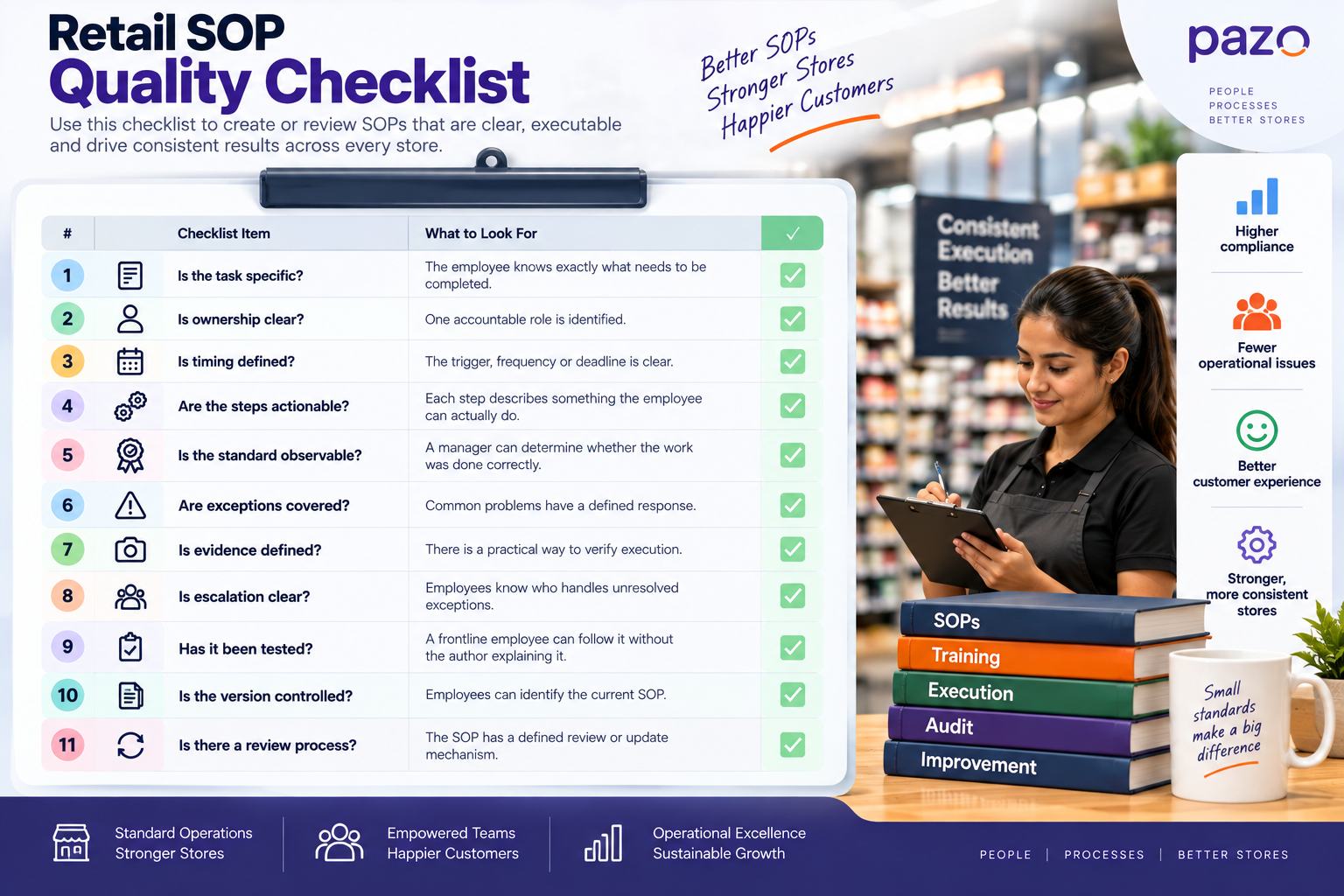
Retail SOP Quality Checklist
Before rolling out an SOP across stores, check whether it answers all of these questions.
SOP quality check
What to look for
Is the task specific?
The employee knows exactly what needs to be completed.
Is ownership clear?
One accountable role is identified.
Is timing defined?
The trigger, frequency or deadline is clear.
Are the steps actionable?
Each step describes something the employee can actually do.
Is the standard observable?
A manager can determine whether the work was done correctly.
Are exceptions covered?
Common problems have a defined response.
Is evidence defined?
There is a practical way to verify execution.
Is escalation clear?
Employees know who handles unresolved exceptions.
Has it been tested?
A frontline employee can follow it without the author explaining it.
Is the version controlled?
Employees can identify the current SOP.
Is there a review process?
The SOP has a defined review or update mechanism.
This checklist can also be used when reviewing an existing SOP library. If several procedures fail the same checks, the problem may be with the retailer's SOP design process rather than with individual employees.
Why Retail SOPs Fail
Writing an SOP does not guarantee consistent store execution. SOP programs tend to break down when the procedure is difficult to use, does not reflect store conditions, or provides no way to verify the expected standard.
1. The SOP describes the ideal store
Stockouts, delayed deliveries, staffing gaps, damaged fixtures and missing promotional material can prevent employees from following the normal process.
If the SOP does not explain what to do in these situations, employees have to improvise.
2. The SOP is too long to use
A procedure can become so detailed that employees stop referring to it during a busy shift.
Frontline instructions should contain what is required to perform the task correctly without burying the actual actions inside unnecessary explanation.
3. “Done” is not clearly defined
Instructions such as “maintain the display” or “check inventory” leave too much room for interpretation.
A good SOP defines observable conditions that indicate successful completion.
4. There is no exception path
A standard process assumes everything goes according to plan. Stores rarely work that way.
When an expected product, material, system or resource is unavailable, employees need a predefined response rather than an informal workaround.
5. Old instructions remain in circulation
New planograms, promotions, products, store formats or operational policies can make previous instructions obsolete.
If employees can still access outdated versions, different stores may end up following different standards.
6. Completion is measured instead of quality
A task marked “completed” does not necessarily mean the required standard was achieved.
A store may report that a planogram was implemented while the actual shelf still has incorrect facings, misplaced SKUs or missing labels.
How to Measure Retail SOP Compliance
Measuring SOP performance requires more than tracking whether employees marked tasks as complete. Retailers should measure both execution and adherence to the defined standard.
SOP Completion Rate
Completed tasks ÷ Assigned tasks × 100
This shows whether assigned SOP-driven activities were completed.
SOP Compliance Rate
Tasks meeting the defined standard ÷ Tasks audited × 100
This measures whether employees completed the task correctly, not simply whether they reported completion.
For example, a store may have a 98% planogram completion rate but only 82% compliance if audits find incorrect SKU positions, missing facings or incorrect labels.
Exception Rate
Tasks requiring exceptions ÷ Total tasks × 100
A consistently high exception rate can indicate that the SOP does not adequately reflect actual store conditions—or that an upstream process is creating recurring problems.
Overdue Task Rate
Measures how frequently SOP-related tasks are completed after their required deadline.
Repeat Failure Rate
Measures how often the same SOP issue occurs again after corrective action.
Together, these metrics help managers determine whether the problem is execution, training, store conditions or the SOP itself.
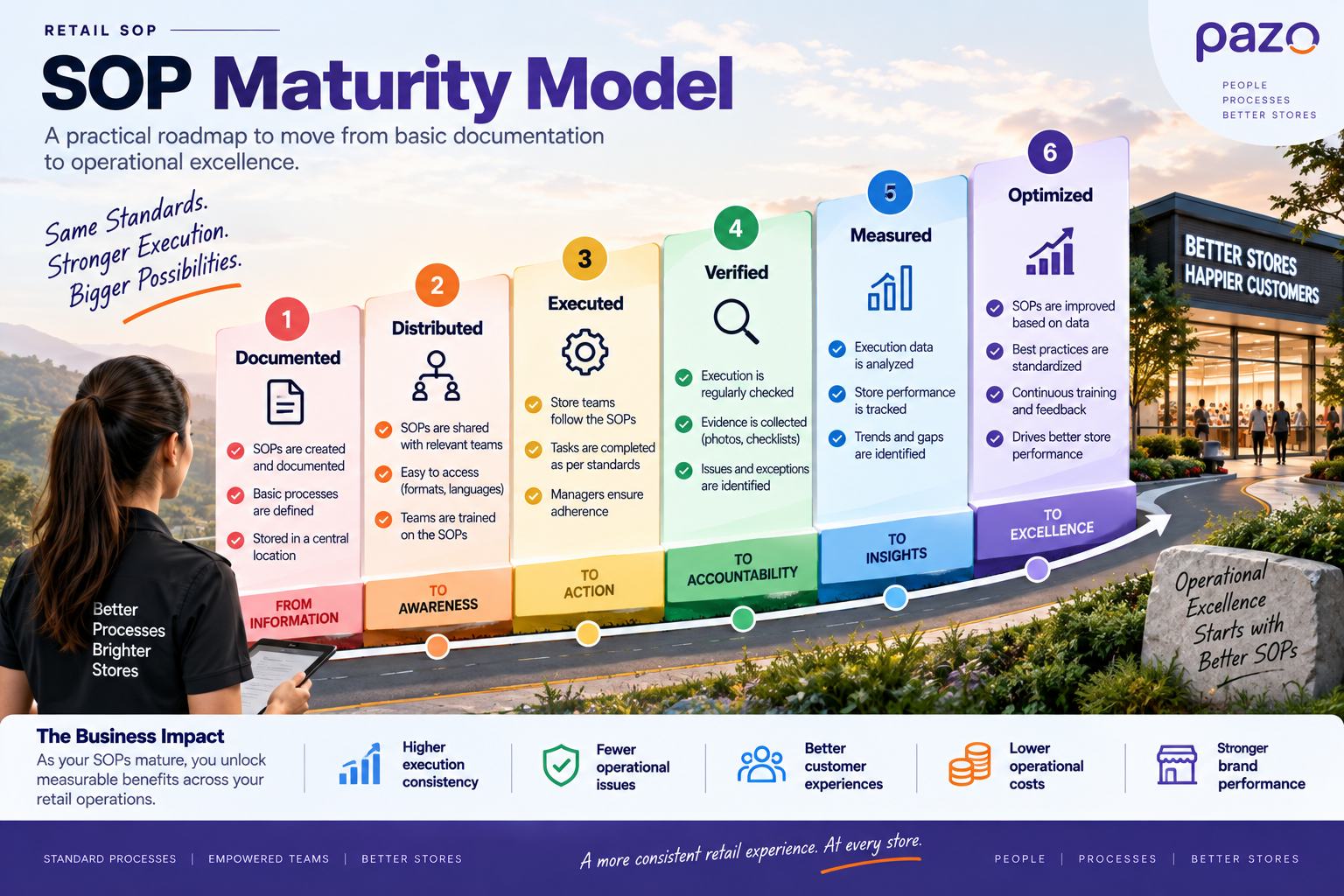
Retail SOP Maturity Model
Retailers often think about SOP maturity as a documentation exercise: create the procedures, distribute them to stores and consider the work complete.
A more useful way to assess maturity is to look at how far the SOP has progressed from documentation to continuous improvement.
Level 1: Documented
The process has been written down and a defined standard exists.
Level 2: Distributed
The current SOP is available to the employees and stores responsible for executing it.
Level 3: Executed
Store teams are actually performing the procedure as part of their assigned work.
Level 4: Verified
Managers can check whether the procedure was executed according to the required standard.
Level 5: Measured
The retailer tracks completion, compliance, exceptions and recurring failures.
Level 6: Optimized
Execution data and feedback from stores are used to improve the process.
An SOP sitting in a shared folder is therefore only the beginning. The operational value increases as the procedure becomes executed, verified, measured and improved.
Where Retail SOP Software Fits
A retail SOP becomes much more useful when it moves beyond a document and becomes part of the store's daily operating workflow.
Instead of distributing a merchandising SOP as a PDF and expecting store teams to remember it, a retailer can connect the procedure to an assigned task with a defined deadline, checklist, execution instructions and required evidence.
This is where retail operations platforms such as Pazo fit into the SOP process.
The software layer can help retailers distribute operational instructions, assign recurring work, capture execution evidence and bring completion and exceptions into a centralized view.
The objective is not simply to digitize an SOP. It is to connect the standard defined by the retailer with what actually happens inside each store.
Conclusion
A retail SOP is more than a set of instructions stored in a document. It is a way to turn a retailer's operating standards into repeatable store-level actions.
The strongest SOPs clearly define the task, owner, timing, procedure, expected standard, exception path and proof of execution. They are tested against real store conditions, measured for compliance and updated when the underlying process changes.
When these procedures are connected to task assignment, checklists, evidence and verification, retailers can move from simply documenting how stores should operate to consistently seeing how stores actually operate.
Take Control of Retail Operations
Connect Store Teams, Tasks & Execution
Standardize workflows, assign store tasks, verify execution and get visibility across locations with Pazo.
As someone who has built highly scalable products from the ground up, I've always been drawn to solving challenging problems. But it's the quest for operational excellence that truly lights my fire. The thrill of streamlining processes, optimizing efficiency, and bringing out the best in a business – that's what gets me out of bed in the morning. Whether I'm knee-deep in programming or strategizing solutions, my focus is on creating a ripple effect of excellence that transforms not just businesses, but the industry at large. Ready to join forces and raise the bar for operational excellence? Let's connect and make retail operations and Facilities Management better, together.
Enjoyed this read?
Stay up to date with the latest video business news, strategies, and insights sent straight to your inbox!
Thank you! Your submission has been received!
Oops! Something went wrong while submitting the form.