Retail
How to Read a Planogram: A Step-by-Step Guide for Retail Teams
Learn how to read a planogram—fixtures, SKUs, facings, and compliance—and see how Pazo makes execution effortless.

CEO - Pazo

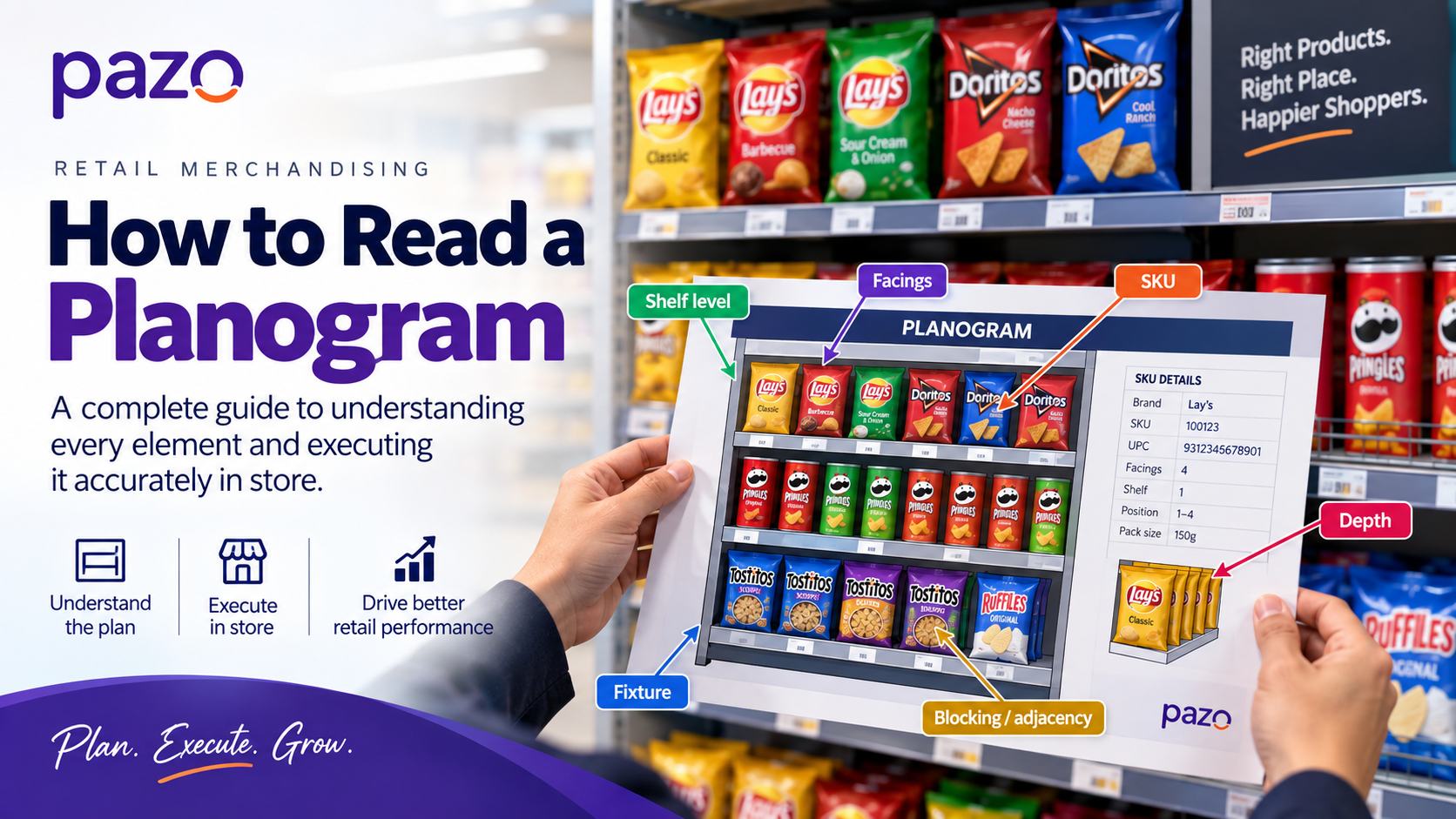
Learn how to read a planogram—fixtures, SKUs, facings, and compliance—and see how Pazo makes execution effortless.
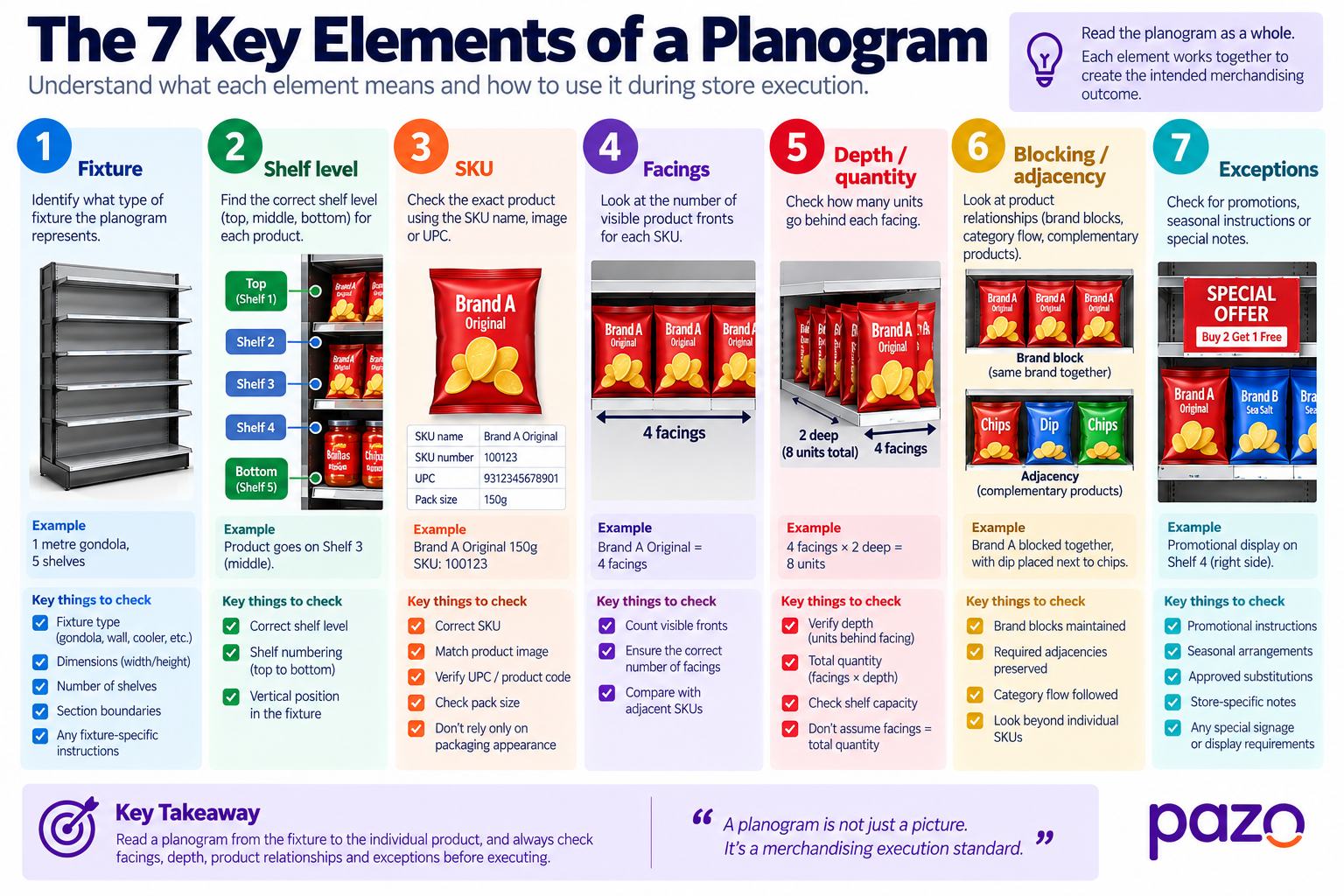
A planogram is a visual merchandising document that specifies how products should be arranged within a particular retail fixture.
Depending on the planogram, it can communicate:
The important distinction is this:
A planogram is not simply a picture of a shelf. It is an execution standard.
It tells the retail team what the intended merchandising arrangement should look like so that the physical shelf can be set up consistently.
One of the easiest mistakes for someone new to planograms is to immediately search for a product.
An experienced merchandiser starts with the fixture.
The reason is simple: a product's position only makes sense within the context of the fixture and shelf structure.
The reading sequence should therefore be:
Fixture → Section → Shelf → Position → SKU
rather than:
SKU → “Where do I put this?”
The same SKU can appear in different positions across different fixtures, store formats, categories, or merchandising configurations.
Before identifying individual products, establish:
Never interpret a product position until you know the fixture and shelf structure that position belongs to.
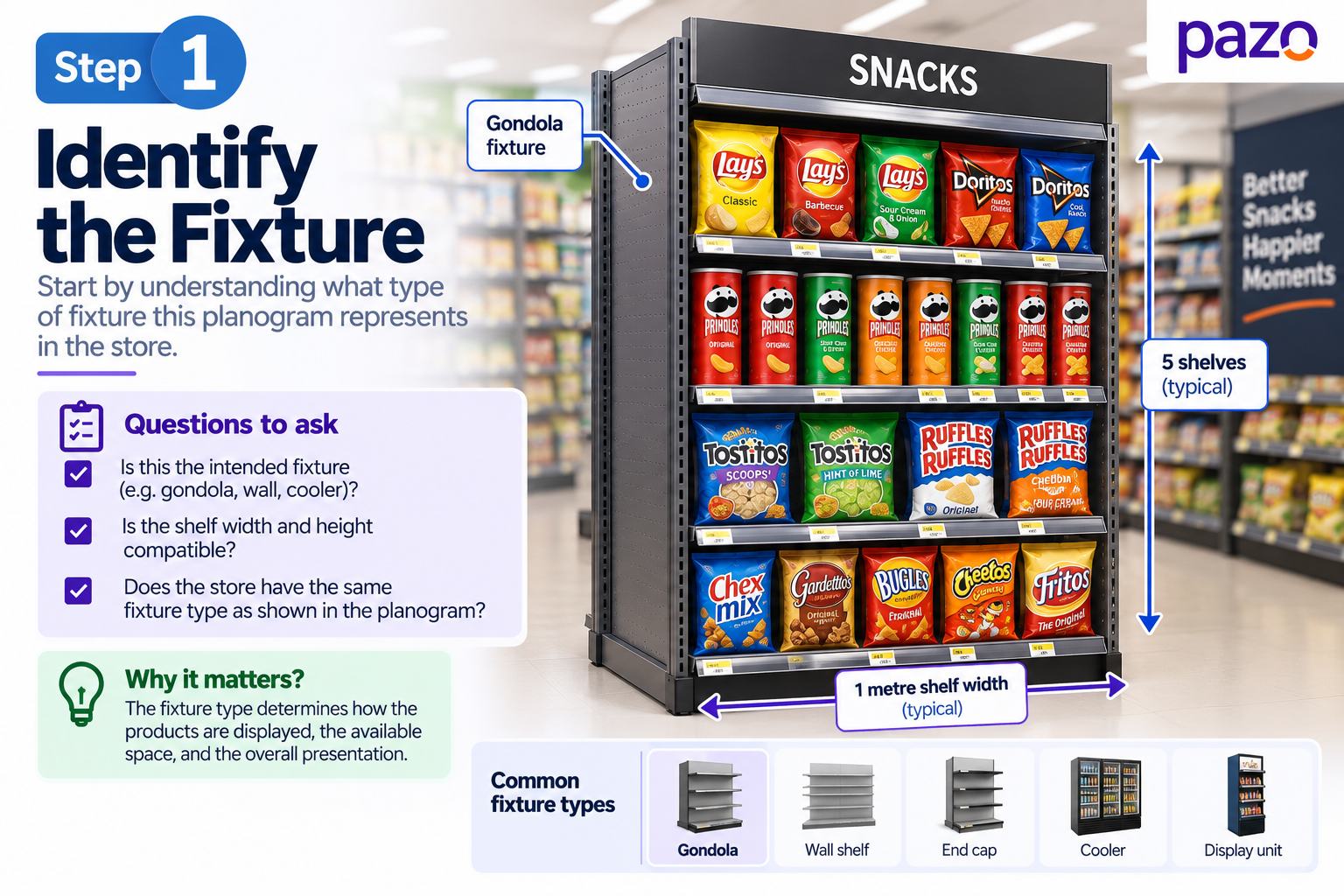
Start by determining what physical fixture the planogram represents.
It might be:
Then look for the physical dimensions and boundaries represented in the planogram.
Check:
The purpose is to establish the physical frame before interpreting individual products.
If the physical fixture in the store is different from the fixture represented in the planogram, that difference may explain why the intended arrangement cannot be reproduced exactly.
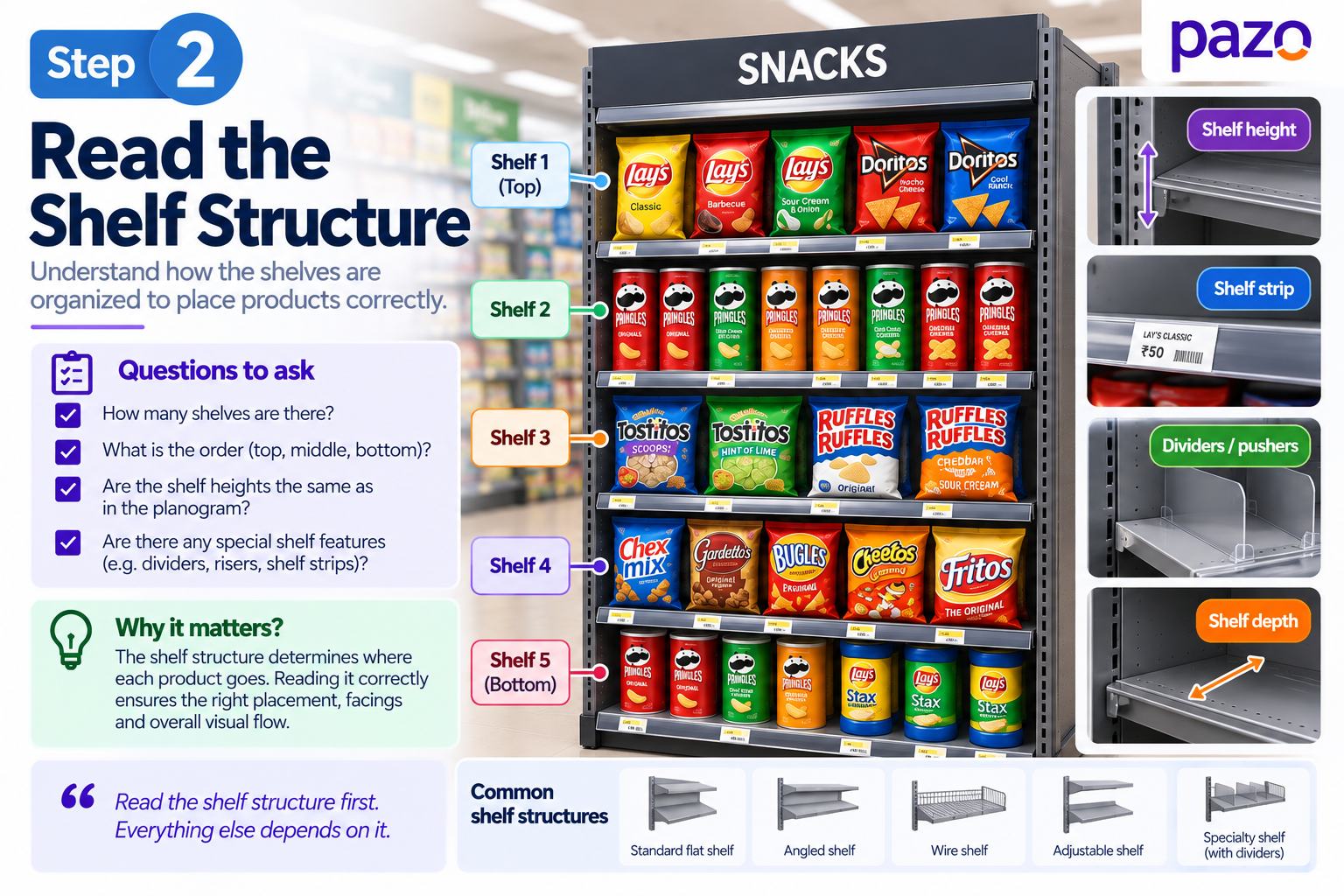
Once you understand the fixture, determine how the planogram divides it.
Look for:
Think of the shelf structure as a coordinate system.
Instead of saying:
“The cereal goes somewhere in the middle.”
You should be able to identify:
“The cereal belongs on the third shelf within the left-side category block.”
That precision becomes important during store execution.
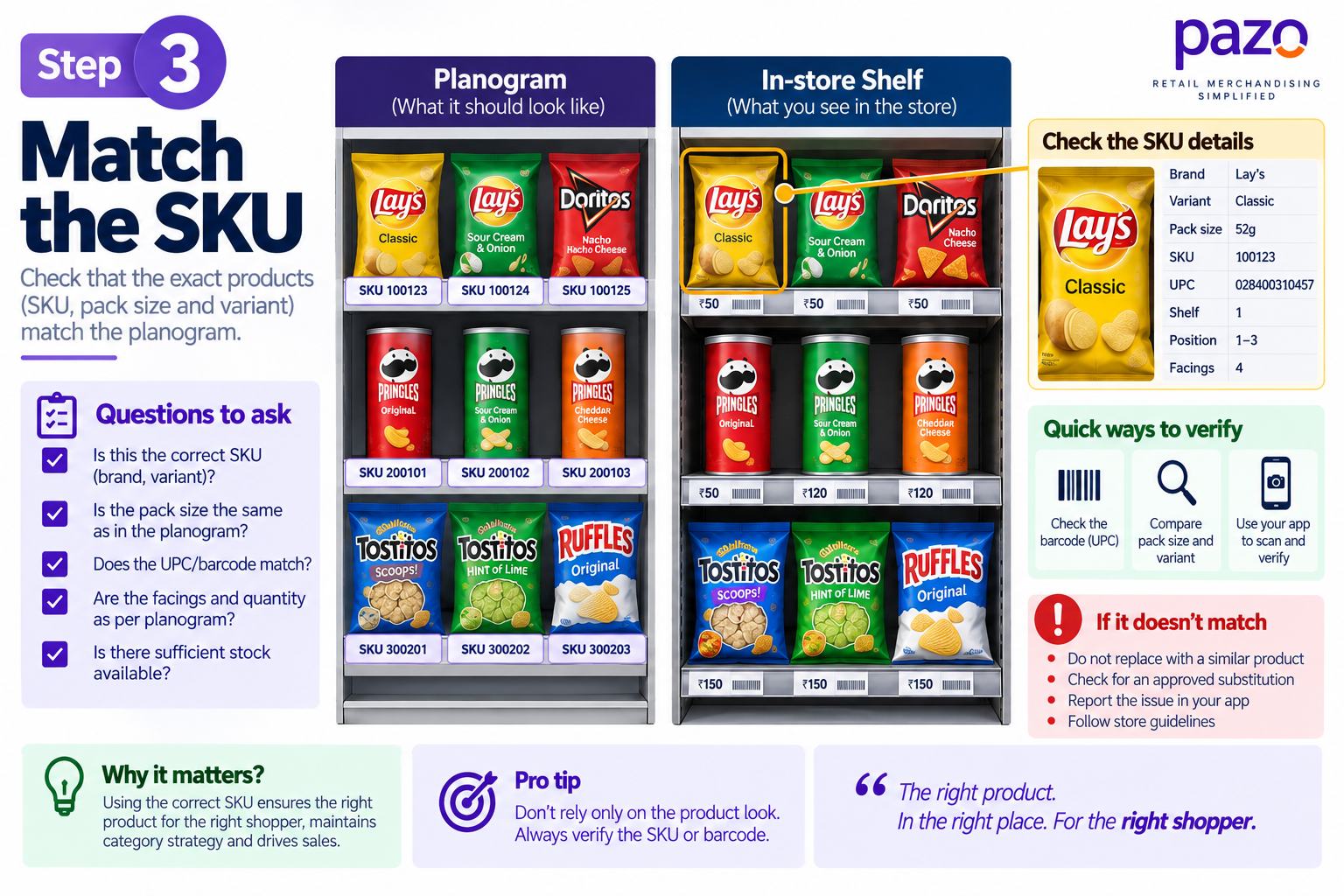
Now identify the exact product.
Use the information available on the planogram:
Don't rely solely on packaging appearance.
Packaging can change while the underlying SKU remains the same. Similarly, two products can look similar while representing different SKUs.
SKU identity first. Product appearance second.
When possible, cross-check the product identifier rather than assuming that visual similarity means product identity.
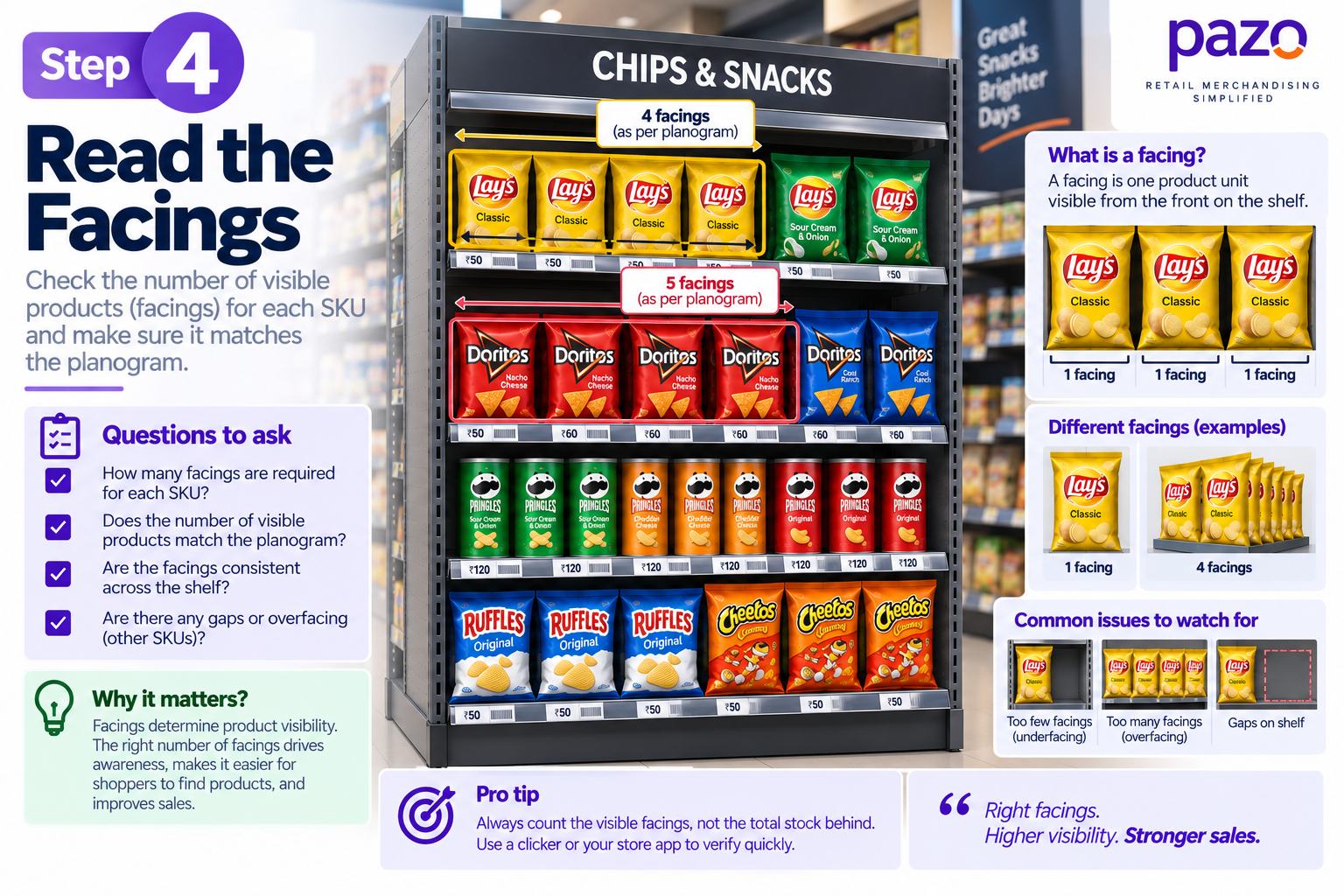
A facing represents the visible front position allocated to a product on the shelf.
If the planogram shows four facings for a product, it is communicating more than:
“Put four products here.”
It is allocating a specific amount of visible shelf presence to that SKU.
For example:
SKU A: 4 facings
SKU B: 2 facings
The planogram is intentionally giving SKU A twice as much visible front-facing space as SKU B.
So during execution, don't simply ask:
“Is SKU A present?”
Ask:
“Does SKU A have the intended number of facings?”
This distinction matters when checking whether the physical shelf follows the intended merchandising standard.
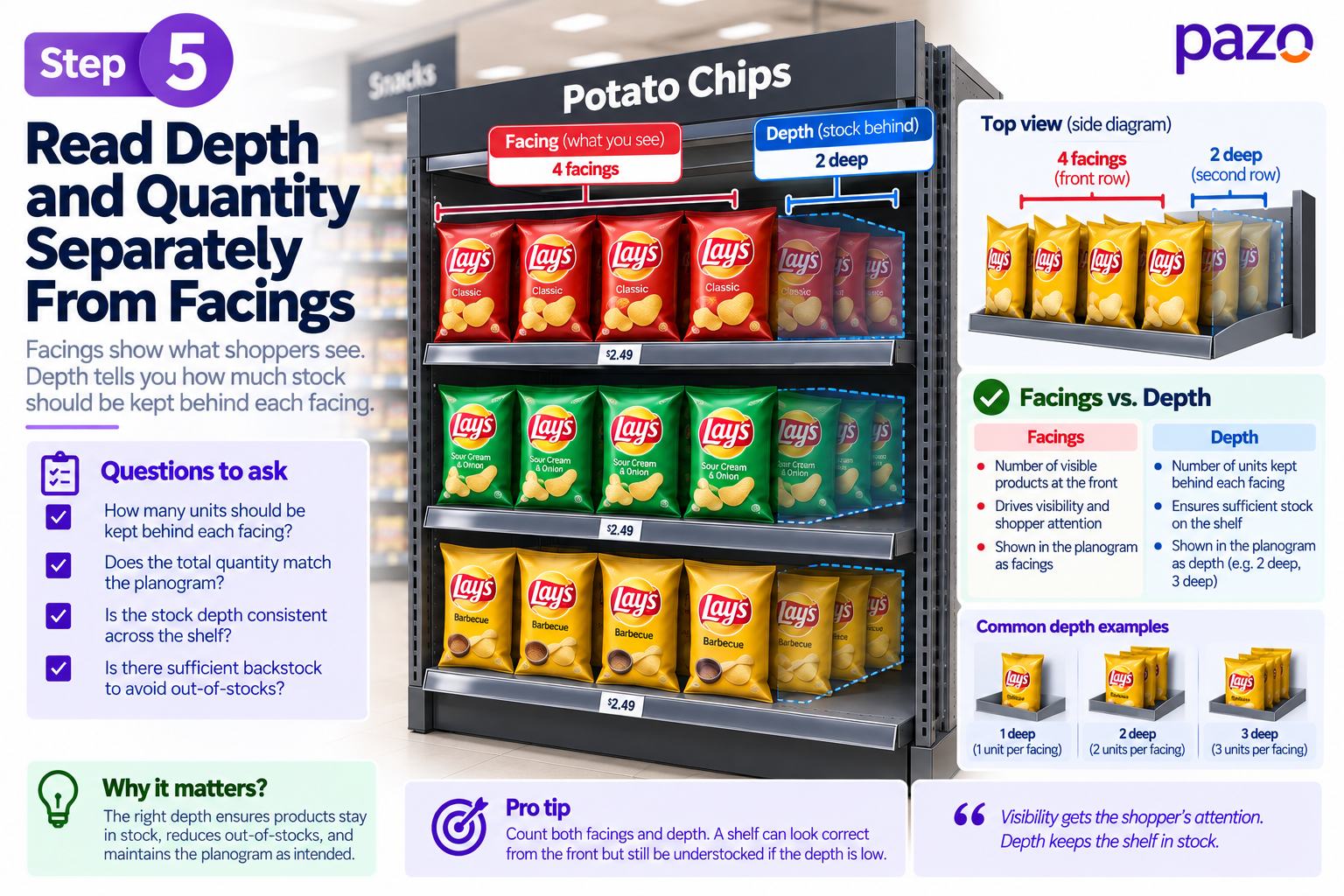
Facings and quantity are not necessarily the same thing.
A product may have:
3 facings × 2 units deep
while another may have:
2 facings × 4 units deep
Both products have visible shelf presence, but their intended physical quantities can differ.
The exact way depth and quantity are represented depends on the planogram convention being used.
The key principle is:
Facings describe visible shelf presence; depth describes how far the product extends behind that visible position.
Read both rather than assuming that the number of visible fronts represents the total number of units.
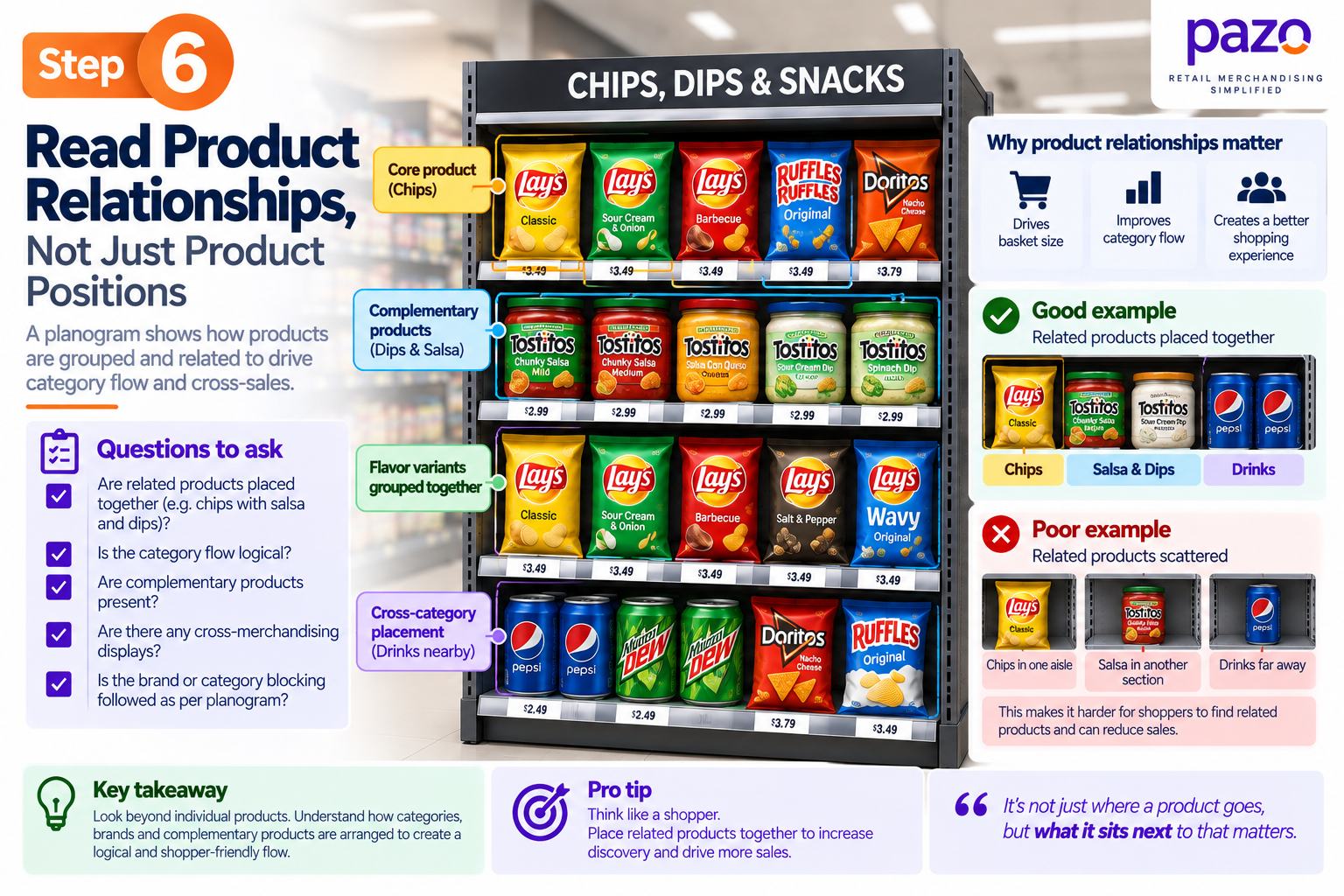
This is one of the most important things to understand when reading a planogram.
A planogram doesn't only communicate where individual products go. It can also communicate relationships between products.
Look for:
Products from the same brand may be intentionally grouped together.
Brand A → Brand A → Brand A → Brand A
Products may be arranged in a particular sequence within the category.
Products that are used or purchased together may be placed next to each other.
For example:
Chips → Dip → Snacks
A promotional SKU may be positioned alongside specific products or signage.
So don't ask only:
“Where does this SKU go?”
Also ask:
“What relationship is this placement trying to preserve?”
This is important because a shelf can contain all the correct products and still fail to reproduce the intended merchandising arrangement if brand blocks, category flow, or important adjacencies have been disrupted.
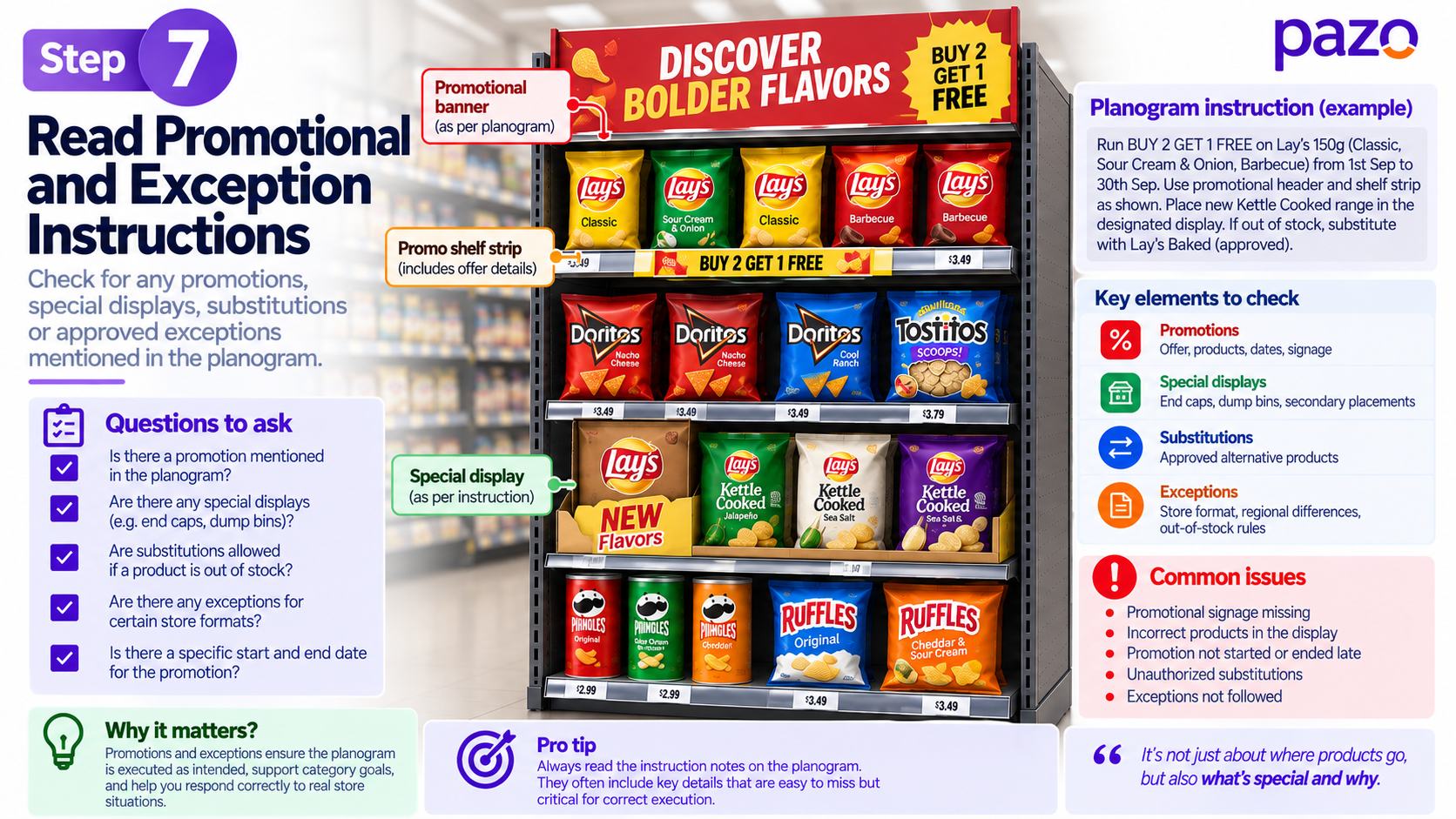
After understanding the normal arrangement, look for instructions that modify it.
These can include:
These instructions should be interpreted in context.
A temporary promotional arrangement, for example, should not automatically be treated as the permanent merchandising standard.
Before execution, establish:
What is the normal arrangement, and what instructions temporarily or specifically override it?
Before moving products, work through these questions:
These checks help prevent a common execution problem: making a shelf look right without understanding why the planogram was designed that way.
This is where planogram reading becomes a practical retail skill rather than simply a visual exercise.
A product not fitting the planogram does not automatically mean that the planogram is wrong or that the store executed it incorrectly.
There can be several causes:
The correct response is to diagnose before improvising.
When the physical shelf cannot reproduce the planogram, don't immediately move neighboring products to make the shelf look right. First identify why the mismatch exists and whether an approved exception applies.
Consider this arrangement:
Planogram
A | A | A | A | B | B | C
The planogram requires four facings of SKU A.
But the physical shelf only appears to accommodate two.
A store associate might simply reduce SKU A to two facings and give the extra space to SKU B.
The shelf may look neat.
But that decision could create:
The better approach is:
Verify SKU → Check pack size → Check stock → Check fixture → Check instructions → Determine permitted action
A physical mismatch should trigger diagnosis before improvisation.
Suppose the planogram requires:
SKU A = 4 facings
but the physical shelf has:
SKU A = 2 facings
It is tempting to conclude:
“The store didn't follow the planogram.”
But several explanations are possible.
Check:
The same physical discrepancy can have very different causes.
Therefore:
A planogram discrepancy is a signal to investigate, not automatically proof of poor execution.
This distinction is especially important when planogram compliance is used to identify store-level problems.
Once the planogram has been understood, compare it with the actual shelf.
Use this sequence:
What should exist?
↓
What actually exists?
↓
What doesn't match?
↓
Why doesn't it match?
↓
What correction or escalation is permitted?
This is more useful than treating compliance as a simple pass/fail exercise.
These four activities are related, but they are not the same.
This creates a more complete operational loop:
Read → Execute → Verify → Diagnose → Correct
A planogram therefore becomes useful only when its instructions can be translated into consistent physical execution.
A planogram communicates the intended merchandising arrangement, but it does not automatically tell you everything required to operate the store.
A planogram does not necessarily tell you:
Therefore:
A planogram is an execution standard, not a complete store operating system.
This distinction becomes important when moving from merchandising planning to store execution and compliance management.
Consider a 4-foot snack gondola with five shelves.
The planogram contains:
The lead SKU is allocated:
4 facings
During execution, the merchandiser finds only:
2 facings
Plan: 4 facings
Physical shelf: 2 facings
There is clearly a difference.
But the difference alone doesn't explain the cause.
Check whether the correct SKU and pack size are being used.
Determine whether enough stock is available to execute the intended number of facings.
Verify that the physical fixture corresponds to the fixture represented in the planogram.
Look for current promotional instructions, substitution rules, store-specific instructions, or approved exceptions.
Only after those checks should the team determine whether the shelf should be corrected, an approved exception applied, or the issue escalated.
The goal isn't to make the shelf look similar to the planogram. The goal is to correctly understand and implement the merchandising instruction.
That distinction separates simple visual matching from proper retail execution.
Problem: The reader misses the fixture and shelf context.
Better approach: Start with the fixture and shelf structure.
Problem: Visible product fronts are confused with total physical units.
Better approach: Read facings and depth separately.
Problem: Products are placed individually without considering brand blocks, category flow or adjacency.
Better approach: Ask what relationship the arrangement is designed to preserve.
Problem: Stock, fixture, product or instruction differences are ignored.
Better approach: Diagnose the cause before assigning responsibility.
Problem: Fixing one discrepancy can create another.
Better approach: Verify the product, fixture and instructions before changing the arrangement.
Problem: Execution errors can remain unnoticed after the merchandising activity is complete.
Better approach: Verify the shelf as close to execution as practical.
Use this checklist before executing a planogram.
Creating a planogram is only one part of merchandising execution.
The operational challenge is ensuring that the intended standard reaches the store floor and that teams can verify whether it was actually implemented.
A typical execution workflow looks like this:
Planogram / Merchandising Standard
↓
Store Task or Instruction
↓
Store Associate Executes
↓
Photo Proof
↓
Manager / HQ Review
↓
Discrepancy Identified
↓
Corrective Action
↓
Execution Data
Pazo supports this execution layer through capabilities such as digital store checklists, photo-based proofing, dashboards and escalation workflows.
The distinction is important:
The planogram defines the intended arrangement. The store execution process ensures that the arrangement is implemented, verified and corrected when necessary.
This connects merchandising planning with what actually happens inside the store.
A facing is the visible front position allocated to a product on the shelf. Multiple facings give the product more visible shelf presence.
First verify the SKU, pack size, stock availability and fixture dimensions. Then check for applicable instructions or exceptions before changing the arrangement.
Not necessarily. A planogram primarily communicates the intended merchandising arrangement. Inventory and replenishment decisions may require separate systems, data or instructions.
Planogram compliance is the degree to which the physical shelf matches the intended merchandising standard.
Changing neighboring products can solve one physical problem while creating incorrect facings, broken brand blocks or altered product relationships. The cause should be understood before changing the arrangement.
A product's intended position depends on the fixture and shelf structure. Establishing the fixture first provides the context needed to interpret the product's position correctly.
Reading means understanding what the planogram instructs. Execution means translating those instructions into the physical shelf. Compliance checks whether the resulting shelf matches the intended standard.
Reading a planogram is not simply finding products on a shelf diagram.
Start with the fixture.
Understand the shelf structure.
Identify the SKU.
Interpret facings and depth.
Look at brand blocks, adjacency and product relationships.
Check promotional and exception instructions.
Then compare the planogram with the physical shelf.
When something doesn't match:
Diagnose before improvising.
A useful way to remember the entire process is:
And when execution doesn't match the plan:
The purpose of a planogram isn't simply to produce a shelf that looks organized. It is to give retail teams a clear merchandising standard that can be understood, executed, verified and corrected consistently.
As someone who has built highly scalable products from the ground up, I've always been drawn to solving challenging problems. But it's the quest for operational excellence that truly lights my fire. The thrill of streamlining processes, optimizing efficiency, and bringing out the best in a business – that's what gets me out of bed in the morning. Whether I'm knee-deep in programming or strategizing solutions, my focus is on creating a ripple effect of excellence that transforms not just businesses, but the industry at large. Ready to join forces and raise the bar for operational excellence? Let's connect and make retail operations and Facilities Management better, together.
Stay up to date with the latest video business news, strategies, and insights sent straight to your inbox!